
 Image from pexels.com
Related guides:
Key takeaways
- What is Access Control and Why Does It Matter So Much: Before we identify the mistakes, let’s quickly clarify what access control entails.
- Mistake 1: Lack of a Formal Access Control Policy: The Risk: Without a clearly defined, documented access control policy, your approach to granting, reviewing, and revoking access will be inconsistent and ad-hoc.
- Mistake 2: Not Following the Principle of Least: The Risk: Granting users more access permissions than they strictly need for their job is a widespread and dangerous mistake.
We live in a time where data is as valuable as oil, highly prized, constantly targeted, and essential to how businesses run. No matter how big or small your organization is, you’re holding onto important information: customer records, financial data, intellectual property, and employee details. The real question isn’t if someone will try to steal that data. It’s when.
And yet, one of the most important defenses against these attacks is often overlooked or poorly handled: access control.
When access control is mismanaged, it leaves massive holes in your security. Hackers love these gaps. They’re silent invitations to walk right into your systems. And the fallout from just one mistake can be brutal: a data breach, huge financial losses, lawsuits, and damage to your brand that may never fully heal.
The good news? These mistakes are easy to fix, once you know what they are.
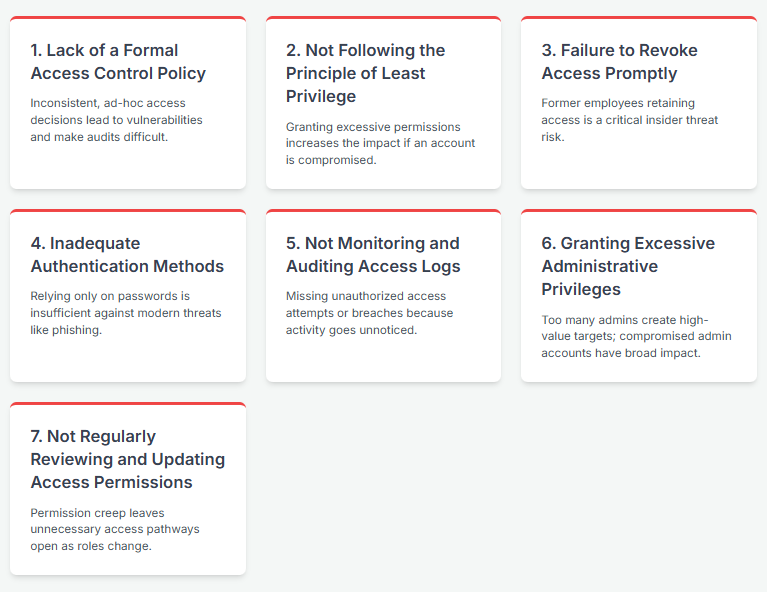
Let’s walk through 7 common access control mistakes that you need to fix right now to keep your data safe and your business secure.
What is Access Control and Why Does It Matter So Much?
Before we identify the mistakes, let’s quickly clarify what access control entails.
Access control is the system that decides who gets into what, when, and what they’re allowed to do once they’re in. It’s the digital gatekeeper, making sure only the right people (or systems) can see or change your sensitive data. But despite how critical it is, many organizations get it wrong, and those mistakes can be dangerous.
At its core, access control involves two main functions:
- Authentication: Verifying the identity of a user or system attempting to access a resource. This is typically done through credentials like usernames and passwords, but increasingly involves stronger methods like multi-factor authentication (MFA).
- Authorization: Determining what an authenticated user or system is allowed to do with the resource (e.g., view, edit, delete, execute).
Together, authentication and authorization form the basis of secure access.
Why does this matter so much? Because without effective access control, all other security measures can be undermined. A strong firewall is useless if an attacker can log in with compromised credentials. Robust encryption offers little protection if an authorized but malicious insider has excessive access keys.
Access control is a fundamental requirement in virtually every security framework and regulation (like HIPAA, GDPR, SOC 2, ISO 27001).
Your security policies, as your internal rulebook, must clearly define your access control procedures to both guide employee behavior and provide evidence for compliance.
Now, let’s look at where organizations often go wrong.
7 Access Control Mistakes You MUST Fix Now
Mistake #1: Lack of a Formal Access Control Policy
The Risk: Without a clearly defined, documented access control policy, your approach to granting, reviewing, and revoking access will be inconsistent and ad-hoc. Decisions might be made on the fly, based on convenience rather than security best practices. Employees won’t have clear guidelines on how access is managed or their responsibilities regarding access security. This confusion creates vulnerabilities and makes it nearly impossible to demonstrate a consistent security practice to auditors or investigators after an incident. As emphasized in discussions on security policies, a formal policy is the necessary documentation to ensure consistency and provide evidence of your security practices.
How to Fix It: Develop, document, and formally approve a comprehensive access control policy. This policy should outline:
- The process for requesting and granting access (based on job role/need).
- Rules for password complexity and management.
- Requirements for multi-factor authentication.
- Procedures for reviewing access permissions periodically.
- A clear process for revoking access when roles change or employees leave.
- Responsibilities for policy enforcement and adherence.
- Communicate this policy to all employees and require acknowledgment. Make it accessible and part of your security awareness training.
Mistake #2: Not Following the Principle of Least Privilege
The Risk: Granting users more access permissions than they strictly need for their job is a widespread and dangerous mistake. This is often done for convenience (“just give them access to everything in that folder”) or due to a lack of understanding of granular permissions.
If an account with excessive privileges is compromised (e.g., through phishing or malware), an attacker gains immediate access to a much larger pool of sensitive data or critical systems than they otherwise would. This significantly increases the potential impact and damage of a breach.
How to Fix It: Implement the principle of least privilege rigorously.
- Define user roles and responsibilities clearly.
- Grant access permissions based only on the specific requirements of each role.
- Avoid using broad permissions (e.g., giving everyone “administrator” rights or access to the entire shared drives).
- Use groups and roles within your access control systems to manage permissions efficiently, rather than assigning permissions individually.
- Regularly review assigned permissions to ensure they still align with the user’s current role (see Mistake 7).
Mistake #3: Failure to Revoke Access Promptly (Especially for Leavers)
The Risk: When an employee or contractor leaves the organization or their role changes significantly, failing to immediately revoke or adjust their access permissions is a critical security lapse.
Former personnel retaining access poses a direct insider threat, whether intentional (malicious data theft or sabotage) or unintentional (accidental access or their dormant account being compromised externally).
Delays in deprovisioning accounts are a common entry point for attackers.
How to Fix It: Establish and strictly enforce a formal, documented offboarding process that includes immediate access revocation.
- Create a checklist of all systems, applications, and physical access points that require deprovisioning.
- Ensure this process is triggered automatically or manually on the employee’s last day (or when a role change occurs).
- Include all types of access: network accounts, email, cloud services, applications, VPNs, physical building access, etc.
- Consider disabling accounts immediately upon notification of departure, with temporary reactivation only if absolutely necessary under strict supervision.
Mistake #4: Inadequate Authentication Methods (e.g., Only Passwords)
The Risk: Relying solely on single-factor authentication, particularly passwords, is no longer sufficient in the face of modern cyber threats.
Passwords can be weak, easily guessed, stolen through phishing, or compromised in large-scale credential stuffing attacks using leaked databases.
Once an attacker has a valid username and password, they can often bypass your access controls without triggering any alarms if no stronger authentication is required.
How to Fix It: Implement Multi-Factor Authentication (MFA) as a mandatory requirement for accessing critical systems and sensitive data, especially for remote access, cloud services, and administrative accounts.
- MFA requires users to provide two or more different types of verification factors (e.g., something they know like a password, something they have like a phone/token, something they are like a fingerprint/face scan).
- Enforce strong password policies (complexity, length, uniqueness) but recognize that MFA is the more significant security enhancement against compromised credentials.
- Educate employees about the risks of phishing and the importance of not sharing MFA codes.
Mistake #5: Not Monitoring and Auditing Access Logs
The Risk: Even with strong access controls, unauthorized access attempts or successful breaches can still occur. If you are not actively monitoring and auditing access logs, you will likely miss these events. This means you won’t detect an intrusion in progress, won’t be able to investigate effectively after an incident, and may lack the necessary evidence to demonstrate compliance or understand the scope of a breach. Silent threats remain silent because their activity goes unnoticed.
How to Fix It: Implement centralized logging for all access attempts and activities across critical systems and applications.
- Use a Security Information and Event Management (SIEM) system or a similar tool to aggregate and analyze logs.
- Configure alerts for suspicious activities, such as multiple failed login attempts, access from unusual locations, access to sensitive data by users who don’t normally interact with it, or activity at odd hours.
- Regularly review access logs as part of your security operations.
- Ensure logs are stored securely and retained for a sufficient period for investigations and compliance requirements.
Mistake #6: Granting Excessive or Unnecessary Administrative Privileges
The Risk: Administrative accounts (“admins”) hold the “keys to the kingdom,” possessing broad permissions to configure systems, install software, and access sensitive data. Granting administrative privileges unnecessarily or to too many individuals creates a high-value target for attackers.
If an admin account is compromised, the attacker gains extensive control, allowing them to bypass most security measures, exfiltrate vast amounts of data, or cause widespread disruption. This is a prime example of violating the principle of least privilege at the highest level.
How to Fix It: Drastically limit the number of individuals with administrative privileges.
- Implement a “just-in-time” or “least privilege” approach to administration, where elevated privileges are granted only when needed for specific tasks and for a limited time.
- Require administrators to use separate, non-privileged accounts for their routine, non-administrative work.
- Implement privileged access management (PAM) solutions to secure, manage, and monitor administrative accounts and sessions.
- Enforce strong authentication (MFA) on all administrative accounts.
Mistake #7: Not Regularly Reviewing and Updating Access Permissions
The Risk: Over time, as employees change roles, take on new responsibilities, or move between departments, their accumulated access permissions can grow beyond what is necessary for their current job. This phenomenon, known as “permission creep,” leaves unnecessary access pathways open.

If an account with accumulated, unnecessary access is compromised, the attacker gains access to systems and data unrelated to the user’s current function, increasing the potential damage and making it harder to trace the source of the breach.
How to Fix It: Establish a formal schedule for periodic access reviews.
- Determine the frequency of reviews based on the sensitivity of the data and systems involved (e.g., quarterly for highly sensitive data, annually for less sensitive).
- Involve data owners or department managers in the review process, as they are best equipped to determine if a user still requires specific access.
- Require justification for continued access to sensitive resources.
- Automate the review process where possible using identity and access management (IAM) tools.
- Ensure role changes trigger an immediate review and adjustment of permissions, not just the scheduled periodic review.
Getting Access Control Right: The Benefits
Addressing these common access control mistakes isn’t just about avoiding negative consequences; it brings significant positive benefits:
- Enhanced Security Posture: Fundamentally strengthens your defenses against unauthorized access and data breaches.
- Reduced Risk: Minimizes the potential impact of a security incident by limiting an attacker’s lateral movement and access to critical assets.
- Improved Compliance: Helps meet the stringent access control requirements mandated by regulations like HIPAA, GDPR, PCI DSS, and frameworks like SOC 2 and ISO 27001, simplifying audits and reducing the risk of fines.
- Increased Trust: Demonstrates a strong commitment to protecting data, building confidence with customers, partners, and stakeholders.
- Streamlined Operations: Clear policies and automated processes can make managing access more efficient over time.
- Better Audit Readiness: Having well-defined, consistently applied, and documented access controls makes preparing for security audits much smoother.
How Technology and SecureSlateCan Help
Rolling out strong access controls across an entire organization isn’t easy. For growing companies juggling dozens (or hundreds) of users, systems, and data sources, the complexity multiplies fast. Manually keeping tabs on permissions, running regular reviews, and enforcing policy rules becomes exhausting, and prone to errors.
That’s where a smart solution like SecureSlate steps in.
While no tool can solve every security issue on its own, the platform SecureSlate simplifies and automates the messy parts of access control, so your team can focus on the bigger picture. Purpose-built for compliance automation and secure access management, SecureSlate helps organizations:
- Centralize user and access data in one place, no more scattered spreadsheets or disconnected systems.
- Automate user provisioning and deprovisioning , ensuring people only have access when they actually need it.
- Run scheduled access reviews with built-in workflows, making it easy for managers to approve or revoke access.
- Enforce security policies like MFA and strong password rules without constant manual intervention.
- Enable centralized monitoring and logging , so you always know who accessed what, and when.
- Align access controls with compliance standards , making audits less painful and more predictable.
By putting SecureSlate to work, you can build stronger access control foundations without drowning in administrative overhead. It helps reduce manual errors, speeds up compliance tasks, and ultimately gives your security team more breathing room to focus on real risks.
For growing businesses, it’s not just helpful. It’s essential.
Conclusion
If you are making any of the 7 access control mistakes outlined above, the answer is likely “not as safe as it should be.” Access control is not a secondary security measure; it is the primary barrier protecting your valuable data and systems from unauthorized access. The “silent system threats” posed by poor access control are real, and their potential consequences are severe.
The time to address these mistakes is now. Investing in robust access control is an investment in the security, resilience, and future of your organization.
Don’t wait for a breach to discover the silent threats lurking within your systems. Fix your access control mistakes today.
Ready to Streamline Compliance?
Building a secure foundation for your startup is crucial, but navigating the complexities of achieving compliance can be a hassle, especially for small teams.
SecureSlate offers a simpler solution:
- Affordable: Expensive compliance software shouldn’t be the barrier. Our affordable plans start at just $284/month.
- Focus on Your Business, Not Paperwork: Automate tedious tasks and free up your team to focus on innovation and growth.
- Gain Confidence and Credibility: Our platform guides you through the process, ensuring you meet all essential requirements, and giving you peace of mind.
Disclaimer (legal note)
SecureSlate is not a law firm, and this article does not constitute or contain legal advice or create an attorney-client relationship. When determining your obligations and compliance with respect to relevant laws and regulations, you should consult a licensed attorney.
Need compliance without the complexity?
SecureSlate automates ISO 27001, SOC 2, GDPR, HIPAA, and more. Built for growing teams. See it in action.
Find compliance gaps in 30 seconds

