
Access Reviews
Run user access reviews across every connected system
SecureSlate pulls every account from your connected systems into one inventory, clears the missing owners and MFA gaps before a cycle starts, and walks reviewers through each system. Anything denied or downgraded stays on an open list until the change is evidenced.
Why access reviews matter
Access accumulates quietly, and it gets noticed after something has already gone wrong.
Access outlives the reason for it
Somebody joins a project, picks up admin on a repository, and moves on. The grant was correct the day it was made, nobody revisits it, and permissions only ever ratchet upward.
The leaver who never quite left
Offboarding catches the obvious systems, the identity provider and the laptop. The niche tool somebody expensed keeps its account, and it is still live months later when nobody remembers it is there.
A review nobody acted on is not a control
Ticking through a spreadsheet produces a document, not a change. When the accounts marked for removal are still there at the next audit, the review was paperwork, and your auditor will treat it that way.
Clean the inventory, run the review, prove the change
Every account from your connected systems in one place, a guided review for each one, and a remediation trail that stays open until the access is genuinely gone.
Every Account in One Inventory
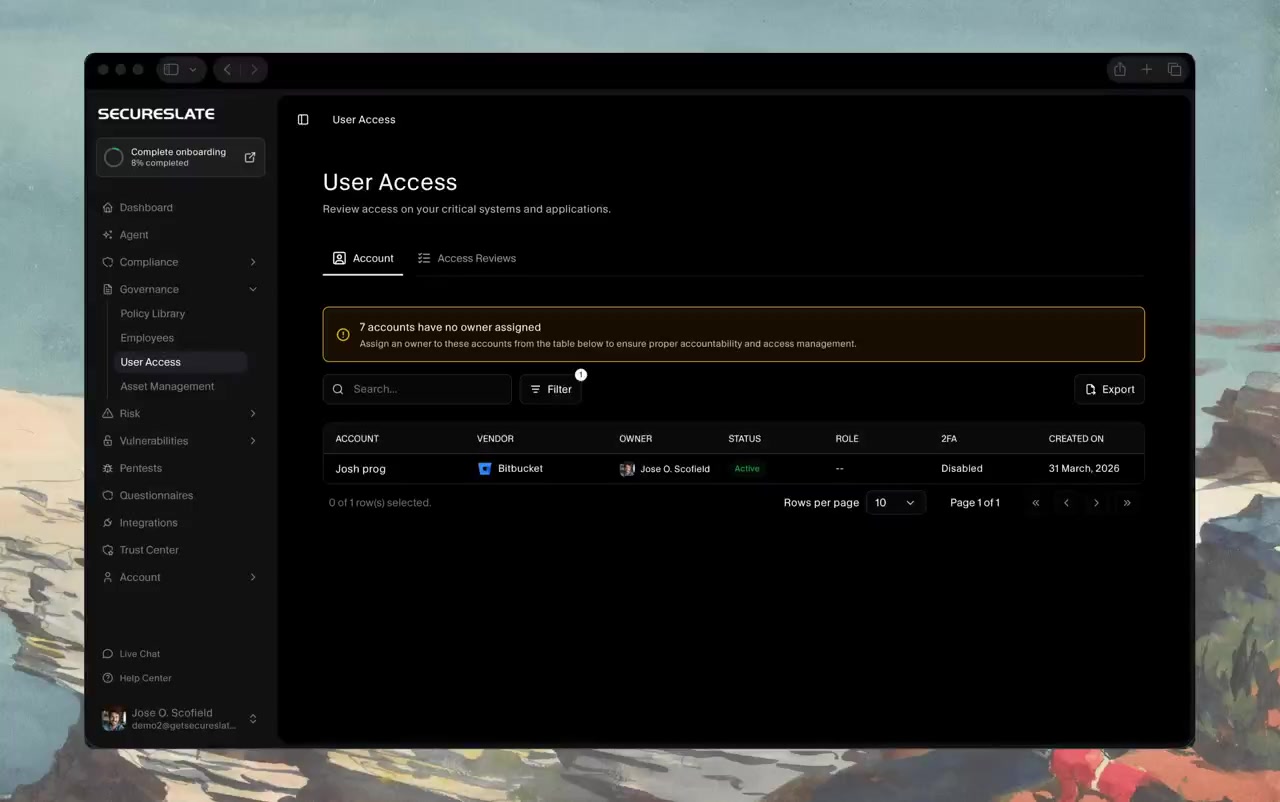
Accounts sync from your connected integrations into a single list showing the vendor, the owner, status, role, whether two-factor is on, and when the account was created. Search it, filter it, and export it by platform. Accounts with nobody assigned are called out at the top, because a review cannot start until every account has a name against it.
The History Behind Every Account
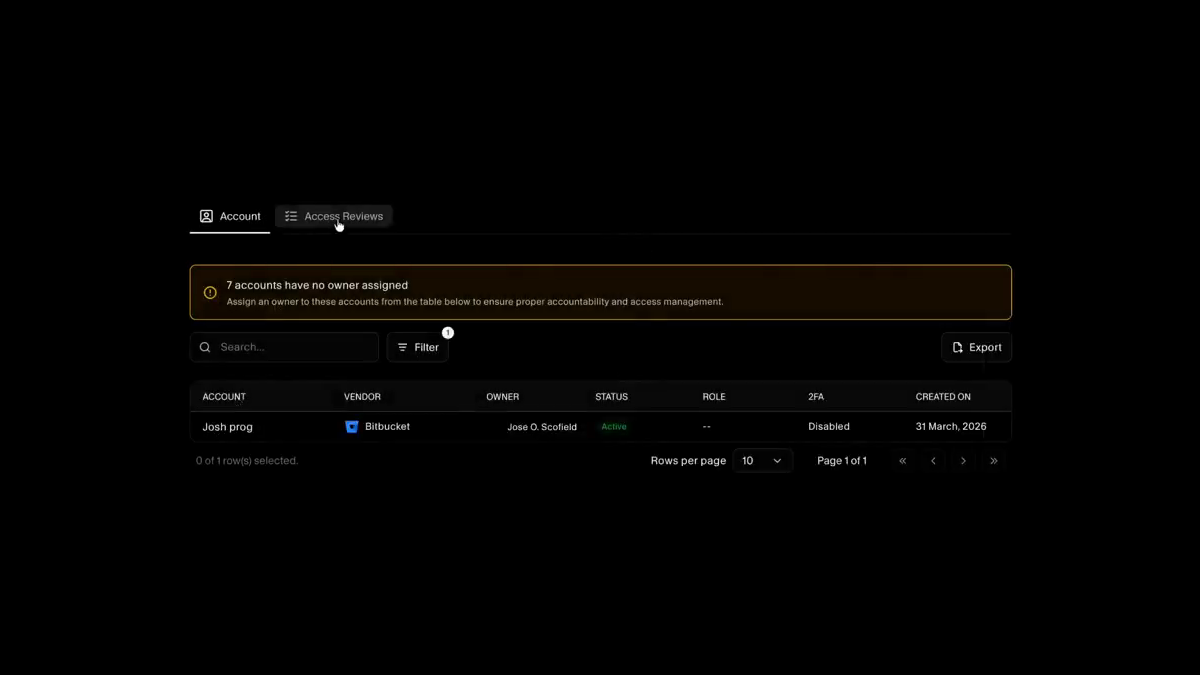
Open an account to see its vendor, status, role, two-factor state, and when it was created or deactivated, and reassign the owner without leaving the panel. Its review history sits underneath, so you can see every cycle that account has been through and what was decided each time.
Review the Riskiest Systems First
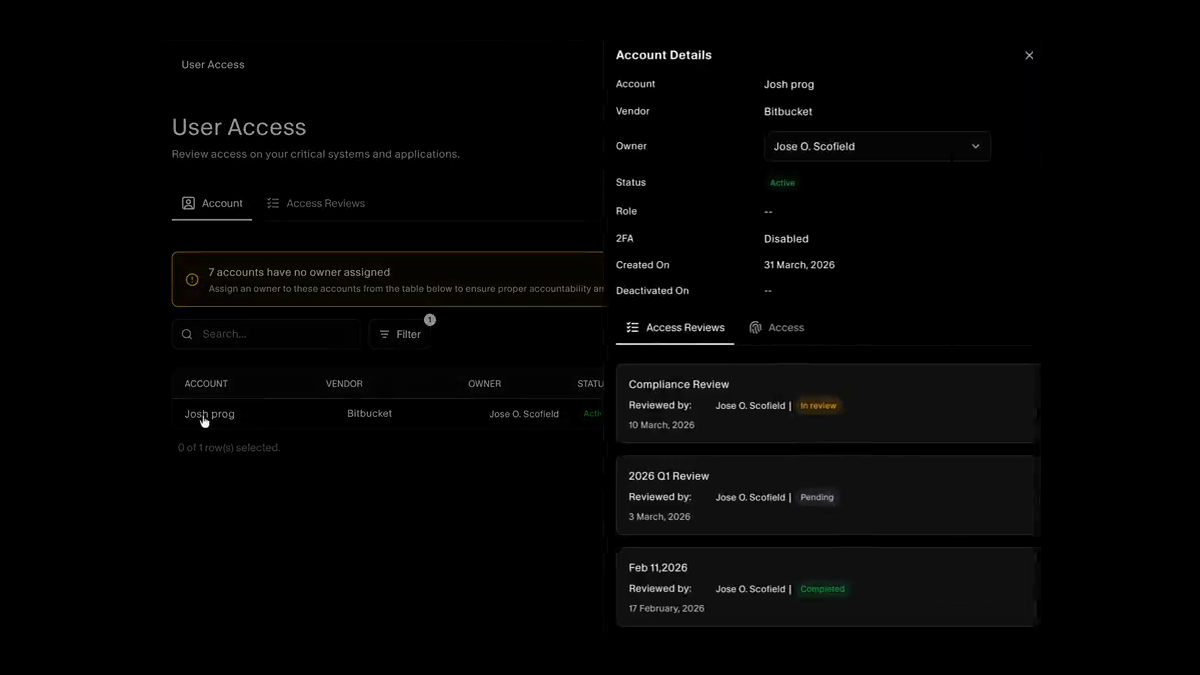
Systems are scored by inherent risk and charted by band, so the review order follows exposure instead of the alphabet. Every cycle is listed with its reviewer, status, the systems in scope, when it started, and when it is due, which makes an overdue review something you notice rather than something your auditor finds.
Integrated Systems, and the Ones That Are Not
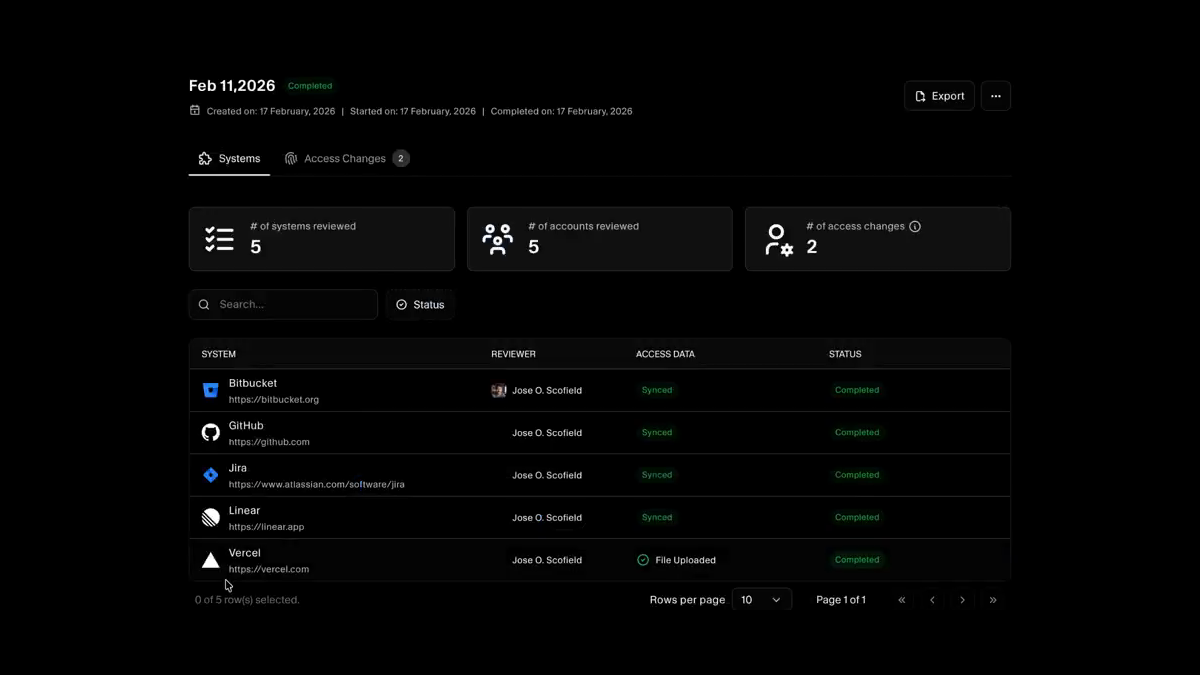
A cycle reports how many systems and accounts were reviewed and how many access changes came out of it. Connected systems pull their accounts straight from the integration, and anything without a native integration is covered by uploading an access file, so a tool you cannot connect to does not quietly fall out of scope.
Guided, One System at a Time
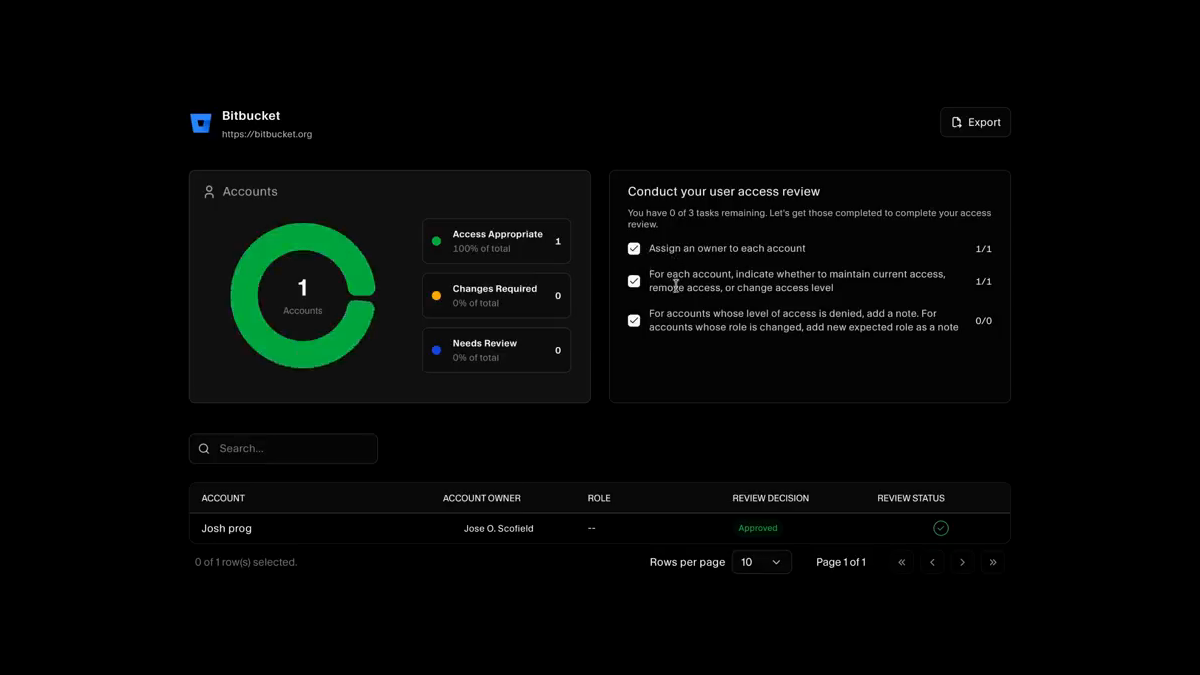
Each system opens with its accounts split into access appropriate, changes required, and needs review, next to a checklist of what the reviewer still has to finish. Every account takes a decision to maintain, change, or remove access, with a note where the case needs explaining.
The Review Is Not Done Until Access Is Gone
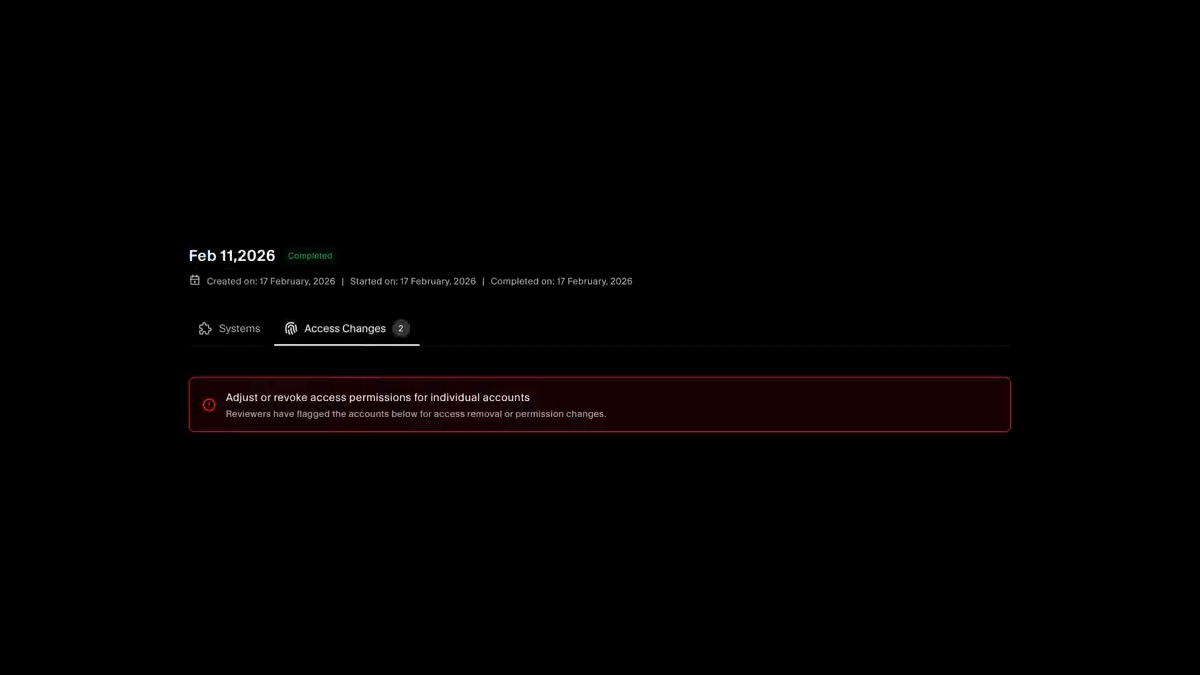
Every account marked denied or role-changed moves to an access changes list and stays there until remediation is evidenced. Approve the agent's plan to revoke access through your connected systems, or attach your own note or screenshot for the ones it cannot reach. The finished review then feeds the compliance test that asks for it.
Resources
Read up before your next cycle.
Practical guides to access reviews, from the quarterly cadence to the evidence an auditor expects to see.
FAQs
Access review questions answered.
A periodic check that the people with access to a system still need it, at the level they have. Someone accountable looks at each account and decides to keep, change, or remove it, and the decisions are recorded. SOC 2 and ISO 27001 both expect it, which is why the evidence matters as much as the exercise.
Your connected integrations. Accounts sync into the Account tab automatically, so the inventory reflects the systems you actually run rather than a list somebody typed out once. Each account arrives with its vendor, status, role, and two-factor state already attached.
Use the access file uploader. Download the template, fill in the account name, owner, role, MFA status, and whether the account is active, and upload it against that system. The system then appears in reviews alongside the integrated ones, so a tool without an integration does not become an untracked gap.
Because a decision without a name behind it is not a decision. Accounts with no owner are flagged at the top of the inventory, and they need resolving before a review is submitted. It also prevents the common failure where service accounts and shared logins sail through a review because nobody felt responsible for them.
Yes. When the inventory shows unassigned owners, two-factor switched off, or inactive accounts, the auto-remediation agent proposes a plan: matching accounts to people in your directory, enforcing MFA or notifying owners, and flagging stale accounts for deprovisioning. You see the full plan and nothing is applied until you approve it.
They open one system at a time and work through its accounts, marking each as appropriate, needing a change, or needing removal, and adding a note where the reason is not obvious. A checklist tracks what is still outstanding, so a reviewer knows when the system is genuinely finished rather than guessing.
They land on the access changes list for that review, showing the system, the account, who decided, what was decided, and the remediation status. The row stays open until you evidence the change, which is what stops a review from ending at the decision and never reaching the system itself.
No. It plans the work, revoking access or updating a role through your connected integrations where that is supported, and opening a ticket where it is not. You review the plan and approve it before anything executes, and the actions and system responses are captured as proof afterwards.
The finished cycle carries its own record: the systems in scope, the accounts reviewed, each decision, the dates, and the remediation attached to every change. That package feeds tests such as verification of a completed access review, which map to SOC 2 and ISO 27001 access controls, so the evidence is already sitting where your auditor looks.
Quarterly is the common cadence, and most frameworks expect at least annually plus a review after significant change. The more useful trigger is your own risk scoring: systems in the higher bands deserve a shorter interval than the ones holding nothing sensitive, which is why the review list is ordered by inherent risk rather than by name.
Find out who still has access
Connect your systems and see every account in one inventory, with the missing owners and the two-factor gaps called out before your next review starts.
