
Short answer: HIPAA has no separate telework rule. When remote employees access PHI from home, the same Security Rule safeguards apply: a risk analysis that covers remote access, workstation and device controls, access control, audit logging, transmission security and training. The Privacy Rule adds reasonable safeguards against family members seeing or overhearing PHI. You must also be able to show evidence that each control works.
Related guides:
- Cybersecurity for a hybrid workforce
- Remote access policy: template and audit evidence
- HIPAA technical safeguards for engineers
Key takeaways
- Same rules, new location. HHS confirms that Security Rule access controls apply to staff who telecommute or work from home offices.
- The home office is in scope. Laptops, home networks, printers and the room itself belong in your risk analysis and policies.
- Addressable does not mean optional. Implement encryption and automatic logoff, or document why not and use an equivalent alternative.
- Encryption changes the outcome of a lost laptop. PHI encrypted in line with HHS guidance is "secured," so losing that device does not trigger breach notification.
- Prove it with evidence. Device posture, MFA, access reviews and training records show compliance without watching what employees do.
Does HIPAA have special rules for remote employees?
No. HIPAA applies the same standards wherever a workforce member accesses PHI, and HHS has said so directly.
In its FAQ on telecommuting employees, HHS states that the Security Rule's access control requirements apply to employees who telecommute or have home-based offices, and that covered entities must implement appropriate safeguards to protect the organization's data. So the real question is whether you have assessed and controlled the risks remote work adds.
Three provisions frame the answer:
- Risk analysis. 45 CFR 164.308(a)(1)(ii)(A) requires an accurate and thorough assessment of risks and vulnerabilities to the ePHI you hold. If ePHI is reachable from a kitchen table, that endpoint and its network belong in the analysis.
- Addressable specifications. Under 45 CFR 164.306(d)(3), you must assess each addressable specification, implement it if reasonable and appropriate, or document why not and implement an equivalent alternative if one is reasonable and appropriate.
- Documentation. 45 CFR 164.316(b) requires written policies and records of required actions, kept for 6 years from creation or last effective date, whichever is later.
HHS also published HIPAA Security Guidance on remote use of EPHI in December 2006. Its structure still works: assess risks to remote access, storage and transmission, then pick strategies for each. NIST SP 800-46 Rev. 2 adds guidance on telework, remote access and BYOD security policies.
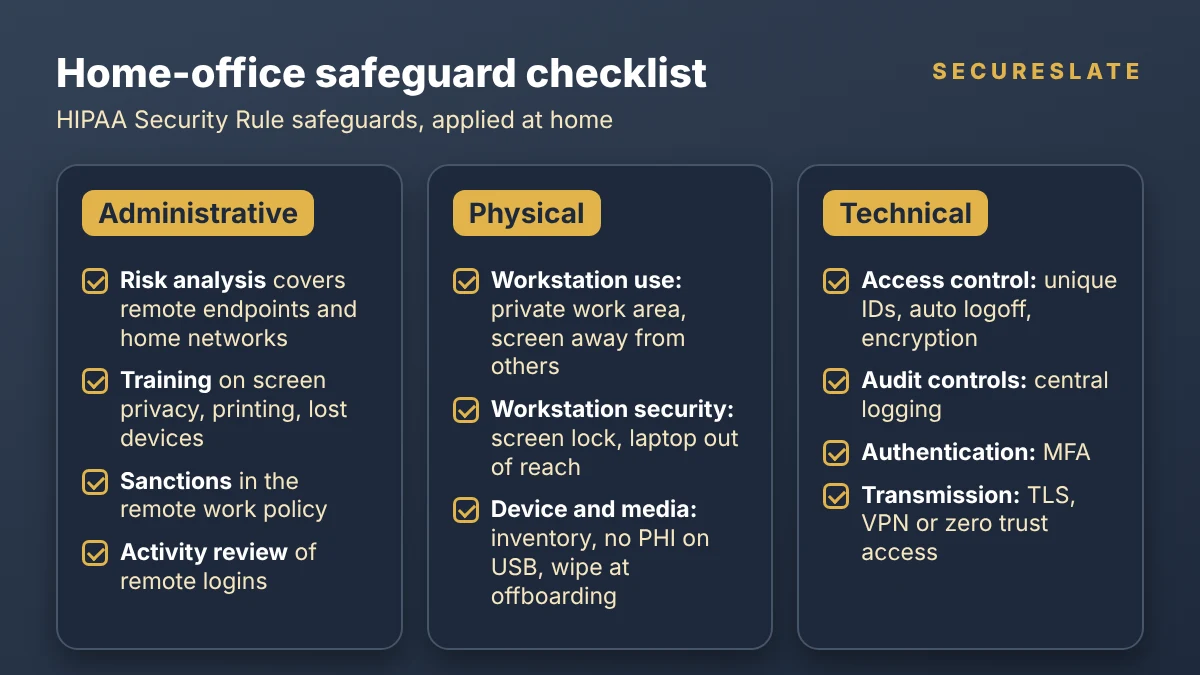
What does HIPAA require for a home office? The checklist
Map every remote work risk to the safeguard that already covers it, then decide what that safeguard looks like in a home.
| Safeguard | What the rule says | What it looks like at home |
|---|---|---|
| Administrative: risk analysis | Assess risks and vulnerabilities to ePHI (164.308(a)(1)(ii)(A)) | Remote endpoints, home networks, printing and shared living spaces listed as assets and threats |
| Administrative: sanctions | Apply appropriate sanctions to workforce members who fail to comply (164.308(a)(1)(ii)(C)) | Remote work policy states consequences, and staff acknowledge it |
| Administrative: activity review | Regularly review records of system activity, such as audit logs (164.308(a)(1)(ii)(D)) | Someone reviews remote login and PHI access logs on a set cadence |
| Administrative: training | Security awareness and training for all workforce members (164.308(a)(5)) | Home-specific module: phishing, screen privacy, printing, reporting a lost device |
| Physical: workstation use | Policies on proper functions and the physical attributes of workstation surroundings (164.310(b)) | Defined work area, screen facing away from windows and shared rooms, no PHI work in public spaces |
| Physical: workstation security | Physical safeguards restricting workstation access to authorized users (164.310(c)) | Screen lock when stepping away, laptop stored out of reach of family and guests |
| Physical: device and media controls | Govern receipt and removal of hardware and media, with required disposal and media re-use procedures (164.310(d)) | Device inventory, no PHI on USB drives, secure return or wipe of laptops at offboarding |
| Technical: access control | Unique user IDs (required), automatic logoff and encryption (addressable) (164.312(a)) | Named accounts, idle session timeouts, full-disk encryption |
| Technical: audit controls | Mechanisms that record and examine activity in systems with ePHI (164.312(b)) | Remote sessions logged centrally, not only on the laptop |
| Technical: authentication | Verify that a person seeking access is the one claimed (164.312(d)) | MFA on email, VPN, EHR and admin consoles |
| Technical: transmission security | Guard against unauthorized access to ePHI sent over networks, with addressable encryption (164.312(e)) | TLS for apps, VPN or zero trust access for internal systems |
In our experience, the administrative layer is where remote programs are thinnest. For owners and cadences per standard, see our HIPAA administrative safeguards checklist.
How do remote employees keep PHI private at home?
Apply the Privacy Rule's "reasonable safeguards" standard to everything a remote worker says, shows or prints.
45 CFR 164.530(c) requires covered entities to have appropriate administrative, technical and physical safeguards, and to reasonably safeguard PHI from intentional or unintentional disclosures and limit incidental ones. At home, the risks are often low-tech:
- Verbal privacy. Take patient calls in a room with a closed door, use a headset, and avoid saying full names and diagnoses when others are nearby.
- Visual privacy. Position screens away from windows and shared spaces, and use a privacy filter if the work area is shared.
- Printing. Default to no printing of PHI at home. If a role needs paper, require locked storage and cross-cut shredding, and record the exception.
- Family and guests. Household members must not use work devices or accounts. Say this plainly in the policy and in training.
- Voice assistants and cameras. In our experience, teams often ask staff to keep smart speakers and home cameras out of the work area.
Train on these rules: 164.530(b) requires documented role-based Privacy Rule training, and 164.530(e) requires documented sanctions for violations.
Can remote staff use personal devices and home Wi-Fi?
Yes, HIPAA does not ban personal devices or home networks, but your risk analysis must show how you control the risks they add.
Personal devices (BYOD). The cleanest pattern keeps PHI off the device: access it through a managed browser session, virtual desktop or app container that can be wiped remotely. If a personal laptop must store PHI, require enrollment, encryption, screen lock and patching before it connects. HHS's remote use guidance already listed password protection, encryption, session time-outs, personal firewalls and updated virus protection as strategies for remote devices. For the enrollment steps themselves, see our device enrollment checklist for remote teams.
Home Wi-Fi and VPN. Treat the home network as untrusted. Your controls should not depend on the employee's router settings. That means encrypting ePHI in transit end to end. HHS's breach guidance on unsecured PHI points to NIST guidance for TLS (SP 800-52), IPsec VPNs (SP 800-77) and SSL VPNs (SP 800-113) for data in motion. Encryption in transit is addressable under 164.312(e)(2)(ii), and over the internet it is hard to justify an equivalent alternative.
How do you monitor and prove remote HIPAA compliance?
Collect evidence that each control is working on each device and account, and limit monitoring to what the safeguards need.
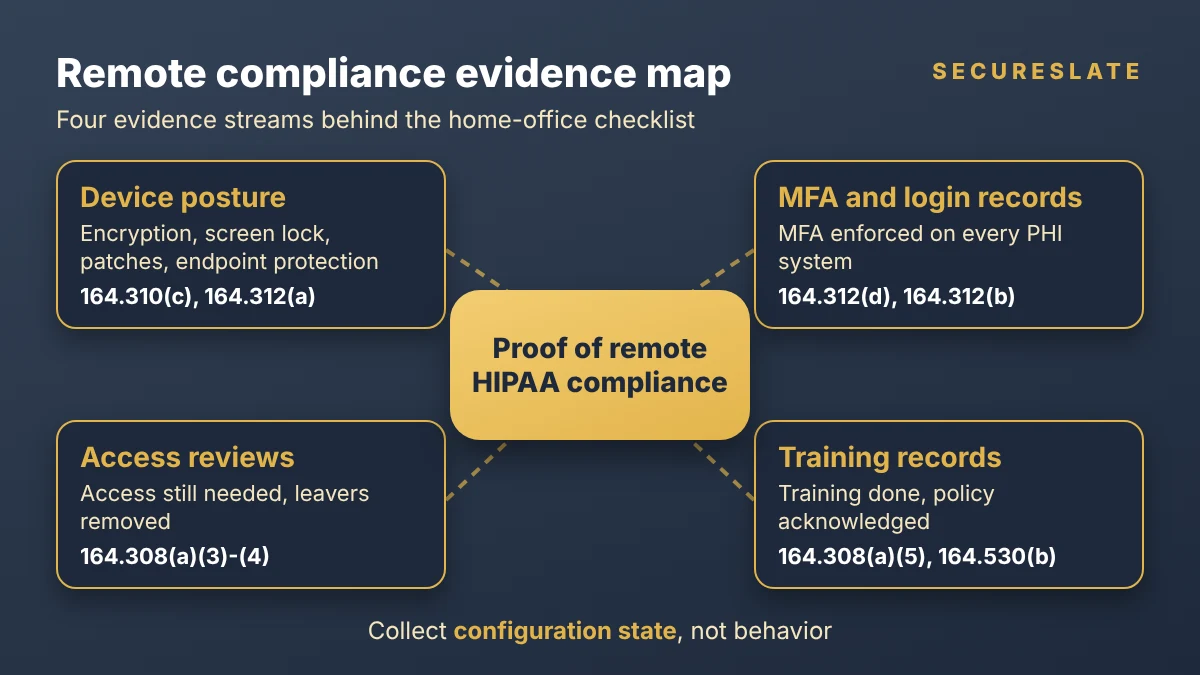
In our experience, auditors and customers ask for proof, and four evidence streams cover most of the checklist above:
| Evidence | What it shows | Safeguards it supports |
|---|---|---|
| Device posture | Disk encryption on, screen lock set, OS patched, endpoint protection running | 164.310(c), 164.312(a)(2)(iii)-(iv), malware protection in 164.308(a)(5) |
| MFA and login records | Every PHI system enforces MFA, and remote logins are recorded | 164.312(d), 164.312(b), log-in monitoring in 164.308(a)(5) |
| Access reviews | Each remote user's access to PHI systems is still needed, and leavers were removed | Access authorization and termination procedures in 164.308(a)(3)-(4) |
| Training and acknowledgements | Each remote worker completed training and signed the remote work policy | 164.308(a)(5), 164.530(b), sanctions in 164.308(a)(1)(ii)(C) |
To respect employee privacy while you collect it:
- Collect configuration state, not behavior. Report encryption and patch status, not browsing history or keystrokes.
- Tell people what you collect in a short notice at onboarding.
- Separate personal devices. On BYOD, check posture at the access gateway or inside a work container rather than inventorying the whole device.
- Keep the record. Store reviews, exceptions and tickets, as 164.316 requires.
What happens when a remote employee loses a laptop?
It depends mostly on whether the PHI was encrypted to HHS's standard. If it was, and the key is safe, there is no reportable breach. If not, you run a breach risk assessment.
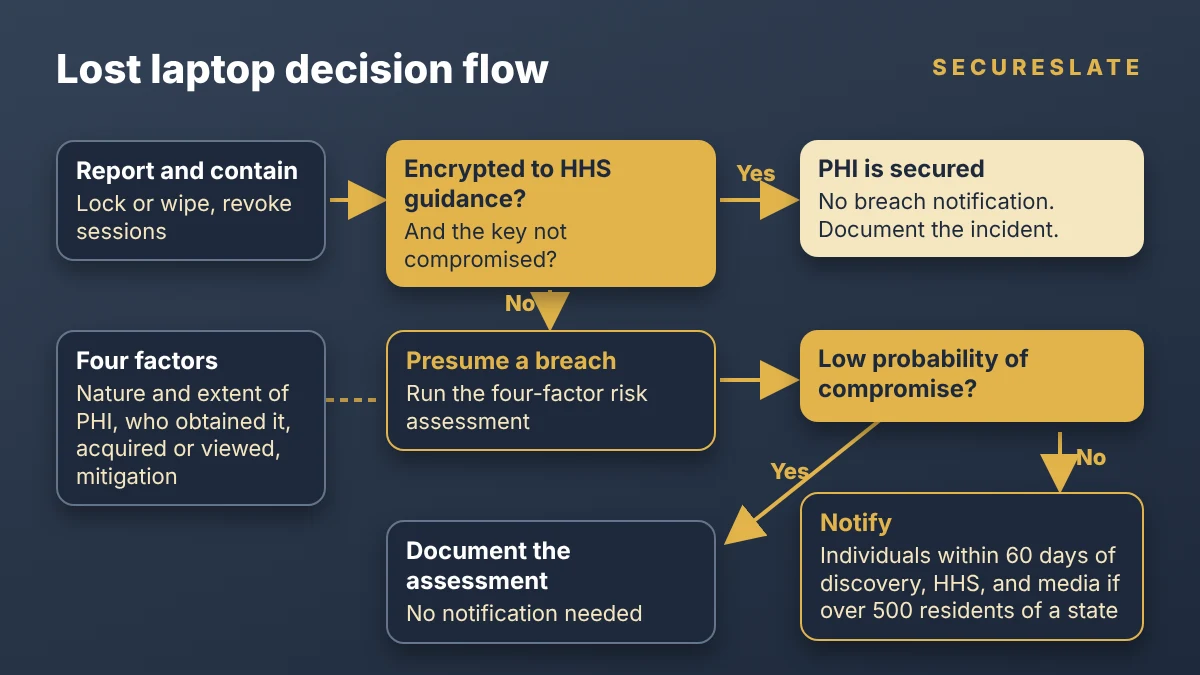
Under the HHS Breach Notification Rule summary, notification duties apply only to unsecured PHI. HHS's guidance on rendering PHI unusable names encryption and destruction as the methods. For data at rest, encryption should be consistent with NIST SP 800-111. It only counts if the decryption key or process has not been breached, and HHS advises keeping keys separate from the data. As an example, a password taped to the laptop lid likely defeats the safe harbor.
Work through it in order:
- Report and contain. The employee reports the loss through your incident process, required by 164.308(a)(6). Lock or wipe the device and revoke its sessions and tokens.
- Check encryption evidence. Pull the device's last reported encryption status from your management tool.
- If PHI was unsecured, presume a breach. HHS presumes an impermissible disclosure is a breach unless a risk assessment shows a low probability of compromise, based on four factors: the nature and extent of the PHI, who obtained it, whether it was actually acquired or viewed, and how far the risk was mitigated. If the assessment shows a low probability, document it and no notification is required.
- Notify if required. Notify affected individuals without unreasonable delay and no later than 60 days after discovery. Notify HHS, within the same 60 days for 500 or more individuals or annually for smaller breaches, and notify prominent media if more than 500 residents of a state or jurisdiction are affected. A business associate must notify the covered entity within 60 days of discovery. Also check whether any state law adds obligations.
Our HIPAA breach notification guide covers notice content.
Will the proposed Security Rule update change remote work?
Possibly, but as of October 2026 it is still a proposal, and the current Security Rule remains in effect.
HHS published a notice of proposed rulemaking in the Federal Register on January 6, 2025, with comments closing March 7, 2025. According to the HHS fact sheet, it proposes to make all implementation specifications required with limited exceptions, require encryption of ePHI at rest and in transit and multi-factor authentication with limited exceptions, and require a technology asset inventory and network map. The most recent Unified Agenda entry we found lists it as a long-term action with final action projected for July 2027. For remote teams, encryption and MFA on every endpoint are already the easiest addressable decisions to defend, and the proposal would make them harder to avoid if finalized as written.
How SecureSlate helps
SecureSlate helps HealthTech teams run HIPAA compliance for remote employees as an evidenced program. The device agent reports posture such as disk encryption, screen lock and OS updates from remote laptops, and agentless read-only cloud integrations pull MFA and account settings from your identity and cloud providers. Access reviews show who can reach PHI systems and record that leavers were removed. Multi-framework control mapping links HIPAA safeguards to SOC 2, ISO 27001 and HITRUST, custom controls cover home-office rules such as printing exceptions, risk management tracks remote work risks, and audit management keeps evidence in one place for auditors and customer reviews.
FAQ
Is working from home allowed under HIPAA?
Yes. HIPAA does not prohibit remote work, but the same Security Rule safeguards and Privacy Rule reasonable safeguards apply, based on a risk analysis that includes remote work.
Do remote employees need a VPN to be HIPAA compliant?
HIPAA does not name a VPN. It requires transmission security, with encryption addressable. A VPN is one way to meet it; TLS-protected cloud apps or zero trust access can also work.
Can remote employees print PHI at home?
HIPAA does not ban it, but printing at home adds disclosure and disposal risk. In our experience, many organizations prohibit it by default and allow documented exceptions with locked storage and shredding.
Is a lost encrypted laptop a HIPAA breach?
Not if the PHI was encrypted in line with HHS guidance and the key was not compromised. That PHI is considered secured, so breach notification does not apply. Document the incident either way.
Disclaimer (legal note)
This article is for general information only and is not legal, regulatory or professional advice. Requirements vary by framework, industry and jurisdiction. Consult qualified advisors for your specific obligations.
Need compliance without the complexity?
SecureSlate automates ISO 27001, SOC 2, GDPR, HIPAA, and more. Built for growing teams. See it in action.
Find compliance gaps in 30 seconds
