
Related guides:
- soc 2 evidence collection
- audit evidence requests
- soc 2 readiness checklist template
- soc 2 type 2
- access review template
Key takeaways
- A SOC 2 audit is mostly an evidence exercise: for a Type II, auditors sample evidence from across the whole observation window, not just the week before fieldwork.
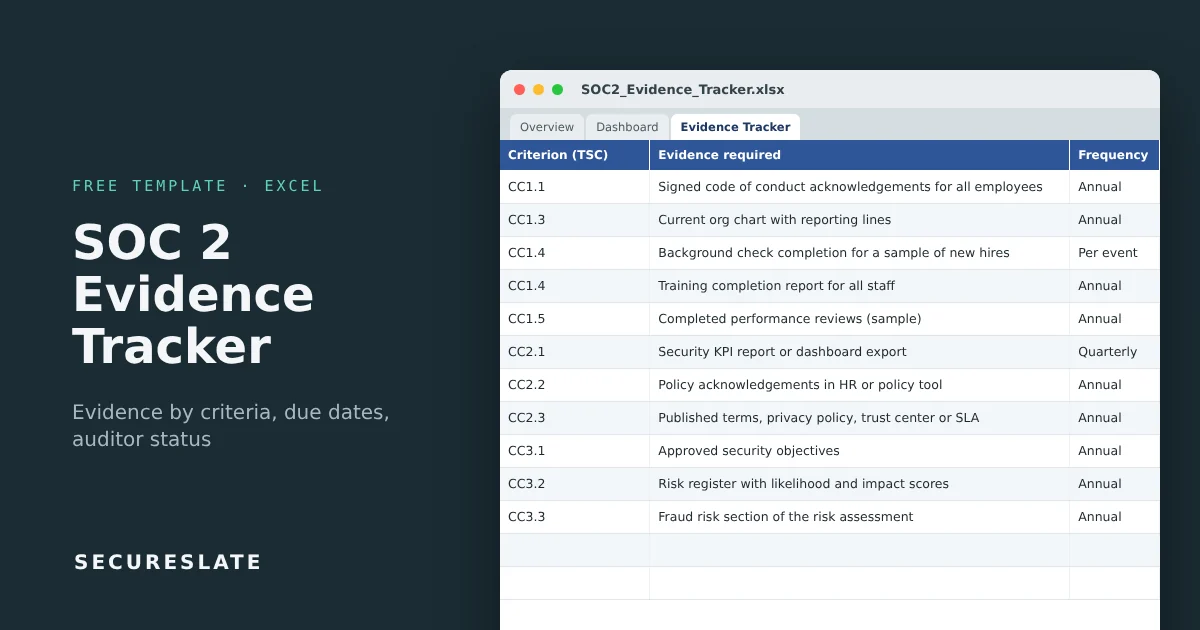
- This workbook comes with 44 common evidence items mapped to the Trust Services Criteria, each with an evidence type and collection frequency.
- Next due date, collection status, audit window check and a dashboard by criteria series calculate automatically from the date you last collected each item.
- SecureSlate collects much of this evidence automatically from your cloud, identity and code tools.
Overview
Teams rarely fail SOC 2 because a control does not exist. They fail, or burn weeks, because the evidence is scattered, out of date, or collected outside the audit period. An evidence tracker fixes that by turning "what does the auditor need?" into a list with owners and due dates.
What SOC 2 evidence is
Evidence is anything that shows a control was designed and operated as described. It falls into a few types:
| Type | Examples |
|---|---|
| Policies and procedures | Information security policy, incident response plan |
| Configuration | MFA enforcement, encryption settings, branch protection |
| System reports | Vulnerability scans, MDM compliance, backup job reports |
| Tickets and logs | Access requests, change approvals, incident tickets |
| Records | Training completion, signed acknowledgements, meeting minutes |
How much you need depends on the report type. A Type I looks at design at a point in time. A Type II tests operating effectiveness over a period, usually 3 to 12 months, so recurring evidence such as quarterly access reviews must exist for every quarter in that window.
What makes it useful
- Pre-filled evidence list: 44 items across CC1 to CC9, availability and confidentiality, so you start editing instead of starting from a blank sheet.
- Frequency-driven due dates: weekly, monthly, quarterly, semi-annual or annual items get a next due date automatically. Per event items, such as new hire tickets, are tracked as collected samples.
- Collection status:
Missing,Overdue,Due soon,CurrentorCollected. - Audit window check: flags evidence dated outside your observation period, the classic Type II problem.
- Auditor status: Not submitted, Submitted, Accepted or Needs rework.
- Dashboard: progress, overdue items and coverage by criteria series.
Download the template
Works in Excel, Google Sheets and LibreOffice. Formulas are ready for 300 evidence items.
Tab-by-tab walkthrough
Overview and Version & Approval
Document control and sign-off.
Settings
Enter the audit period start and end dates. Adjust the days behind each collection frequency and the due soon window if your program differs. The list of Trust Services Criteria for the criterion dropdown lives here too.
Evidence Tracker
One row per evidence item. You fill in the criterion, control, evidence required, type, frequency, owner, source system, the date it was last collected, a link to where it is stored, and the auditor status. These columns calculate:
| Column | Logic |
|---|---|
| Next due | Last collected + frequency days (blank for per event and once per period) |
| Days until due | Next due minus today |
| Collection status | Missing if never collected, otherwise Overdue, Due soon, Current or Collected |
| In audit period | Yes if the collection date falls inside the audit period on Settings |
Dashboard
Share of evidence collected, missing and overdue counts, auditor acceptance, items collected outside the audit period, days left in the period, and a table of items, missing and overdue for each criteria series (CC1 to CC9, A, C, PI, P).
Running evidence collection step by step
- Confirm scope. Delete rows for criteria outside your report (for example the privacy criteria) and add rows for controls specific to your system description.
- Assign owners. Every row gets one named owner and the system the evidence comes from.
- Set the audit period. For Type II, enter the observation window so the tracker can flag evidence from outside it.
- Collect a baseline. Gather everything once and record the dates. The dashboard now shows your real gap.
- Work the due dates. Review the
Due soonandOverdueitems weekly. Quarterly evidence collected late leaves a gap the auditor will find. - Store evidence consistently. One folder per criterion, files named with the evidence ID and date, link in the tracker. The tracker stores only the latest collection date, so this folder is your record that each quarter or month was covered.
- Hand over to the auditor. Use auditor status to manage requests and rework during fieldwork.
What auditors look for
| Auditor expectation | How the tracker helps |
|---|---|
| Evidence covers the whole period | Next due dates show when to collect again. Each row keeps only the latest date, so keep every dated copy in the evidence folder |
| Recurring controls ran every time | Frequency and collection status track the current cycle. Check the evidence folder for one dated file per occurrence |
| Populations for sampling | Per event rows point to the full ticket or log export |
| Clear ownership | Owner column per item |
| Fast responses to requests | Auditor status and evidence links |
Common mistakes
- Screenshots without dates, system names or the person who took them
- Recurring evidence collected late, leaving gaps in a Type II window
- Evidence from before the audit period submitted as if it covered the period
- Sampling evidence yourself instead of giving the auditor the full population
- One person holding all evidence, which stalls everything when they are away
How SecureSlate helps
SecureSlate collects evidence automatically from your cloud, identity, device and code tools, maps it to the Trust Services Criteria and keeps it current through the audit window, so the tracker fills itself.
FAQ
How much evidence does a SOC 2 audit need?
It depends on your controls, scope and auditor. A first Type II for a small SaaS company often involves somewhere around 80 to 150 evidence requests. The 44 items here cover the most common ones.
What is the difference between Type I and Type II evidence?
Type I evidence shows a control is designed and in place on one date. Type II evidence shows it operated throughout the period, so recurring controls need evidence from each occurrence.
What does "per event" mean?
Controls triggered by events, such as onboarding, offboarding, changes or incidents. Auditors sample from the full list of events in the period, so keep a complete export and record when you last pulled it.
Can we use screenshots as evidence?
Yes, if they show the system, the setting, the date and ideally the user. System-generated reports and exports are stronger because they are harder to dispute.
How long should we keep SOC 2 evidence?
At least until the report is issued and the next audit begins, and in practice for several years. Check your auditor's and your customers' expectations.
Disclaimer (legal note)
This article is for general information only and is not legal, regulatory, or professional advice. Requirements vary by framework, industry, and jurisdiction. Consult qualified advisors for your specific obligations.
Need compliance without the complexity?
SecureSlate automates ISO 27001, SOC 2, GDPR, HIPAA, and more. Built for growing teams. See it in action.
Find compliance gaps in 30 seconds
