
Related guides:
- iso 27001 risk treatment plan
- risk assessment template
- iso 27001 statement of applicability template
- risk appetite statement
- iso 27001 risk assessment
Key takeaways
- ISO 27001 clause 6.1.3 e) requires a documented risk treatment plan, and 6.1.3 f) requires risk owners to approve it and accept the residual risk.
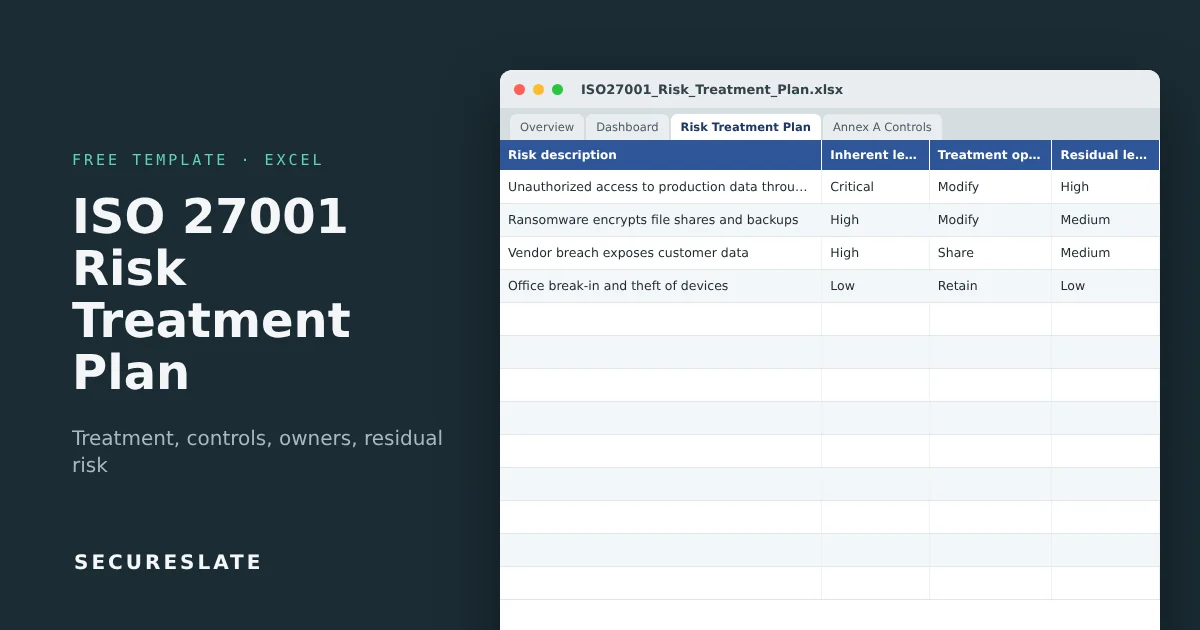
- This workbook tracks each risk from inherent score to treatment action to residual score, with Annex A controls, owners, dates and progress.
- Timeline status, risk appetite checks and a dashboard calculate automatically, so overdue actions and unacceptable residual risk stand out.
- SecureSlate links treatment actions to live controls and evidence, so the plan stays current after the audit.
Overview
The risk assessment tells you what could go wrong. The risk treatment plan is where you decide what to do about it, who does it, by when, and what risk is left afterwards. Auditors read it next to your Statement of Applicability: the controls you chose to treat risks should be the controls you marked as applicable.
What a risk treatment plan is
For every risk that is not acceptable as it stands, the plan records:
- The treatment option: modify the risk with controls, avoid it by stopping the activity, share it (insurance, contracts, outsourcing), or retain it.
- The actions and controls: what will be done, mapped to the Annex A controls it implements.
- Ownership and timing: who does the work and when it is due.
- The residual risk: the expected likelihood and impact after treatment.
- Acceptance: the risk owner's approval of the plan and of the residual risk.
ISO 27001:2022 does not prescribe a format. A spreadsheet like this one is the most common way small and mid-sized organizations meet the requirement, and it is what most auditors expect to see on day one of Stage 1.
What makes it useful
- All 93 Annex A controls on their own tab, feeding a dropdown so each action maps to a real control ID.
- Inherent and residual scoring with Low, Medium, High and Critical levels from thresholds you set.
- Risk appetite check: any residual score above your appetite is flagged
No: escalate. - Timeline status:
Overdue,Due soon,On track,CompletedorNo due datefrom the due date and status. - Owner acceptance tracking: a dashboard figure shows residual risks that no owner has accepted yet.
- Dashboard and heat maps for management review, plus formulas for 300 rows.
Download the template
Works in Excel, Google Sheets and LibreOffice. Four example risks show how a completed plan looks; overwrite or delete them.
Tab-by-tab walkthrough
Overview and Version & Approval
Document control and approval. Version the plan whenever you re-run the risk assessment.
Settings
Scoring thresholds, your risk appetite (the highest residual score you accept without escalation, 9 by default) and the due soon window. Change them once and every formula follows.
Risk Treatment Plan
The working tab, with one row per risk so the dashboard counts stay accurate. If a risk needs several actions, list them in the same row and use the last due date. For each risk:
| Column group | What you enter | What calculates |
|---|---|---|
| Risk | ID, description, asset or process, risk owner | |
| Inherent risk | Likelihood and impact (1 to 5) | Score and level |
| Treatment | Option, action, primary Annex A control, other controls | |
| Delivery | Action owner, start and due date, status, % complete | Days remaining and timeline status |
| Residual risk | Likelihood and impact after treatment | Score, level and appetite check |
| Acceptance | Owner accepted (Yes/No) and date |
Annex A Controls
Reference list of all 93 ISO/IEC 27001:2022 controls with their themes. It is the source of the control dropdown.
Dashboard
Risk counts, average completion, overdue and due soon actions, residual risk above appetite, residual risk not yet accepted, breakdowns by level, treatment option and timeline, and inherent vs residual heat maps.
Building the plan step by step
- Start from the risk assessment. Copy every risk above your acceptance criteria from your risk register, with its owner and inherent scores.
- Choose a treatment option. Most information security risks are modified with controls. Use Share for insurance or contractual transfer, Avoid when you stop an activity, and Retain only within your criteria.
- Define concrete actions. "Improve access control" is not an action. "Enforce MFA for all admin roles in AWS and GitHub" is.
- Map controls. Pick the primary Annex A control, add others, and make sure each one is marked applicable in your SoA.
- Assign and schedule. Name an action owner and a realistic due date. The timeline column will track it from here.
- Estimate residual risk. Score likelihood and impact assuming the action is complete. The appetite check tells you if more treatment is needed.
- Get owner sign-off. Each risk owner approves the plan and accepts the residual risk. Record the date.
- Review regularly. Update progress monthly and bring the dashboard to management review (clause 9.3).
How to use it as audit evidence
| Requirement | Evidence in the template |
|---|---|
| 6.1.3 a) to c): treatment options and controls selected and compared with Annex A | Treatment option and control columns |
| 6.1.3 e): risk treatment plan | The Risk Treatment Plan tab |
| 6.1.3 f): owner approval and residual risk acceptance | Accepted and acceptance date columns |
| 8.3: implement the plan and retain results | Status, % complete and completed rows |
| 9.3: management review input | Dashboard snapshot |
Auditors usually sample a few risks and trace them end to end: from the risk register, to the treatment action, to the control in the SoA, to evidence the control operates. Keep those links tidy and the sample goes quickly.
Common mistakes
- Controls in the plan that are marked "not applicable" in the SoA, or the other way around
- Actions without owners or due dates, which leaves nothing to show progress
- No residual risk estimate, so nobody can say whether the treatment is enough
- Residual risk never formally accepted by the risk owner
- A plan written for the certification audit and never updated afterwards
How SecureSlate helps
SecureSlate connects each treatment action to the controls and automated tests that prove it works, tracks owners and deadlines, and keeps your SoA, risk register and treatment plan in sync for ISO 27001 audits.
FAQ
Is a risk treatment plan mandatory for ISO 27001?
Yes. Clause 6.1.3 e) requires you to formulate one, and clause 8.3 requires you to implement it and retain documented information of the results.
What is the difference between the risk register and the risk treatment plan?
The register records and scores risks. The treatment plan records what you will do about the unacceptable ones, who owns it, when it is due, and the residual risk afterwards. Some teams keep both in one sheet; keeping them separate makes progress easier to track.
What are the four treatment options?
Modify (reduce with controls), avoid (stop the activity), share (transfer part of the risk, for example with insurance) and retain (accept it). ISO/IEC 27005 describes them in detail.
Who should accept residual risk?
The risk owner: the person with the accountability and authority to manage the risk. For risks above your appetite, that should be top management.
How does the plan relate to the Statement of Applicability?
The SoA lists every Annex A control and whether it applies. Controls you choose in the treatment plan are a key reason a control applies, so the two must agree.
How often should we update it?
Track progress at least monthly, and revise the plan after each risk assessment, which should run at least annually and after significant changes.
Disclaimer (legal note)
This article is for general information only and is not legal, regulatory, or professional advice. Requirements vary by framework, industry, and jurisdiction. Consult qualified advisors for your specific obligations.
Need compliance without the complexity?
SecureSlate automates ISO 27001, SOC 2, GDPR, HIPAA, and more. Built for growing teams. See it in action.
Find compliance gaps in 30 seconds
