
Short answer: A HIPAA incident response plan is the set of policies and procedures the Security Rule requires at 45 CFR 164.308(a)(6) to identify, respond to, mitigate and document security incidents. It must also tell your team when an incident becomes a reportable breach of unsecured PHI and who has to be notified, by whom and how.
Related guides:
Key takeaways
- Response and reporting is required, not addressable. Every covered entity and business associate needs written security incident procedures.
- Security incidents are broader than breaches. Attempted unauthorized access counts as a security incident. Only some incidents become reportable breaches.
- A breach is presumed for an impermissible use or disclosure of PHI unless a documented four-factor risk assessment shows a low probability of compromise.
- Business associates report upward. A HealthTech vendor reports security incidents and breaches of unsecured PHI to its covered entity customers.
- Documentation is the evidence. Incident records, risk assessments and plan versions must be kept for six years.
What does HIPAA require for incident response?
The Security Rule requires you to implement policies and procedures to address security incidents, and to identify, respond to, mitigate and document them.
The standard sits in the administrative safeguards at 45 CFR 164.308(a)(6). Its one implementation specification, response and reporting, is marked "Required." It asks you to:
- Identify and respond to suspected or known security incidents.
- Mitigate, to the extent practicable, harmful effects of security incidents known to you.
- Document security incidents and their outcomes.
The standard itself requires all of this to run through implemented policies and procedures, not ad hoc judgement.
The rule does not prescribe a template. In its FAQ on the security incident procedures standard, HHS says each entity should use its risk analysis and risk management work to decide what counts as an incident in its operations, who receives reports and what responses fit. Internal reporting is inherent in these policies, while the Security Rule generally does not require reporting to outside parties. External duties come from business associate agreements and the Breach Notification Rule.
As of October 2026, HHS has also published a proposed Security Rule update that would require written security incident response plans and written procedures for testing and revising them. It is a proposal, and HHS states the current Security Rule remains in effect while rulemaking proceeds.
What counts as a security incident under HIPAA?
A security incident is any attempted or successful unauthorized access, use, disclosure, modification or destruction of information, or interference with system operations in an information system.
That is the definition in 45 CFR 164.304. Two words do a lot of work:
- "Attempted" means a blocked attack is still a security incident, such as failed credential stuffing or a phishing email reported before anyone clicks.
- "Information system" means the scope is the system, not just the PHI record. A denial of service on your patient portal counts even if no data leaves.
HHS does not expect every ping to be handled like a ransomware outbreak. Its FAQ contrasts a ping needing minimal response and brief documentation with a malicious incident needing detailed response and mitigation. In practice, that means a severity scheme:
| Severity | Typical trigger | Expected handling |
|---|---|---|
| Low | Blocked scans, failed logins within normal patterns | Logged in aggregate, reviewed for trends |
| Medium | Successful phishing click, malware blocked on a laptop, policy violation with no PHI exposure | Ticket, investigation, documented outcome |
| High | Any suspected access to or loss of PHI, ransomware, compromised admin credentials | Full plan activation, PHI assessment, breach risk assessment |
HHS is explicit on one high-severity case: its ransomware fact sheet says ransomware on a covered entity's or business associate's systems is a security incident under the Security Rule, and detection should start your response and reporting procedures.
Security incident vs breach: what is the difference?
A security incident is any attempted or successful compromise of an information system, while a breach is a narrower event: an impermissible acquisition, access, use or disclosure of PHI that compromises its security or privacy.
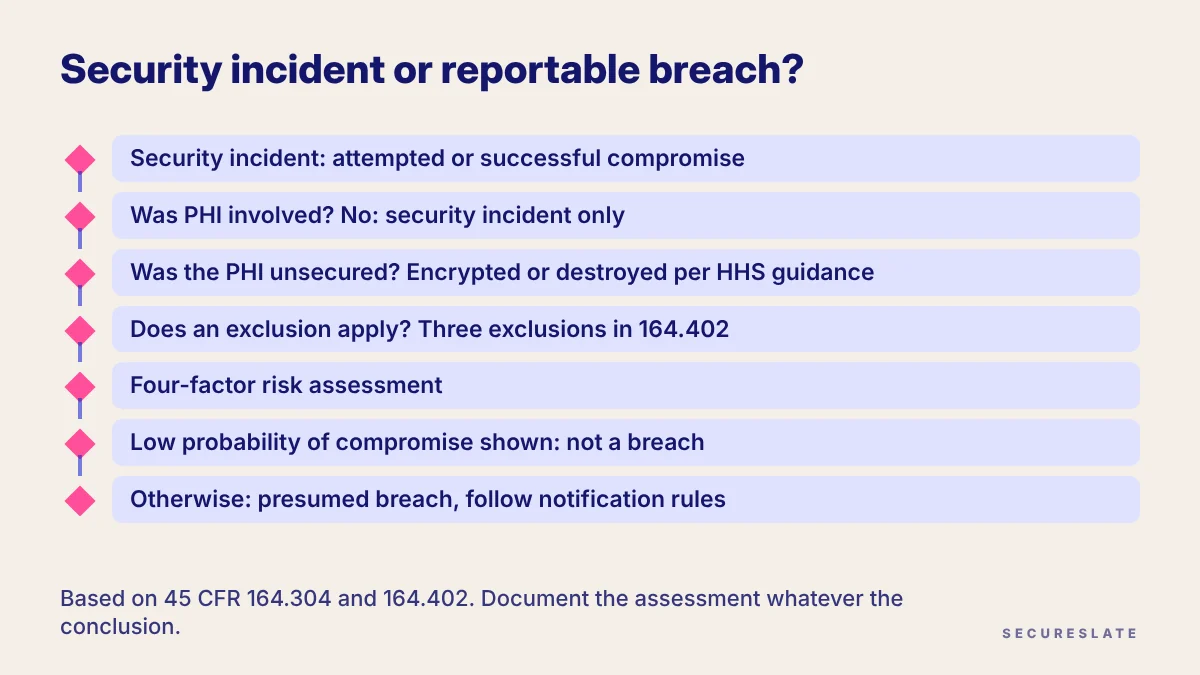
The breach definition in 45 CFR 164.402 sets up the decision your plan has to walk through:
- Was PHI involved? A blocked attack on a system with no PHI is a security incident, not a breach.
- Was the PHI unsecured? Notification duties apply to unsecured PHI, meaning PHI not rendered unusable, unreadable or indecipherable to unauthorized persons. HHS's Breach Notification Rule page names encryption and destruction as the methods in its guidance.
- Does an exclusion apply? The three exclusions cover good-faith unintentional access by a workforce member within their authority, inadvertent disclosure between authorized people at the same entity, and disclosure to a recipient who could not reasonably have retained the information.
- Can you show a low probability of compromise? Otherwise, the event is presumed to be a breach. Rebutting that presumption takes a risk assessment of at least four factors.
The four factors in 164.402 are:
- The nature and extent of the PHI involved, including the types of identifiers and the likelihood of re-identification.
- The unauthorized person who used the PHI or to whom it was disclosed.
- Whether the PHI was actually acquired or viewed.
- The extent to which the risk to the PHI has been mitigated.
Require the assessment to be written, dated and signed off, whatever the conclusion. Notice to individuals, HHS and the media then follows the Breach Notification Rule, covered in our HIPAA Breach Notification Rule guide.
What must a business associate report to its customers?
A business associate must report any security incident it becomes aware of to the covered entity, and must notify the covered entity of any breach of unsecured PHI it discovers.
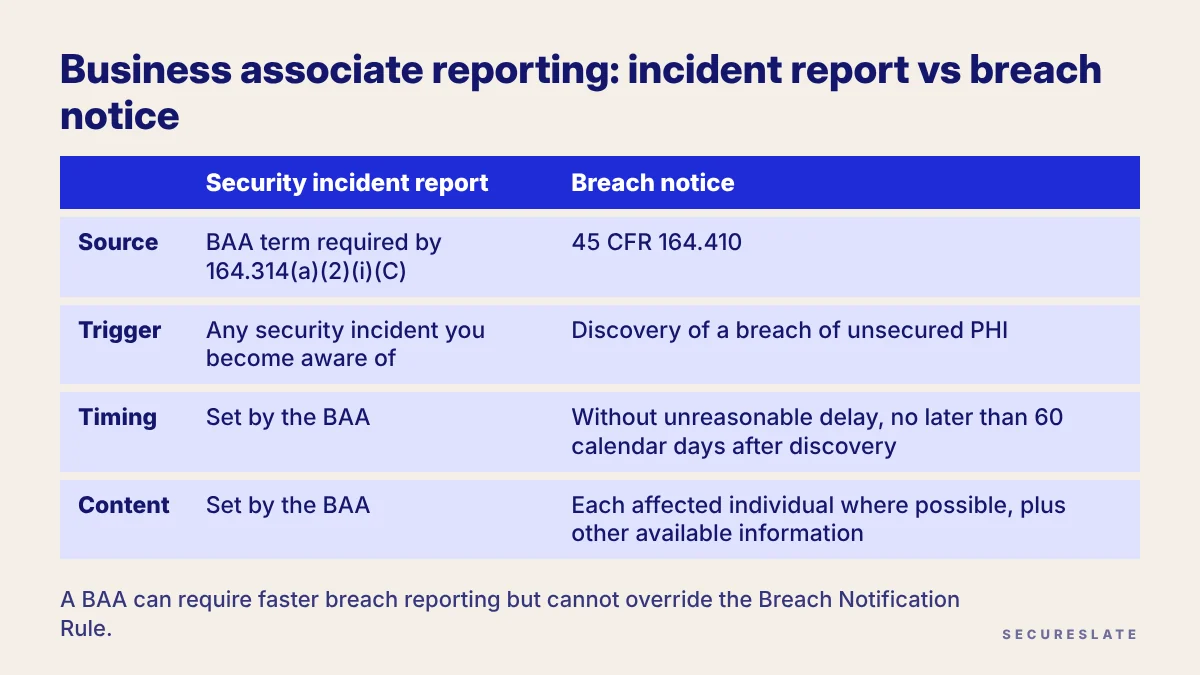
Many HealthTech SaaS companies are business associates, so these are the duties that shape their plan:
| Security incident report | Breach notice | |
|---|---|---|
| Source | BAA term required by 164.314(a)(2)(i)(C) | 45 CFR 164.410 |
| Trigger | Any security incident you become aware of | Discovery of a breach of unsecured PHI |
| Timing | Set by the BAA | Without unreasonable delay, no later than 60 calendar days after discovery |
| Content | Set by the BAA | Identity of each affected individual where possible, plus other available information the covered entity needs for its own notices |
Three details catch teams out:
- Discovery is imputed. Under 164.410, a breach is treated as discovered on the first day it is known, or would have been known with reasonable diligence, to any employee, officer or other agent other than the person who committed it.
- The BAA can be stricter. HHS's FAQ on cloud service providers says the parties can agree the detail, frequency and format of incident reports in the BAA, including how attempts are handled. A BAA can require faster breach reporting but cannot override the Breach Notification Rule.
- Subcontractors flow down. Under 164.314(a)(2)(i)(B), your own vendors that handle ePHI for you must agree to the same Security Rule requirements, so their incident reporting terms should feed your plan.
Keep a BAA register of each customer's reporting window, contact and format. In our experience, customer BAAs often set windows far shorter than 60 days, and the shortest becomes your operating standard.
How should a HealthTech SaaS team structure the plan?
Use seven phases from preparation to documentation, with an explicit PHI check and breach risk assessment that generic security plans usually lack.
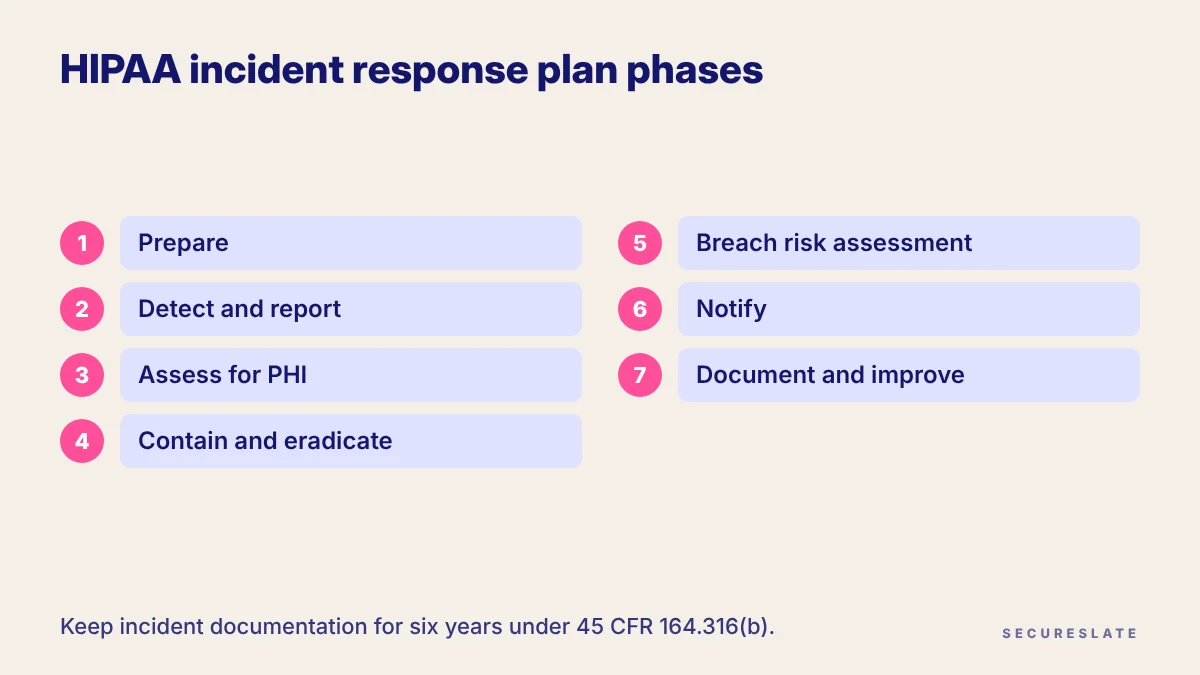
- Prepare. Name an incident lead, a privacy or compliance owner and a legal contact. Keep a data map of systems holding PHI, the BAA register and severity definitions. Train staff to report suspected incidents.
- Detect and report. Route alerts from cloud logs, endpoint tools, support tickets and staff reports into one intake. Timestamp each report, since discovery can be imputed.
- Assess for PHI. Decide early whether PHI was in scope. An incident with no PHI exposure may close after investigation.
- Contain and eradicate. Isolate affected systems, revoke exposed credentials, close public access and preserve logs as evidence. Restoring from backups and wider disaster recovery belong to your separate contingency planning, so hand off rather than repeat it.
- Breach risk assessment. Apply the 164.402 exclusions and four factors and record the conclusion with its evidence.
- Notify. As a business associate, report to each affected customer per the BAA and 164.410. As a covered entity, follow the Breach Notification Rule timelines. Agree messaging with customers before anything goes to patients.
- Document and improve. Close the incident record, capture lessons learned and update the risk analysis, controls and the plan itself.
For roles and runbooks, adapt our incident response plan template and add phases 3, 5 and 6 above.
How do common incident types play out?
Every incident follows the same phases, but the PHI and breach questions resolve differently. The rows below are illustrative examples for a HealthTech SaaS company, not rulings; outcomes depend on your facts.
| Example incident | Security incident? | PHI questions to answer | Likely path |
|---|---|---|---|
| Example: lost company laptop | Yes | Did it hold PHI? Was full-disk encryption on and the key not compromised? | If encrypted in line with HHS guidance, the PHI may not be unsecured; record the evidence. See our lost laptop playbook. |
| Example: storage bucket with PHI exports left publicly readable | Yes | Do access logs show downloads by unknown parties? How long was it exposed? | Four-factor assessment; "actually acquired or viewed" turns on log evidence. |
| Example: phishing that compromises a support agent's mailbox | Yes | Did the mailbox or ticket system contain PHI? Was there mail forwarding or bulk export? | Contain the account, review activity, then assess. |
| Example: ransomware on a production server | Yes | Which ePHI was encrypted or exfiltrated? | HHS says a breach is presumed unless a low probability of compromise is shown. |
| Example: blocked credential stuffing against the patient portal | Yes (attempted) | No access succeeded | Log, trend and report per the BAA's terms for attempted incidents. |
| Example: report emailed to the wrong customer clinic | Yes | Is the recipient covered by HIPAA? Did they delete it and confirm in writing? | Check the exclusions, then the four factors, especially recipient and mitigation. |
What documentation should you keep, and for how long?
Keep your incident policies and every incident record, assessment and notice for six years from creation or from the date last in effect, whichever is later.
That is the retention rule in 45 CFR 164.316(b), which also requires it to be available to the people who carry out the procedures and updated as your environment changes. HHS also notes that you carry the burden of showing that required notices were made, or that notice was not required, so the risk assessment is your evidence.
A practical evidence checklist for each incident:
- Intake record with time reported and who reported it
- Severity rating and the reasoning behind it
- Systems and data involved, with the PHI determination
- Containment and eradication actions with timestamps
- Written four-factor risk assessment, or the reason none was needed
- Copies of reports and notices sent to customers, individuals or HHS
- Lessons learned, resulting changes and the plan version in force
How SecureSlate helps
SecureSlate helps HealthTech teams run incident response inside a governed HIPAA program. Built-in HIPAA support, with multi-framework control mapping to SOC 2, ISO 27001 and HITRUST, links your security incident procedures to related controls. Custom controls add steps such as the PHI determination and four-factor assessment, and audit management keeps each incident's evidence together. Agentless read-only cloud integrations and the device agent help surface misconfigurations and unencrypted endpoints, secrets detection helps catch exposed credentials in code, and vendor risk management tracks subcontractor BAAs. Risk management records assessment decisions, and the trust center and security questionnaire automation help you explain your process to buyers.
FAQ
Is a HIPAA incident response plan required?
Yes. The security incident procedures standard in 164.308(a)(6) requires policies and procedures to address security incidents, and its response and reporting specification is marked required, not addressable.
Is every security incident a HIPAA breach?
No. A security incident can involve no PHI at all, or only an attempt. A breach requires an impermissible acquisition, access, use or disclosure of PHI, and notification duties apply to unsecured PHI.
Do business associates have to report unsuccessful attempts?
The BAA must require reporting of security incidents, and attempts fall within the definition. HHS says the parties can agree in the BAA how attempted incidents are reported.
How long does a business associate have to report a breach?
Under 164.410, without unreasonable delay and no later than 60 calendar days after discovery, unless a BAA sets a shorter window.
Disclaimer (legal note)
This article is for general information only and is not legal, regulatory or professional advice. Requirements vary by framework, industry and jurisdiction. Consult qualified advisors for your specific obligations.
Need compliance without the complexity?
SecureSlate automates ISO 27001, SOC 2, GDPR, HIPAA, and more. Built for growing teams. See it in action.
Find compliance gaps in 30 seconds
