
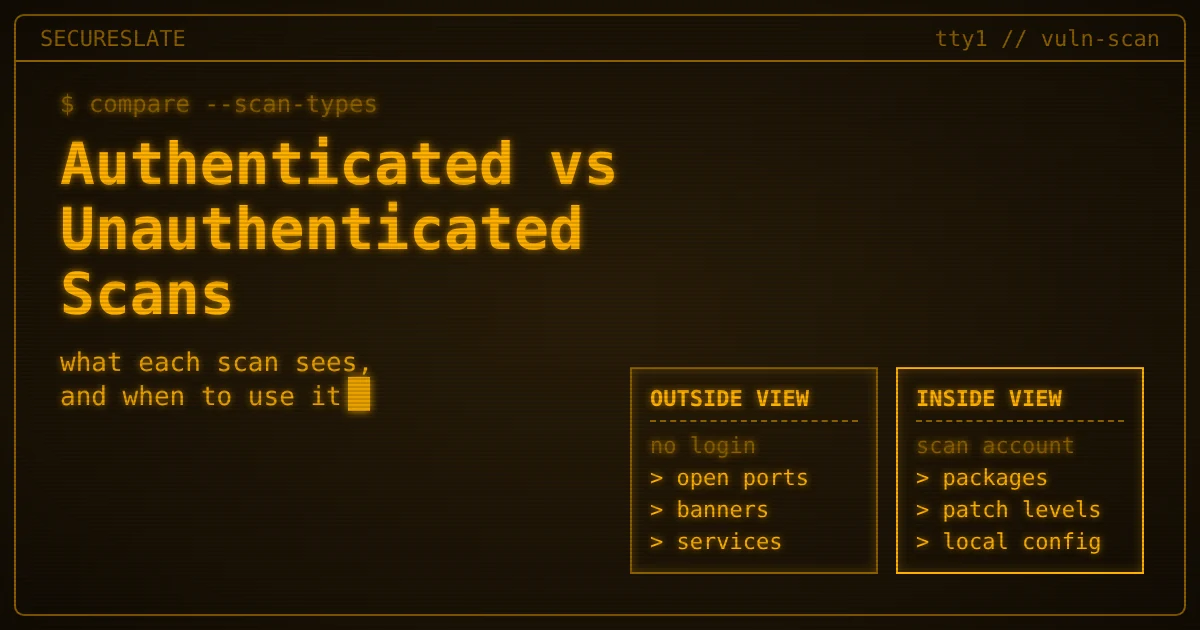
Short answer: An unauthenticated scan probes systems over the network and sees only what an outsider sees: open ports, service banners and exposed services. An authenticated, or credentialed, vulnerability scan logs in with a dedicated account and reads installed software, patch levels and configuration, so it usually finds more with less guessing. Most teams need both.
Related guides:
- Vulnerability scanning tools
- Vulnerability scanning frequency by framework
- Penetration testing vs vulnerability scanning
Key takeaways
- Different viewpoints, different answers. A non-credentialed scan shows your attack surface. An authenticated scan shows the state of the host itself.
- Credentials improve accuracy but add risk. The scan account is a privileged identity on every host it touches, so it needs least privilege, vaulting, rotation and monitoring.
- PCI DSS now requires authenticated internal scans. Requirement 11.3.1.2 became effective on 31 March 2025 for PCI DSS v4.x assessments.
- CIS Controls asks for both. Safeguard 7.5 calls for authenticated and unauthenticated scans of internal assets.
- Agents and cloud APIs fill the gaps. Laptops that roam and cloud services you cannot log in to need other assessment methods.
What is the difference between authenticated and unauthenticated scans?
The difference is whether the scanner logs in: an unauthenticated scan tests a system from the outside, while an authenticated scan signs in and inspects it from the inside.
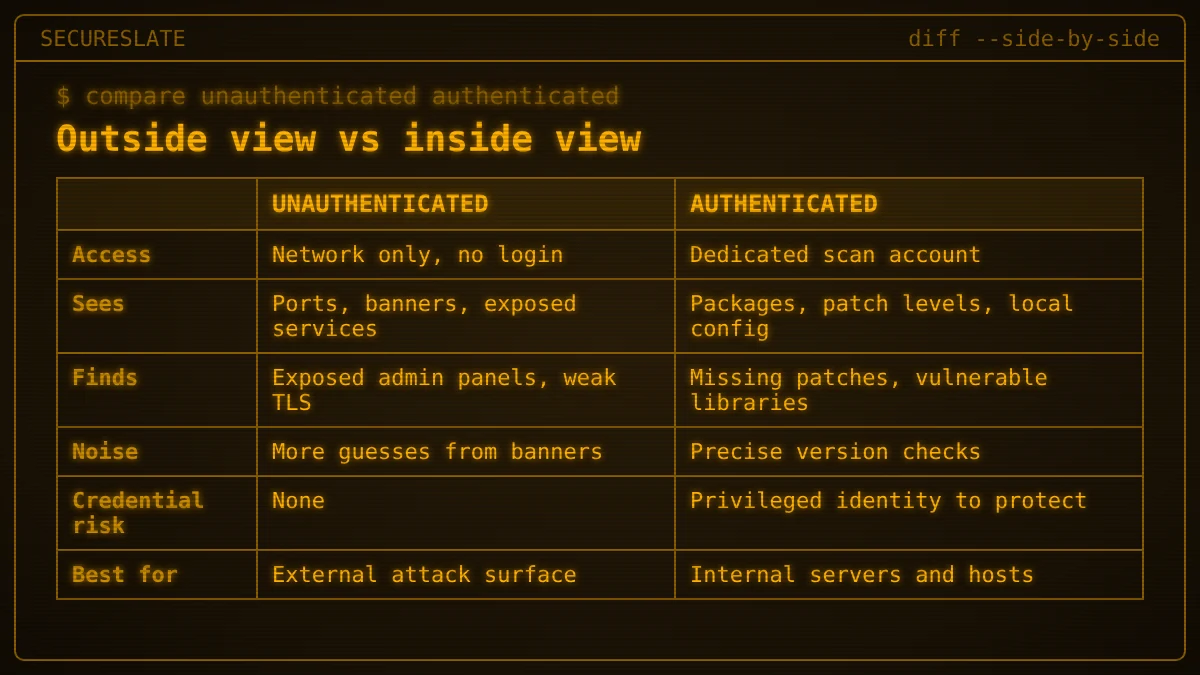
A non-credentialed scan sends network traffic to a target, sees which ports answer, reads banners and version strings, and runs safe checks against exposed services. It has the same view as an attacker who has not yet broken in, which makes it the right tool for your external attack surface.
An authenticated scan uses a username and password, SSH key, or similar credential to connect through a management protocol such as SSH or Windows remote management. Once connected, it queries the package manager or registry, reads configuration files and lists local settings. It reads installed versions directly instead of inferring them.
| Unauthenticated (non-credentialed) | Authenticated (credentialed) | |
|---|---|---|
| Access | Network only, no login | Logs in with a dedicated scan account |
| What it sees | Open ports, banners, exposed services, TLS settings | Installed packages, patch levels, local configuration, local accounts |
| Typical findings | Exposed admin panels, weak TLS, outdated service versions, default pages | Missing OS and application patches, vulnerable libraries, insecure local settings |
| Noise | More guesses from banners, so more false positives and false negatives | More precise version checks, fewer guesses |
| Credential risk | None | Scan account is a privileged identity to protect |
| Best for | External attack surface, segment exposure checks | Internal servers, workstations, in-scope system hardening |
What does each scan type find, and what does it miss?
Unauthenticated scans find what is exposed, while authenticated scans find what is wrong inside, and each misses what the other catches.
What an unauthenticated scan is good at:
- Services that should not be reachable, such as a database port or remote desktop open to the internet.
- Weak or expired TLS certificates and protocols.
- Web servers and appliances advertising outdated versions.
- Default credentials pages and admin interfaces left public.
Where it goes wrong: Banner checks guess. A Linux distribution may backport a security fix without changing the version string, so the scanner reports a vulnerability that is already patched (a false positive). The reverse also happens: a service hides its banner, so a real flaw goes unreported (a false negative). Anything that does not listen on the network, such as an outdated browser, a vulnerable library inside an application, or a missing local patch, is invisible.
What an authenticated scan adds:
- Exact package and patch inventory, checked against vulnerability data.
- Client-side software such as browsers, PDF readers and office suites.
- Configuration weaknesses such as password policy, disabled logging or insecure file permissions.
- Vulnerable libraries installed on the host.
Where it goes wrong: Authenticated scans fail quietly. If the login fails because a password rotated or a firewall blocks the management port, many scanners fall back to a network-only result. The report looks clean because the scanner never got in. In our experience, this is one of the most common reasons an internal scan "passes" while hosts stay unpatched. Always review the authentication success rate before you trust the results.
What do PCI DSS, CIS Controls, SOC 2, ISO 27001 and HIPAA expect?
PCI DSS v4.x and CIS Controls v8 explicitly call for authenticated scanning, while SOC 2, ISO 27001 and the current HIPAA Security Rule set broader vulnerability management expectations without prescribing it by name.
PCI DSS v4.x. The PCI Security Standards Council's summary of changes from v3.2.1 to v4.0 lists requirement 11.3.1.2 as a new requirement that internal vulnerability scans are performed via authenticated scanning, and marks it as a best practice until 31 March 2025. The Council's guidance on future-dated requirements confirms that those requirements became effective as of 31 March 2025. So, as of October 2026, internal scans of in-scope systems are expected to be authenticated. External scans remain a separate duty: the Council's resource guide on vulnerability scans notes that requirement 11.3.2 requires evidence of passing external scans by an Approved Scanning Vendor at least once every three months.
CIS Controls v8. The CIS Controls assessment specification for Control 7 is direct:
- Safeguard 7.5 asks you to scan internal enterprise assets quarterly or more often and to conduct both authenticated and unauthenticated scans, using a SCAP-compliant tool.
- Safeguard 7.6 asks you to scan externally exposed assets monthly or more often, also with a SCAP-compliant tool.
Both safeguards sit in Implementation Groups 2 and 3, so they are a reasonable benchmark for a growing SMB.
SOC 2, ISO 27001 and HIPAA. These frameworks are outcome based. In the texts we reviewed, they expect you to identify and manage technical vulnerabilities but do not name authenticated scanning as a specific requirement. Under HIPAA, scanning supports the risk analysis and risk management specifications in 45 CFR 164.308(a)(1). HHS's proposed Security Rule update would require vulnerability scanning at least every six months, but as of October 2026 HHS describes it as a proposal and states the current rule remains in effect. In practice, auditors for all three tend to ask whether your scans can actually see missing patches, and authenticated results are the easiest way to show that. For cadence by framework, see our vulnerability scanning frequency guide.
How do you set up a least-privilege scan account?
Create one dedicated, non-human account per environment with only the rights the scanner needs, store its secret in a vault, rotate it, and alert on any use outside scan windows.
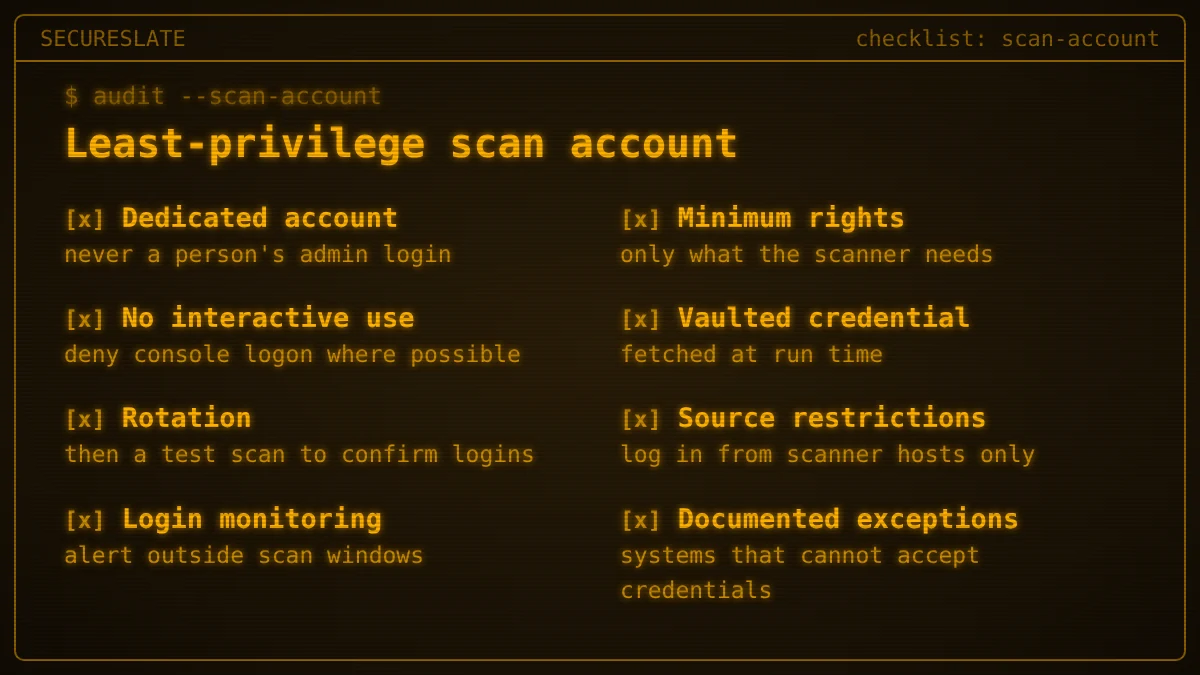
A credentialed vulnerability scan works because the account can log in nearly everywhere. That is also what makes it attractive to an attacker. Treat it like any other privileged identity:
- Dedicated account. Use a named scan account, never a person's admin account or a shared team login.
- Minimum rights. Grant only what your scanner's documentation lists for the checks you run. Some platforms need elevated rights for complete results, so scope them narrowly, for example to specific read commands rather than a full shell.
- No interactive use. Deny console and remote desktop logon where your platform allows it, and do not reuse the account for anything else.
- Vaulted credential. Store the password or key in a secrets vault that the scanner retrieves at run time, not in a spreadsheet or the scanner's local config.
- Rotation. Rotate on a schedule and immediately after staff changes or suspected exposure. Run a test scan after each rotation to confirm logins still succeed.
- Source restrictions. Allow the account to log in only from scanner IP addresses or scanner hosts.
- Monitoring. Alert on any login by the scan account outside scheduled windows or from an unexpected source.
- Separate accounts per zone. Use different credentials for production, corporate and any PHI or cardholder data environment, so one leak does not open everything.
- Documented exceptions. Keep a list of systems that cannot accept credentials, with the reason and the compensating assessment method.
Include the scan account in your regular access reviews, so its rights are confirmed by an owner rather than growing over time.
Where do agent-based and cloud API assessments fit?
Agents and cloud API assessments cover what credentialed network scans struggle to reach: devices that move and services that have no operating system you can log in to.
Agent-based assessment. A lightweight agent on the endpoint collects the same kind of inside view as an authenticated scan, then reports outbound. There is no inbound scan credential to protect, and laptops are assessed even when they are off the corporate network. The trade-off is that an agent only covers devices where it is installed, so pair it with an asset inventory to spot gaps.
Cloud API-based assessment. Managed services such as object storage, managed databases, serverless functions and identity settings have no host to log in to. Read-only API access lets a tool check configuration, such as public storage, missing encryption or overly broad roles. This is configuration assessment, not a replacement for scanning the virtual machines and containers you run yourself.
How they combine. A sensible SMB stack often looks like this:
- Unauthenticated scans of everything internet facing.
- Authenticated scans of internal servers and in-scope systems.
- Agents on laptops and workstations.
- Read-only cloud API checks for managed services.
- Image or dependency scanning in the build pipeline for containers and code.
For help choosing products for each layer, see our vulnerability scanning tools guide. Scanning of any kind is not a penetration test, which our penetration testing vs vulnerability scanning comparison explains.
Which scan should you run? A decision guide
Choose by asking where the asset sits, whether you can log in to it, and which framework applies.
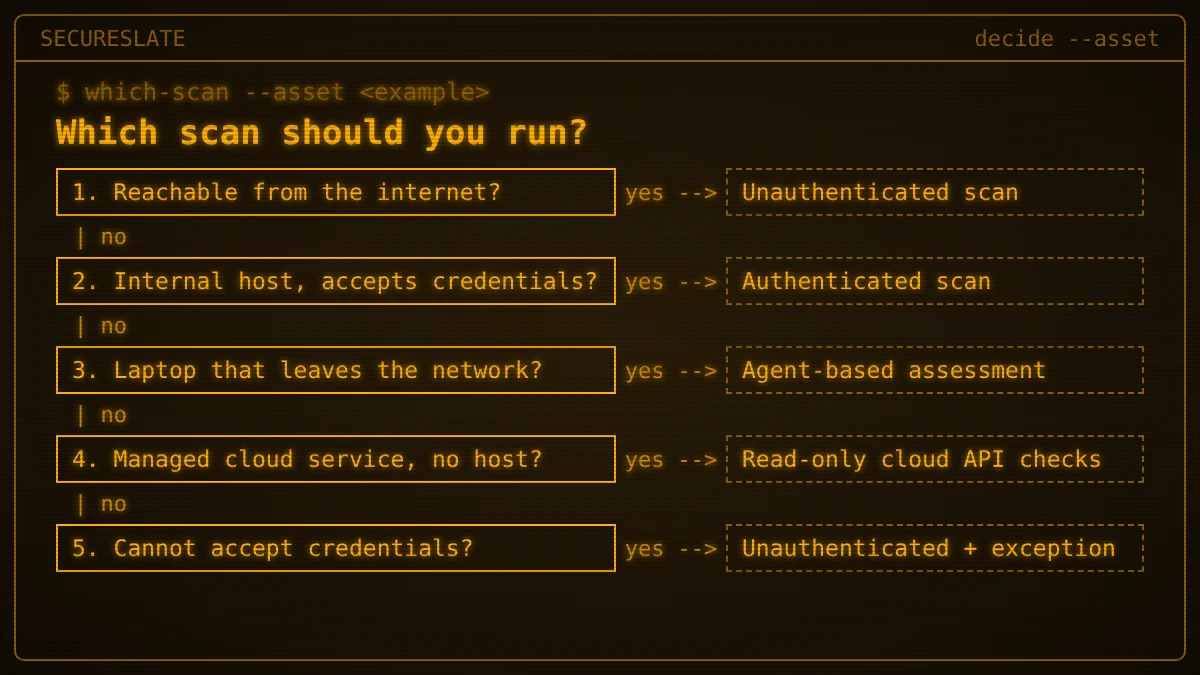
Walk each asset class through these questions:
- Is it reachable from the internet? Run unauthenticated external scans. If it is in PCI scope, these include the quarterly ASV scans.
- Is it an internal host that can accept credentials? Run authenticated scans, and add an unauthenticated pass if you follow CIS Safeguard 7.5 or want to see segment exposure.
- Is it a laptop or device that leaves the network? Use an agent.
- Is it a managed cloud service with no host to log in to? Use read-only cloud API configuration checks.
- Is it an appliance or legacy system that cannot accept credentials? Run an unauthenticated scan, document the exception and add compensating checks such as vendor advisories and configuration reviews.
| Example asset | Recommended approach |
|---|---|
| Example: public patient portal and API | Unauthenticated external scans, plus application testing |
| Example: internal Linux servers processing PHI | Authenticated scans, with an unauthenticated pass per segment |
| Example: staff laptops working from home | Agent-based assessment |
| Example: managed database and storage buckets | Read-only cloud API configuration checks |
| Example: network appliance with no scan login | Unauthenticated scan plus documented exception |
How SecureSlate helps
SecureSlate helps SMB and HealthTech teams turn scanning decisions into evidence. Multi-framework control mapping links your vulnerability management controls across built-in frameworks such as PCI DSS, SOC 2, ISO 27001, HIPAA and NIST CSF, and custom controls let you track items like the authenticated scan exception list. Agentless read-only cloud integrations check cloud configuration, the device agent covers staff laptops, and code security and secrets detection help catch exposed credentials in code. Access reviews keep the scan account's rights in front of an owner, risk management records accepted exceptions, and audit management keeps scan reports and remediation evidence together for your auditor.
FAQ
Is a credentialed scan the same as an authenticated scan?
Yes. Credentialed and authenticated describe the same thing: the scanner logs in to the target with an account. Non-credentialed and unauthenticated are likewise interchangeable.
Does PCI DSS require authenticated scanning?
For internal vulnerability scans, yes. Requirement 11.3.1.2 in PCI DSS v4.x calls for internal scans via authenticated scanning, and it became effective on 31 March 2025 after a best-practice period.
Can an authenticated scan replace an external scan?
No. An authenticated scan shows the state of the host, not what an attacker can reach from outside. You still need unauthenticated scans of your external attack surface.
Are authenticated scans risky?
They add one specific risk: the scan credential. A dedicated least-privilege account, vaulted and rotated, with alerts on unexpected logins, keeps that risk manageable.
Disclaimer (legal note)
This article is for general information only and is not legal, regulatory or professional advice. Requirements vary by framework, industry and jurisdiction. Consult qualified advisors for your specific obligations.
Need compliance without the complexity?
SecureSlate automates ISO 27001, SOC 2, GDPR, HIPAA, and more. Built for growing teams. See it in action.
Find compliance gaps in 30 seconds
