
Short answer: Azure can support HIPAA workloads, but Azure alone does not make you compliant. Microsoft offers a HIPAA business associate agreement through its Product Terms and lists which services it covers. You still have to use only in-scope services, configure access, logging and encryption correctly, run your own risk analysis, and document your safeguards.
Related guides:
- HIPAA compliance in cloud-based healthcare
- What is a HIPAA business associate agreement?
- AWS Control Tower and HIPAA
Key takeaways
- A cloud provider that stores your ePHI is a business associate, even if it cannot read encrypted data, according to HHS guidance on HIPAA and cloud computing.
- As of October 2026, Microsoft's HIPAA compliance page says its BAA is available by default through the Product Terms to customers that are covered entities or business associates. There is no separate contract to sign.
- The BAA covers specific services. Check the in-scope list before you put ePHI into any new Azure service, including AI services.
- Your data, accounts, access management and endpoints stay your responsibility in every Azure service model.
- Azure Policy and Defender for Cloud help you monitor settings, but Microsoft itself says a compliant result in Azure Policy is only a partial view of your status.
Is Azure HIPAA compliant?
Azure is a platform you can use to build HIPAA-compliant systems, but no cloud is "HIPAA compliant" on its own. Compliance depends on how you configure and operate your workloads.
Microsoft's page makes this explicit. It states that using Azure "doesn't automatically impart compliance onto your cloud solutions" and that your organisation is responsible for having an adequate compliance program and internal processes. The same page notes that there is currently no HHS-approved certification program through which a cloud provider acting as a business associate could demonstrate HIPAA compliance.
So when a hospital customer asks "is your Azure environment HIPAA compliant?", the useful answer covers three things: the BAA chain, how you configured your environment, and the evidence that your safeguards operate. Our HIPAA in cloud-based healthcare guide, linked above, explains the cloud-agnostic principles. This guide focuses on the Azure specifics.
How do you get a BAA for Azure?
You do not negotiate a separate BAA with Microsoft for Azure. According to Microsoft's HIPAA page, the HIPAA BAA is part of the Microsoft Product Terms and is available by default to covered entities and business associates, and the data protection addendum says executing your volume licensing agreement includes executing the BAA.
What that means for a HealthTech startup:
- Confirm which agreement you are on. Make sure the Microsoft agreement your organisation accepted incorporates the Product Terms and the data protection addendum, and keep a copy in your vendor file.
- Record the BAA in your vendor register. Auditors and customers will ask for proof that every vendor touching ePHI is under a BAA. A dated copy or reference to the terms you accepted works better than "Microsoft covers it".
- Flow obligations to your customers. If you are a business associate to a covered entity, Microsoft becomes your subcontractor. Your own BAA with the customer should reflect that you use subcontractors under written agreements.
The BAA guide linked above covers the clauses your customer-facing agreement needs.
Which Azure services can store or process ePHI?
Only use services that Microsoft lists as in scope for its HIPAA BAA. Microsoft points to its cloud services in audit scope page for this list.
Build a simple gate into your engineering workflow:
- Before adoption: check the service against the in-scope list and record the result with the date you checked.
- In architecture reviews: flag any data flow that would send ePHI to a service not on the list, including logging, analytics and AI services.
- Periodically: re-check the list for services you already use, because scope lists change over time.
Previews and new features deserve extra care. If you cannot confirm coverage, keep ePHI out until you can.
What does Microsoft secure, and what do you secure?
Microsoft secures the physical datacenters, network and hosts. Everything above that is shared or yours, depending on the service model.
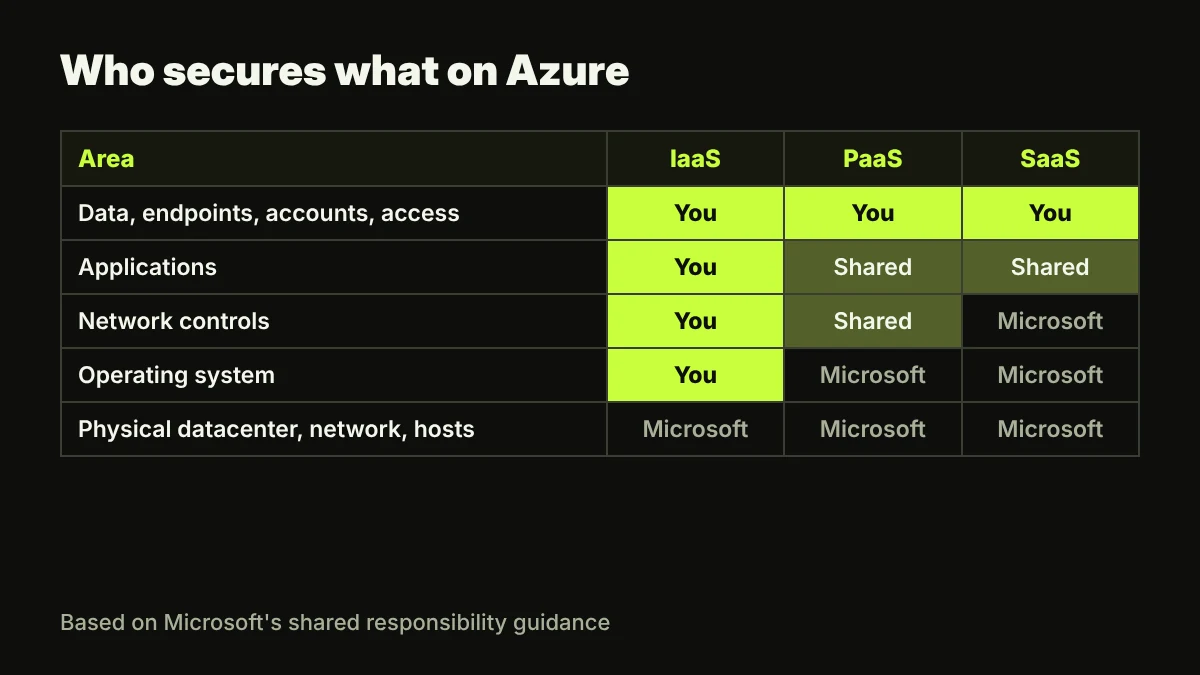
Microsoft's shared responsibility article lists four responsibilities you always keep, regardless of deployment type:
| Always yours | What it means for ePHI |
|---|---|
| Data | Classification, protection, encryption decisions and data governance |
| Endpoints | The laptops and mobile devices your team uses to reach Azure |
| Accounts | Creating, managing and removing user access |
| Access management | Role-based access control, multifactor authentication and conditional access |
The same article shows the operating system as your responsibility in IaaS but Microsoft's in PaaS. That is one reason many HealthTech teams prefer managed PaaS services for ePHI: fewer layers to patch and evidence.
Azure HIPAA configuration checklist
Use the technical safeguard standards in 45 CFR 164.312 as the structure for your Azure configuration. The rule sets standards, not product settings, so the Azure items below are examples of how teams commonly meet each one.
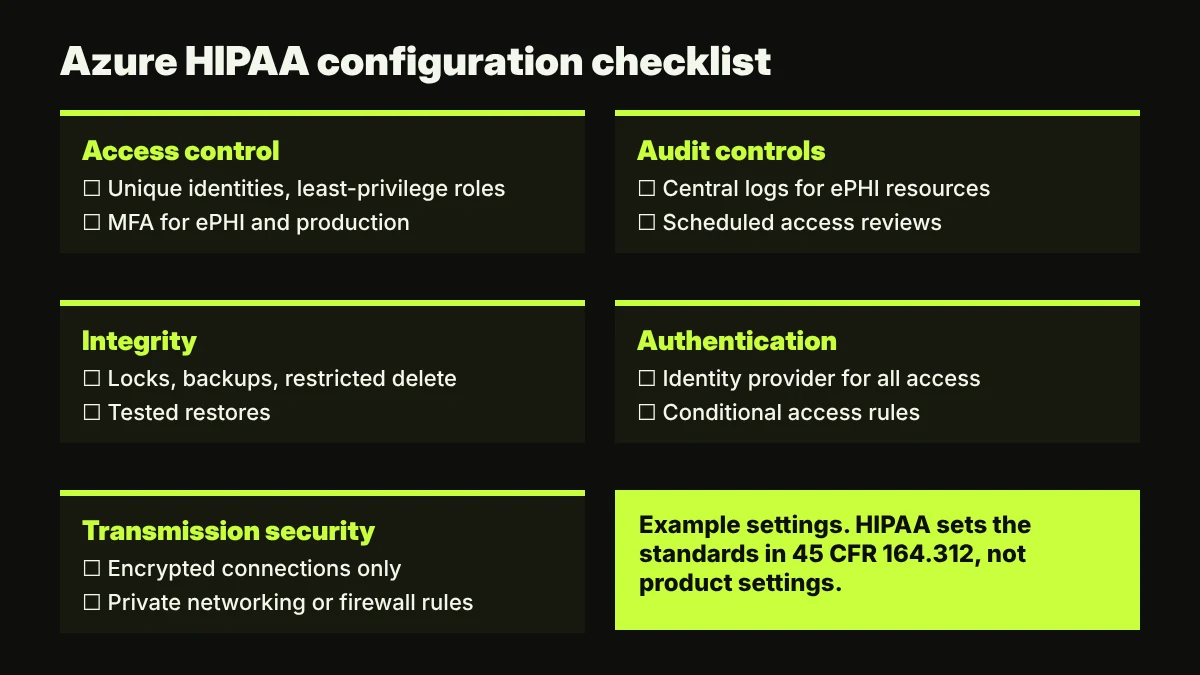
Access control (164.312(a))
- Use unique identities for every person and workload, with no shared admin accounts
- Assign least-privilege roles with role-based access control, scoped to the ePHI resource groups
- Require multifactor authentication for anyone with access to ePHI or production
- Decide on encryption at rest for every ePHI store, and document the decision (encryption is an addressable specification under 164.312(a)(2)(iv))
Audit controls (164.312(b))
- Send activity logs and resource logs for ePHI resources to a central workspace
- Set retention long enough to support investigations and your documentation policy
- Review access and admin activity on a schedule, and keep the review record
Integrity (164.312(c))
- Protect ePHI stores from improper change, for example with locks, backups and restricted delete permissions
- Test restores, and record the results
Person or entity authentication (164.312(d))
- Use your identity provider for all access, with conditional access rules for risky sign-ins
Transmission security (164.312(e))
- Enforce encrypted connections for every endpoint that carries ePHI
- Restrict network access to ePHI services with private networking or firewall rules
Keep the checklist in code where you can. Settings defined in infrastructure as code are easier to review, and drift from them is easier to spot.
How far do Azure Policy and Defender for Cloud get you?
Azure Policy and Defender for Cloud are good at continuously checking technical settings. They do not cover the administrative work HIPAA also requires.
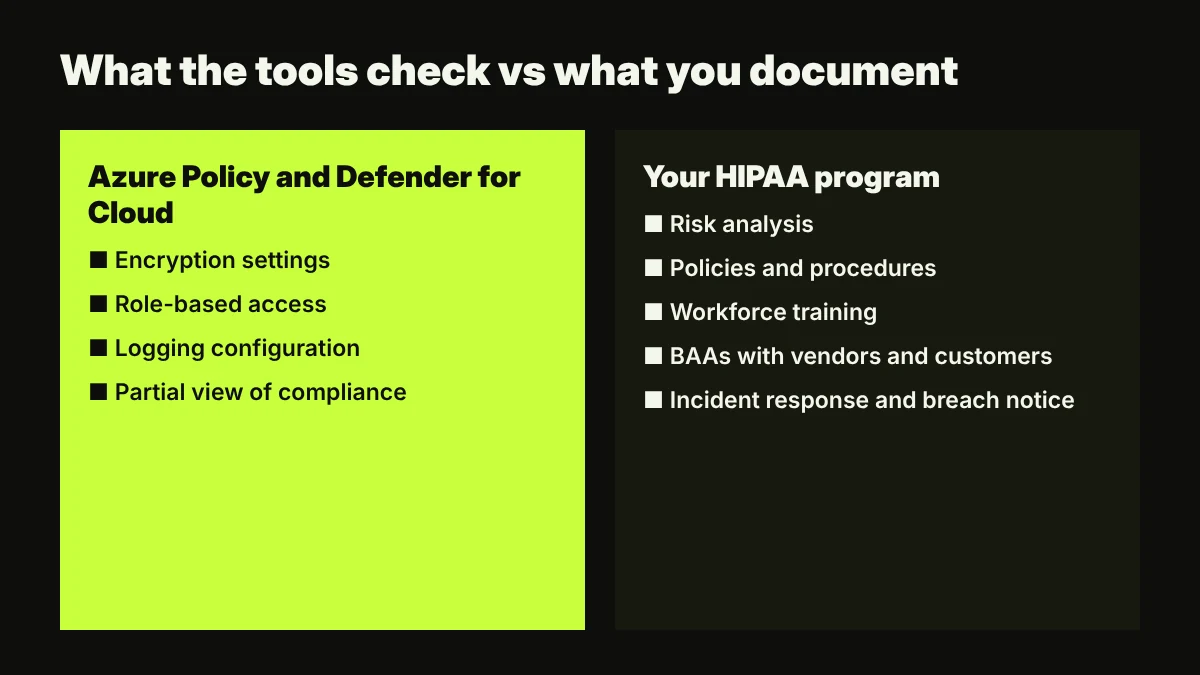
What they offer:
- Azure Policy built-in initiative. Microsoft publishes a HIPAA HITRUST regulatory compliance initiative that maps policy definitions to control domains. Examples include "Transparent Data Encryption on SQL databases should be enabled" and "Role-Based Access Control (RBAC) should be used on Kubernetes Services".
- Defender for Cloud regulatory compliance dashboard. The dashboard shows enabled standards, their controls and assessments. Microsoft notes that adding non-default standards requires at least one paid Defender for Cloud plan.
What to keep in mind:
- Microsoft states that "Compliant in Azure Policy refers only to the policy definitions themselves" and does not ensure you are fully compliant with all requirements of a control.
- A clean dashboard says nothing about your risk analysis, workforce training or customer BAAs.
- The initiative maps to HIPAA and HITRUST domains, but using it is not a HITRUST assessment. Our HITRUST inheritance guide explains how provider assessments fit into your own.
Which HIPAA work happens outside Azure?
Most of the HIPAA Security Rule is about your organisation, not your cloud console. Plan for these items alongside the technical work:
- Risk analysis. 45 CFR 164.308(a)(1)(ii)(A) requires an accurate and thorough assessment of risks to ePHI. Your Azure architecture is an input, not the whole analysis.
- Policies and procedures. Document how you meet each standard, and keep that documentation for six years as 45 CFR 164.316 requires.
- Workforce training and access reviews. People and process controls sit outside Azure but decide who reaches your ePHI.
- Vendor management. Microsoft is one vendor. Your email provider, support desk and monitoring tools need BAAs too if they touch ePHI.
- Incident response and breach notification. Know how you would investigate an incident in Azure and who notifies your covered entity customers.
- Endpoints. Laptops that access the Azure portal or ePHI need encryption, screen locks and patching, because endpoints stay your responsibility.
How SecureSlate helps
SecureSlate helps HealthTech teams run the HIPAA program around their Azure environment. Built-in HIPAA and HITRUST support with multi-framework control mapping to SOC 2 and ISO 27001 lets one Azure control count toward several frameworks. Agentless read-only cloud integrations collect configuration evidence from your cloud accounts, and the device agent covers the endpoints that stay your responsibility. Vendor risk management tracks Microsoft and every other vendor that touches ePHI, including BAA status, while access reviews, risk management and audit management cover the work that happens outside Azure. The trust center and security questionnaire automation help you answer hospital security reviews consistently. See how the Azure integration fits into evidence collection.
FAQ
Do I need to sign a separate BAA with Microsoft for Azure?
Not according to Microsoft. As of October 2026, its HIPAA compliance page says the BAA is available by default through the Product Terms to covered entities and business associates, with no separate contract to sign. Keep a record of the terms you accepted.
Are all Azure services covered by the BAA?
No. Microsoft lists in-scope services on its cloud services in audit scope page. Check every service against that list before it stores or processes ePHI, and re-check periodically.
Does a compliant score in Defender for Cloud mean we are HIPAA compliant?
No. Dashboards check technical settings mapped to controls. Microsoft states that a compliant result in Azure Policy covers only the policy definitions themselves. Administrative safeguards, your risk analysis and BAAs still need their own evidence.
Is Azure better than AWS or Google Cloud for HIPAA?
The choice usually depends on your team's skills and existing stack. Whichever provider you use, confirm its BAA and in-scope service list, and expect the HIPAA work on your side to look much the same. See our AWS Control Tower and HIPAA guide for the AWS view.
Disclaimer (legal note)
This article is for general information only and is not legal, regulatory or professional advice. Requirements vary by framework, industry and jurisdiction. Consult qualified advisors for your specific obligations.
Need compliance without the complexity?
SecureSlate automates ISO 27001, SOC 2, GDPR, HIPAA, and more. Built for growing teams. See it in action.
Find compliance gaps in 30 seconds
