
Short answer: HIPAA applies to telehealth the same way it applies to in-person care. Since the COVID-19 enforcement discretion ended in 2023, covered providers must use telehealth technology that meets the Security Rule, sign a business associate agreement (BAA) with any vendor that stores or handles PHI beyond simple transmission, and include telehealth in their risk analysis.
Related guides: What is a HIPAA BAA? · HIPAA technical safeguards · HIPAA encryption requirements
Key takeaways
- There is no separate "telehealth HIPAA rule". The Privacy, Security and Breach Notification Rules apply to virtual care as they do to any other care.
- OCR's pandemic-era telehealth enforcement discretion expired on May 11, 2023, and the transition period ended on August 9, 2023.
- A telehealth vendor that stores recordings, messages or session data is a business associate and needs a BAA. A pure conduit with only transient access does not.
- Audio-only calls over a traditional landline fall outside the Security Rule, but calls over VoIP, cellular data or apps fall inside it.
- Telehealth tools must be part of your asset inventory, risk analysis and access controls.
Does HIPAA apply to telehealth?
Yes, if the provider or plan delivering the care is a covered entity, or the platform is acting as a business associate for one. HIPAA regulates who handles protected health information (PHI) and why, not the channel used to deliver care. A video visit produces the same kinds of PHI as an office visit: identity, symptoms, diagnoses, prescriptions and notes. If the platform also records sessions, transcribes them or stores chat history, it creates more electronic PHI (ePHI) to protect.
Two groups need to think about this:
| Who | Role under HIPAA | What it means for telehealth |
|---|---|---|
| Clinic, practice, hospital or health plan | Covered entity | Owns the Privacy Rule duties, the risk analysis and the choice of compliant technology |
| Telehealth platform, video API, transcription or scheduling vendor | Business associate when it creates, receives, maintains or transmits PHI for the covered entity | Must sign a BAA and meet the Security Rule directly |
| Direct-to-consumer wellness app not working for a covered entity | Often outside HIPAA | May fall under the FTC Health Breach Notification Rule and state health privacy laws instead |
If you are building a digital health product and are not sure which row you are in, start with HIPAA for healthtech.
What changed when the COVID-19 waivers ended?
The flexibility to use any non-public-facing video app without a BAA is gone. During the public health emergency, OCR used enforcement discretion and said it would not penalize providers who used everyday communication apps for telehealth in good faith. According to HHS's telehealth guidance page, that discretion expired at 11:59 pm on May 11, 2023, followed by a 90-day transition period that ended at 11:59 pm on August 9, 2023.
Since then, the normal rules apply. If a practice still runs visits on a consumer app that will not sign a BAA, that is a compliance gap to close now. Note that Medicare telehealth payment flexibilities are a separate topic governed by CMS and Congress. They do not change HIPAA privacy and security obligations.
When does a telehealth vendor need a BAA?
A telehealth vendor needs a BAA when it does more than carry the data across the wire. OCR's guidance on HIPAA and audio-only telehealth explains that a covered entity is not required to have a BAA with a telecommunication service provider that has only transient access to the PHI it transmits, because that provider is acting as a conduit. Once a vendor stores PHI, for example session recordings kept in the developer's cloud, it is creating, receiving and maintaining PHI, and a BAA is required.
In practice, most telehealth platforms store something: appointment details, chat messages, recordings, transcripts, files or logs. Treat them as business associates unless you have confirmed they only transmit. The same applies to the vendors behind the platform, such as the cloud host and transcription service, which the platform must cover with its own subcontractor BAAs. Our BAA guide, linked above, lists the clauses to check.
How does HIPAA treat audio-only telehealth?
The Privacy Rule always applies, but whether the Security Rule applies depends on the technology. OCR's guidance says the Security Rule does not apply when a provider uses a standard telephone landline, because that information is not electronic. It does apply when the call runs over electronic communication technologies such as VoIP, cellular data, Wi-Fi or smartphone apps, and when a tool records or transcribes the session.
OCR also sets practical expectations for any audio-only visit:
- Hold the call in a private setting where feasible. If that is not possible, use lowered voices and avoid speakerphone.
- Verify the identity of a patient you do not already know, either orally or in writing.
- Remember that civil rights laws require effective communication, and audio-only may not work for every patient with a disability.
Which safeguards should a telehealth platform have?
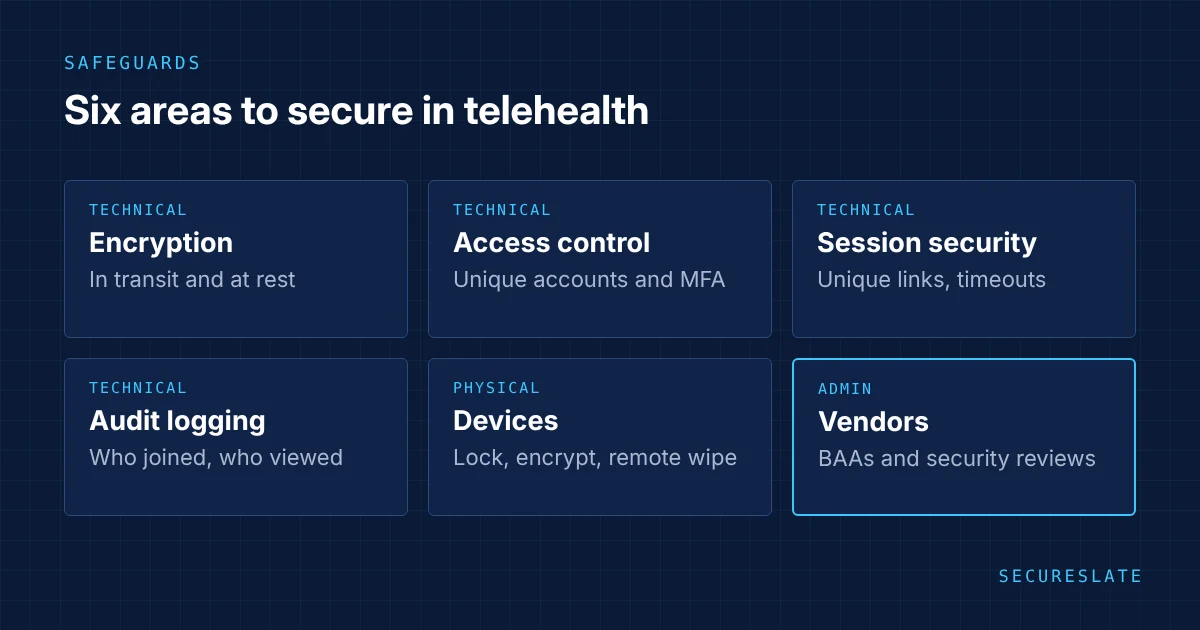
The Security Rule is technology neutral, so it does not name products. It asks you to analyze risks and put reasonable safeguards in place under 45 CFR 164.308 (administrative), 164.310 (physical) and 164.312 (technical). For telehealth, the safeguards that come up most often are grouped below.
| Area | What good looks like |
|---|---|
| Encryption | Video, audio and chat encrypted in transit; recordings, transcripts and files encrypted at rest |
| Access control | Unique accounts, MFA for clinicians and admins, role-based access to recordings and records |
| Session security | Unique or expiring meeting links, waiting rooms, automatic logoff after inactivity |
| Audit logging | Logs of who joined, who accessed recordings and admin changes, retained and reviewed |
| Devices | Clinician laptops and phones with screen lock, disk encryption and remote wipe; see HIPAA for remote employees |
| Vendors | BAAs with the platform and its subprocessors, plus a review of their security posture |
OCR's audio-only guidance also asks providers to consider whether a technology supports encrypted transmission, whether recordings can be encrypted, whether access requires authentication and whether sessions time out. A robust asset inventory helps keep the risk analysis accurate as tools change. For more on encryption choices, see the encryption guide linked at the top of this page.
Telehealth HIPAA compliance checklist
Use this as a starting point for a practice or a telehealth product team.
- Inventory every telehealth tool. Video, phone systems, messaging, scheduling, e-prescribing, transcription and any AI note-taking tools.
- Classify each vendor. Decide whether it is a conduit or a business associate, and get a signed BAA from every business associate.
- Update the risk analysis. Add telehealth data flows, recordings and remote devices. Our guide on how to conduct a HIPAA risk assessment walks through the method.
- Configure the platform. Turn on encryption, MFA, waiting rooms, unique links and inactivity timeouts. Turn off recording unless you need it.
- Set a recording and retention rule. If you record, decide who can access recordings, where they live and how long they are kept.
- Verify identity. Define how clinicians confirm a patient's identity at the start of each visit.
- Train the workforce. Cover private settings, headphones, screen sharing and what to do if the wrong person joins.
- Educate patients. HHS publishes a resource to help providers explain privacy and security risks of remote communication technologies to patients.
- Review access and logs. Check who can see telehealth records on a regular schedule and remove leavers promptly.
- Plan for incidents. Include telehealth scenarios, such as a misdirected link or exposed recording, in your incident response and breach assessment.
How SecureSlate helps
SecureSlate gives telehealth teams one place to run the HIPAA program behind their virtual care. The built-in HIPAA framework maps Security Rule controls and links them to SOC 2, ISO 27001 or HITRUST if customers ask for those too. Vendor risk management tracks every telehealth vendor, its BAA and its security review. Agentless, read-only cloud integrations and the device agent check configuration such as MFA, encryption and screen lock, and access reviews keep clinician access current. Risk management holds your telehealth risk analysis, and a trust center plus security questionnaire automation help platforms answer health system due diligence. SecureSlate does not issue certifications or guarantee compliance.
FAQ
Is Zoom or another video app HIPAA compliant for telehealth?
No app is HIPAA compliant on its own. What matters is whether the vendor offers and signs a BAA, whether you use the version or plan covered by that BAA, and whether you configure it securely and include it in your risk analysis.
Can I still use FaceTime or consumer messaging apps for telehealth?
The COVID-19 enforcement discretion that allowed this ended in 2023. Today, a tool that handles PHI beyond transient transmission needs a BAA and must meet the Security Rule, which most consumer apps do not offer.
Do I need patient consent for telehealth under HIPAA?
HIPAA does not require a specific telehealth consent for treatment, payment or health care operations. State laws and payer rules often do require informed consent for telehealth, so check those separately.
Does HIPAA require telehealth sessions to be recorded?
No. HIPAA does not require recording. If you record, the recordings are ePHI and need access controls, encryption, a retention rule and coverage in your BAA.
Is a telehealth startup a covered entity or a business associate?
It depends on the model. A platform serving clinics is usually a business associate. A company that employs clinicians and bills insurance electronically may be a covered entity. A direct-to-consumer app may be outside HIPAA but under FTC and state rules.
Disclaimer (legal note)
This article is for general information only and is not legal, regulatory, or professional advice. Requirements vary by framework, industry, and jurisdiction. Consult qualified advisors for your specific obligations.
Need compliance without the complexity?
SecureSlate automates ISO 27001, SOC 2, GDPR, HIPAA, and more. Built for growing teams. See it in action.
Find compliance gaps in 30 seconds