
Short answer: Cloud configuration drift is any difference between how your cloud resources are actually configured and the approved baseline, usually your infrastructure as code. Detect it by comparing live state to code on a schedule and on every change, then remediate each finding by reverting it, adopting it into code through review, or recording an approved exception.
Related guides:
Key takeaways
- Drift is a gap between intended and actual configuration. It is not always a misconfiguration, but every unreviewed change weakens the evidence that your controls work.
- Most drift starts with a well-meant manual fix: a console change during an incident, a hotfix that never reaches code, or a teammate testing a setting.
- Detection needs two views. Infrastructure as code tools compare state with code, and configuration recorders show what changed and when.
- Each finding has three honest outcomes: revert, adopt through review, or accept as a documented exception. "Ignore it" is not one of them.
- Auditors care less about zero drift and more about whether you find it, decide on it and keep a record.
What is cloud configuration drift?
Cloud configuration drift is the difference between a resource's expected configuration and its real configuration in your cloud account. The expected configuration usually lives in Terraform, CloudFormation, Bicep or another infrastructure as code (IaC) tool, or in a written baseline if you do not use IaC yet.
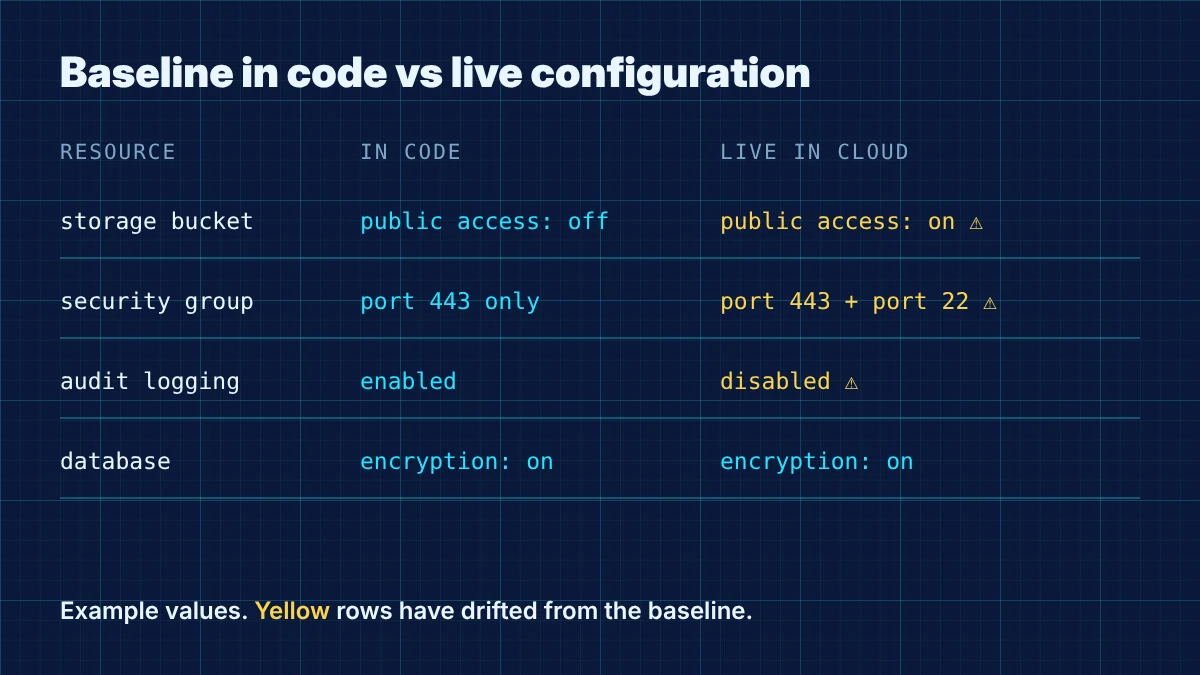
The AWS CloudFormation drift detection guide gives a precise definition: a resource has drifted if any of its actual property values differ from the expected values, including when the property or resource has been deleted. HashiCorp's resource drift tutorial describes the same idea from the Terraform side, where manual changes leave the state file out of sync with real infrastructure.
Two kinds of drift are worth separating:
- Managed drift: a resource your IaC defines was changed outside the pipeline.
- Unmanaged resources: something was created by hand and never defined in code at all. Tools that compare against a template can miss these entirely, so you need an inventory view too.
What causes configuration drift?
Drift almost always comes from people and processes, not from the cloud provider. In our experience, these are the usual sources in SMB and HealthTech environments:
- Incident hotfixes. An engineer opens a port or raises a limit in the console at 2 a.m. and the change never makes it back into code.
- Console experiments. Someone tests a setting in a shared account and forgets to roll it back.
- Multiple automation paths. Two pipelines or scripts manage overlapping resources and overwrite each other.
- Provider defaults and new features. A service adds a setting your template never declared, so nothing tracks it.
- Out-of-band tools. Admin tools, support staff or third-party integrations with write permissions change resources directly.
- Partial IaC adoption. Only some environments or resource types are in code, so the rest drift by default.
The CloudFormation documentation also points to a quieter cause: it only checks properties explicitly set in the template, not service defaults. If a setting matters to you, declare it explicitly, even when you are setting it to the default value.
Why does drift matter for SOC 2, ISO 27001 and HIPAA?
Drift matters because every major framework expects you to know your approved configuration and to control changes to it. An unreviewed console change is, by definition, a change that bypassed that control.
| Framework | Relevant requirement | What drift puts at risk |
|---|---|---|
| SOC 2 | CC7.1 in the Trust Services Criteria covers detecting changes to configurations that introduce new vulnerabilities | Evidence that you detect risky configuration changes |
| SOC 2 | CC8.1 covers authorising, testing, approving and implementing changes to infrastructure | Evidence that every production change was approved |
| ISO 27001:2022 | Annex A 8.9 Configuration management and 8.32 Change management in ISO/IEC 27001 | Documented, monitored and reviewed configurations |
| NIST | SP 800-128 on security-focused configuration management, which supports SP 800-53 | Baselines and controlled change |
| HIPAA | 45 CFR 164.308(a)(8) calls for evaluation in response to environmental or operational changes affecting ePHI security | Knowing when your ePHI environment changed |
For HealthTech teams, a drifted setting on a storage bucket or database that holds ePHI is also a security incident question, not only an audit question. Our cloud security controls guide covers the baseline settings most teams should pin down first.
How do you detect configuration drift?
Detect drift by combining a state comparison with a change history. One tells you what is different now, the other tells you who changed it and when.
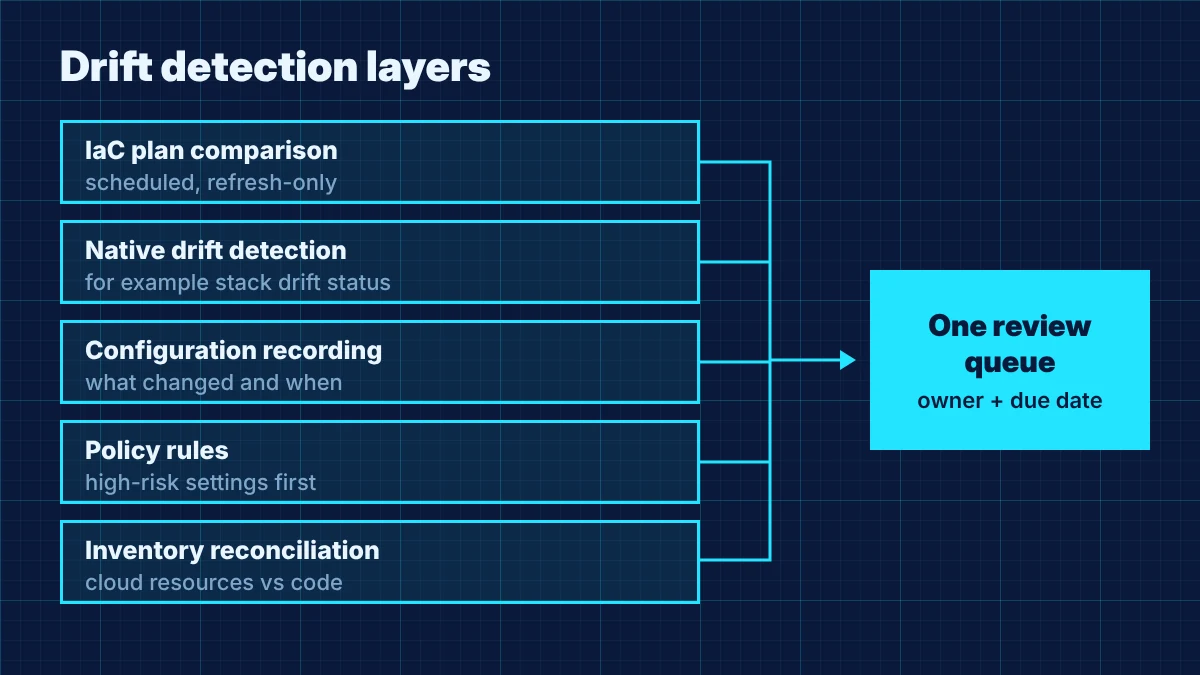
Use these layers together:
- IaC plan comparisons on a schedule. Running a Terraform plan with the
-refresh-onlyflag shows how state would change to match real infrastructure without modifying any resources, as HashiCorp's tutorial explains. Run it nightly in CI for each workspace, not only when someone ships a change. - Native drift detection. CloudFormation reports stack status as
DRIFTEDorIN_SYNCand resource status asMODIFIED,DELETEDorIN_SYNC. Note its documented limits: nested stacks need their own checks, and some resource types and properties are not checked. - Configuration recording. AWS Config generates configuration items when a resource's configuration changes and evaluates rules either on change or periodically. Other cloud providers offer their own configuration history and policy services, so check your provider's documentation. This layer catches unmanaged resources that IaC never knew about.
- Policy rules. Guardrails such as "storage must not be public" or "logging must be on" flag the drift that matters most, even when you cannot yet manage every resource in code.
- Inventory reconciliation. Compare the resources in your accounts with the resources in your code. Anything in the first list but not the second is either drift or a gap in your IaC coverage.
Route every finding into one queue with an owner and a due date. Five tools sending alerts to five channels is how drift gets normalised.
How do you remediate drift without breaking production?
Remediate each drift finding with one of three decisions, made by someone who understands why the change happened. Blindly re-applying code can undo an emergency fix and cause an outage.
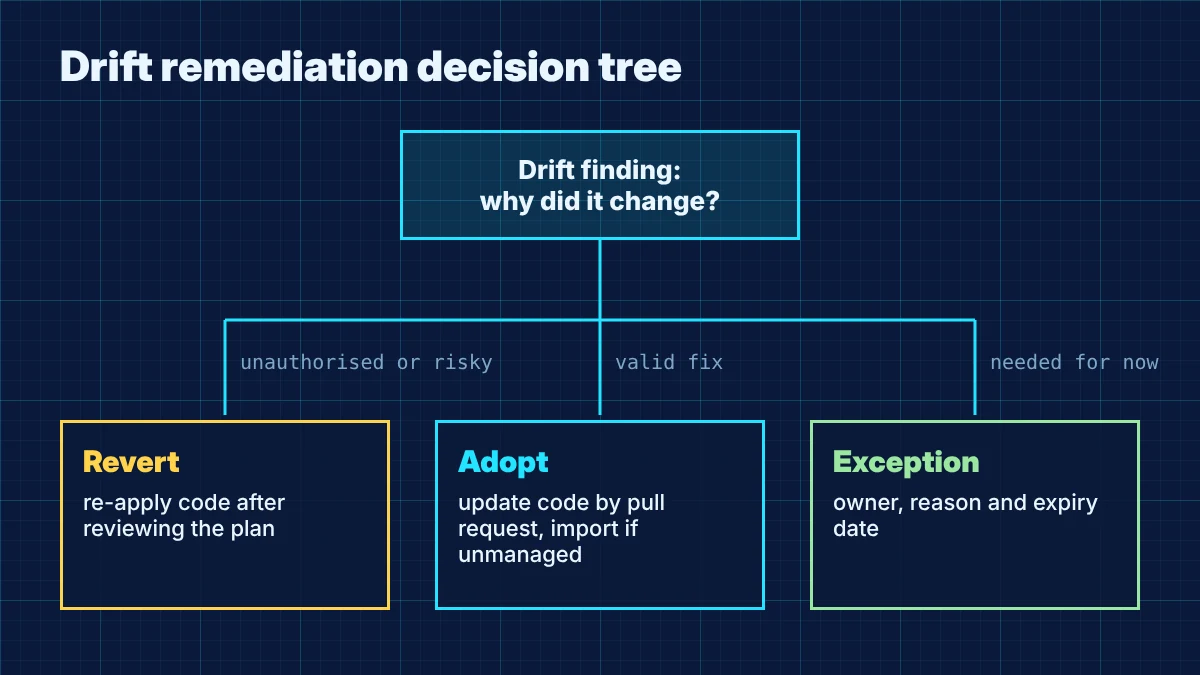
- Revert to the baseline. If the change was unauthorised, risky or unnecessary, re-apply the code. HashiCorp notes that a normal plan or apply without
-refresh-onlywill attempt to revert manual changes. Review the plan before applying so you know exactly what will change. - Adopt the change into code. If the live change was a valid fix, update the IaC through a normal pull request with review, then apply. For resources created by hand, import them into state so your tool manages them from now on.
- Accept it as an exception. If the change has to stay for a while and cannot go into code yet, record a time-limited exception with a business reason, an owner, compensating controls and an expiry date.
Two habits make this safer. First, triage by risk: public exposure, disabled logging, weakened encryption and broad IAM permissions go first. Second, link every remediation to a ticket, so the change itself goes through your change management policy rather than becoming another out-of-band fix.
How do you stop drift from coming back?
You prevent drift by making the pipeline the easiest path to change production and by limiting who can change it any other way.
- Restrict console write access. Give most engineers read-only production access and use time-bound elevation for emergencies, with the session logged.
- Create a break-glass process. Emergency changes are fine when they are recorded and followed by a pull request that brings code back in line within an agreed window.
- Declare security-relevant settings explicitly. Encryption, logging, public access and network rules should be set in code even when the default is already safe.
- Use one owner per resource. Avoid two pipelines or tools managing the same resource.
- Block risky changes before deployment. Policy checks in CI stop a pull request that would make storage public or turn off logging.
- Review drift trends monthly. If the same team or service keeps drifting, fix the workflow that pushes people to the console.
If you are running across several providers, our multi-cloud security guide covers how to keep baselines consistent between them.
What drift evidence do auditors ask for?
Auditors usually want proof that drift detection runs, that findings are triaged and that changes are approved. Clean dashboards on the day of the audit matter less than a consistent record over the period.
Keep these artefacts ready:
- The documented baseline, such as the IaC repository and the configuration standard it implements
- Drift detection run history showing frequency and coverage of accounts and environments
- A sample of drift findings with the decision taken, who approved it and the linked ticket or pull request
- The exception register with reasons, owners and expiry dates
- Access configuration showing who can change production outside the pipeline, and the break-glass log
- Periodic review notes, such as a monthly drift summary
How SecureSlate helps
SecureSlate helps you turn drift management into audit-ready evidence. Agentless read-only cloud integrations collect configuration evidence from your cloud accounts without write access, and multi-framework control mapping links your configuration and change management controls across SOC 2, ISO 27001, HIPAA and NIST CSF so one process satisfies several frameworks. Custom controls let you define your own drift review cadence and exception rules, risk management keeps accepted exceptions visible with owners, and code security and secrets detection help you catch problems in the infrastructure code itself. Audit management gives your auditor the run history, findings and approvals in one place.
FAQ
Is configuration drift the same as a misconfiguration?
No. A misconfiguration is a setting that creates risk. Drift is any difference from your approved baseline. Drift can introduce a misconfiguration, but it can also be a harmless or even valid change that simply has not been reviewed yet.
How often should we check for drift?
Check continuously or on every change where your tooling supports it, and run a full scheduled comparison at least daily for production. The right cadence depends on your change volume and the sensitivity of the data in each environment.
Should we always revert drift automatically?
Not by default. Automatic revert works well for a small set of high-risk settings with clear rules, such as public storage. For everything else, a person should decide between revert, adopt or exception, because reverting an emergency fix can cause an outage.
Does SOC 2 require infrastructure as code?
No. SOC 2 does not prescribe tools. It expects you to detect risky configuration changes and to authorise and approve changes to infrastructure. IaC simply makes that much easier to prove.
What is the difference between drift and policy drift?
Configuration drift is about technical settings on cloud resources. Policy drift usually describes written policies and procedures falling out of step with how a team actually works. Both need periodic review, but they are found and fixed in different ways.
Disclaimer (legal note)
This article is for general information only and is not legal, regulatory or professional advice. Requirements vary by framework, industry and jurisdiction. Consult qualified advisors for your specific obligations.
Need compliance without the complexity?
SecureSlate automates ISO 27001, SOC 2, GDPR, HIPAA, and more. Built for growing teams. See it in action.
Find compliance gaps in 30 seconds
