
Short answer: A safe compliance platform migration starts right after an audit closes, not in the middle of one. Export every policy, control, evidence record, risk, vendor and access review with its dates intact, run both platforms in parallel until integrations are proven, tell your auditor early, and only then switch off the old tool.
Related guides:
- Compliance automation platform: what to buy for SOC 2, ISO 27001 and continuous GRC
- SOC 2 Type 2
- Maintaining ISO 27001 certification: surveillance audits and continuous ISMS
Key takeaways
- Your compliance program belongs to you, not to the tool. A migration moves the records that prove your controls ran. It should not change the controls themselves.
- Timing is the biggest risk. The quietest moment is usually right after a SOC 2 report is issued or right after an ISO 27001 surveillance audit closes.
- Export history, not just current state. Auditors test what happened in the past, so evidence, review records and approvals need their original dates and owners.
- Run in parallel until every integration in the new platform has produced at least one clean evidence cycle.
- Tell your auditor before you start, and agree how evidence from the old platform will be handed over for the current period.
When should you switch compliance automation platforms?
Switch when the tool is blocking your program, not when a newer interface looks nicer. Migrating compliance software means re-mapping controls, re-connecting integrations and retraining owners, so it should solve a lasting problem.
In our experience, these are the signals that justify a move:
- New frameworks you cannot model. Customers now ask for HIPAA, ISO 42001 or a regional framework, and your platform cannot map one control to several frameworks or support custom ones.
- Manual evidence that should be automated. Your team still takes screenshots for cloud, identity or device controls because the integrations you need do not exist or keep breaking.
- Your stack has outgrown it. You changed cloud, identity or HR systems and the platform did not follow.
- Auditor friction. Your auditor struggles to get read access or finds exported evidence hard to follow.
If the problem is process, such as unowned controls or missed reviews, a new tool will not fix it. Fix the ownership first. If you are still deciding what a platform should do for you, our guide on GRC platforms vs compliance automation software can help you scope requirements before you shortlist.
When is the safest time to migrate around an audit?
The safest time is immediately after an audit milestone, which gives you the longest runway before the next one. Changing your GRC tool mid-audit is possible, but it means two systems hold evidence for the same period and your auditor has to trust both.
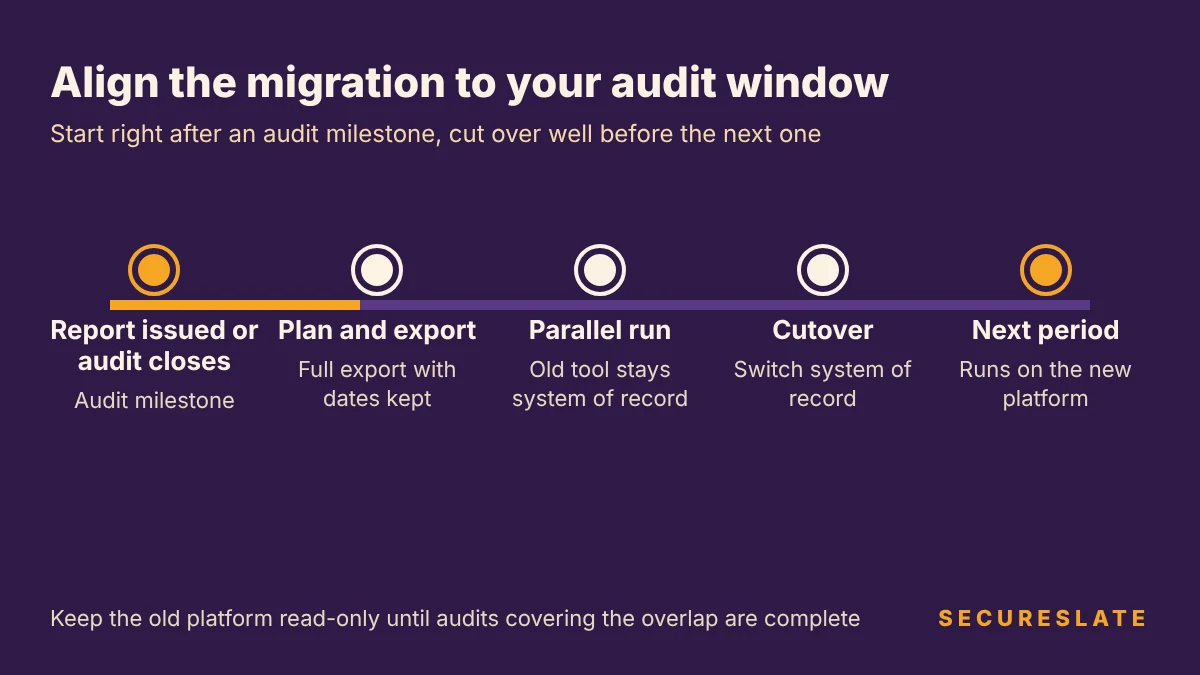
For SOC 2 Type 2. A Type 2 examination reports on the suitability of design and operating effectiveness of your controls (AICPA). Your auditor will sample evidence from across the period defined in your engagement, so every record from that period must stay retrievable, whichever tool holds it. The cleanest pattern is to plan and export once your report is issued, run both tools in parallel early in the next period, and cut over well before fieldwork begins.
For ISO 27001. Under ISO/IEC 17021-1, the standard accredited certification bodies follow, the certification cycle runs three years from the certification decision, surveillance audits take place at least once a calendar year except in recertification years, and the first surveillance audit must fall within 12 months of the initial certification decision (ISO/IEC 17021-1:2015 section 9, published by IAS). That means there is always an audit on the horizon. Start the migration right after a surveillance audit closes, so internal audits, management reviews and corrective actions for the next visit are recorded in the new platform from the start. Our guide to maintaining ISO 27001 certification covers what each visit checks.
If you must switch mid-period, freeze control definitions, keep the old platform readable until the audit is complete, and document which evidence lives where.
What should you export from your current platform?
Export everything an auditor or customer could ask about, with dates, owners and links between records preserved. Current state is easy to rebuild. History is not.
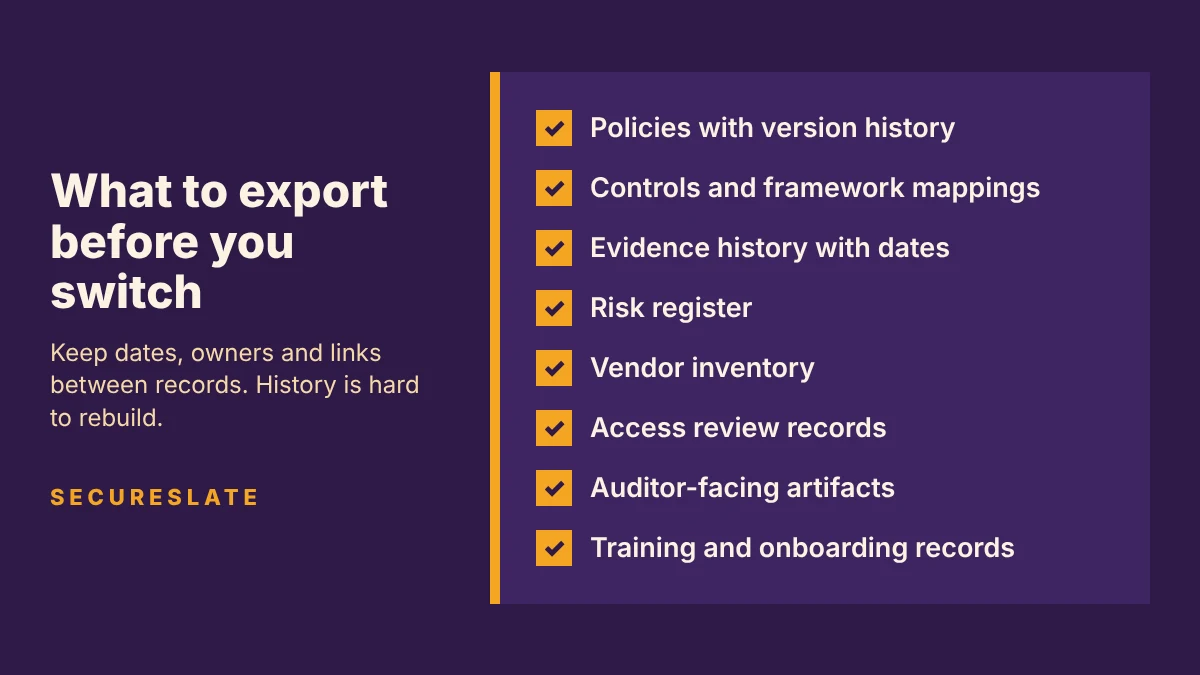
| Data set | What to capture | Why it matters |
|---|---|---|
| Policies | Every version, approval date, approver and employee acknowledgements | Auditors check that policies were approved and reviewed on schedule |
| Controls | Control text, owners, framework mappings, custom controls | Mappings are the slowest part to rebuild by hand |
| Evidence history | Files, screenshots, test results and the date each was collected | Type 2 and surveillance audits test operation over time |
| Risk register | Risks, scores, treatment decisions, owners and review dates | Shows risk management is ongoing, not a one-off |
| Vendor inventory | Vendors, risk tiers, reviews, contracts, security reports | Vendor reviews are recurring controls with their own history |
| Access review records | Each review, the reviewer, findings and remediation tickets | A common sampling target in both SOC 2 and ISO 27001 audits |
| Auditor-facing artifacts | Past reports, certificates, statement of applicability, audit requests and responses, open findings | Gives the next audit continuity with the last one |
| Training and onboarding | Completion records, background check confirmations | Often sampled per employee |
Practical tips:
- Ask for a full export early and check a sample. Some exports flatten evidence into one archive with no dates.
- Check your contract. Know when access ends and whether you can keep a read-only account after renewal lapses.
- Keep a cold archive of the raw export in your own restricted storage.
For more on how evidence should be organized once it lands, see our evidence collection guide.
Should you run both platforms in parallel?
Yes. Run both platforms in parallel until the new one has proven it collects the same evidence reliably. Parallel running is the main safeguard against a silent gap, where a control kept operating but nobody captured proof.
A workable approach:
- Make the old platform the system of record at the start of the parallel run. Nothing changes for control owners yet.
- Connect the new platform in read-only mode and let it collect evidence alongside the old one.
- Compare outputs control by control. For each automated test, confirm the new platform reports the same pass or fail state on the same resources.
- Switch the system of record once automated results match for at least one full evidence cycle of each integration, such as a monthly vulnerability scan, and you have confirmed that manual recurring tasks, such as a quarterly access review, can be run and recorded in the new platform.
- Keep the old platform read-only until any audit that covers the overlap period is complete.
During the overlap, complete each recurring task once, in the system of record. Double completion creates conflicting dates.
How do you cut over integrations without evidence gaps?
Cut over integrations one category at a time, verify each one produces evidence, then disconnect the old connection. Doing everything on a single day is how gaps appear.
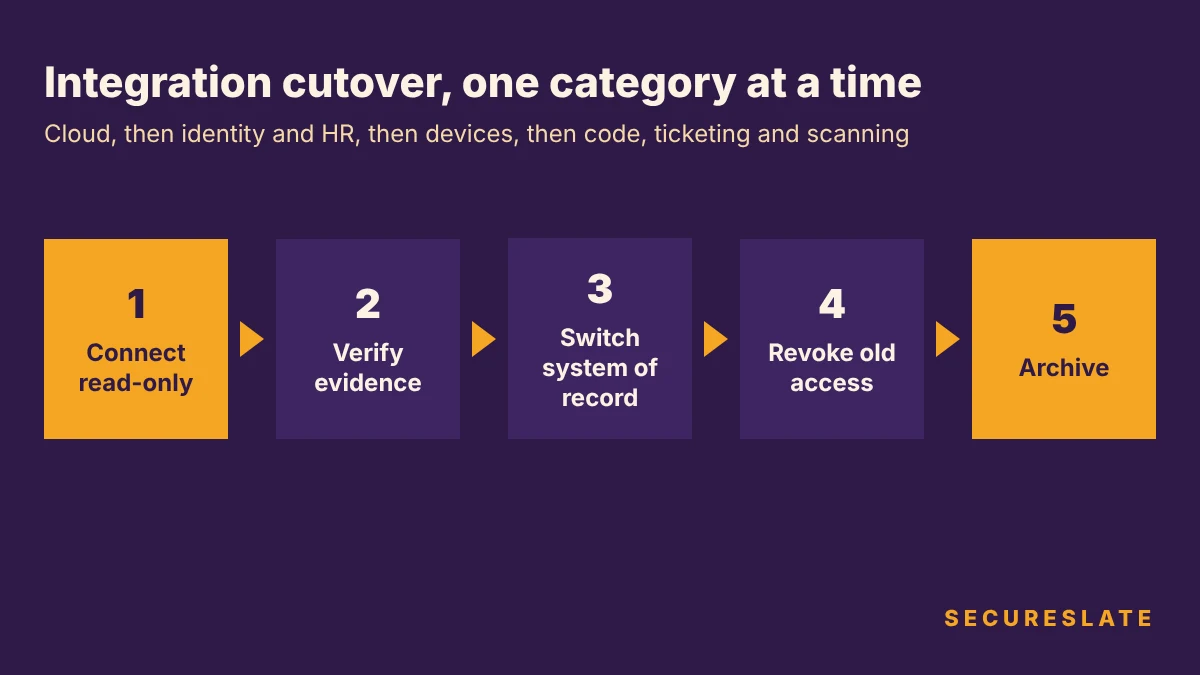
Suggested order:
- Cloud infrastructure first, since it backs the largest number of automated controls.
- Identity provider and HR system next, so onboarding, offboarding and access reviews have a reliable user list.
- Devices and endpoints, including any agent that reports disk encryption, screen lock and OS updates.
- Code repositories, ticketing and vulnerability scanning, which feed change management and vulnerability controls.
For each integration, grant least privilege, record the go-live date and confirm the first successful evidence pull. Then revoke the old connection's credentials and API tokens. A stale integration with read access to your cloud is a risk in its own right.
What should you tell your auditor?
Tell your auditor before you start, in writing, and agree how evidence will be provided for any period the old platform covers. Auditors do not mind a tool change. They mind surprises during fieldwork.
Cover these points:
- Why and when you are moving, and the planned cutover date.
- What stays the same: the control set, owners and frequencies. If you are also changing controls, say so separately.
- Where evidence for each part of the period lives, and how the auditor will access it, such as read-only access to the old platform or an indexed export.
- New access for the auditor in the new platform, if they use one.
Keep a short migration log of decisions, dates and owners. It doubles as change management evidence for the migration itself.
Step-by-step compliance platform migration checklist
Use this as a starting plan and adjust it to your audit dates.
Plan
- Confirm the reasons for switching and the requirements the new platform must meet
- Map upcoming audit dates and pick a window right after a milestone
- Review the current contract for export rights and end-of-access dates
- Name a migration owner and a backup
- Tell your auditor in writing and agree how evidence for the current period will be provided
Export
- Request a full export and check a sample for dates and metadata
- Export policies, controls, evidence, risks, vendors, access reviews, training records and auditor artifacts
- Store a cold archive with restricted access
Build
- Recreate the control library and framework mappings
- Import policies with version history and re-collect acknowledgements if needed
- Import the risk register and vendor inventory
Parallel run
- Connect integrations read-only, one category at a time
- Compare automated test results control by control
- Confirm manual recurring tasks can be run and recorded in the new platform
- Complete each recurring task once, in the system of record
Cutover
- Switch the system of record and notify control owners
- Revoke old integration credentials and API tokens
- Confirm the cutover date with your auditor and grant access to the new platform
Close out
- Keep the old platform read-only until audits covering the overlap are complete
- Record the migration in your change log
- Review the first full evidence cycle in the new platform
How SecureSlate helps
SecureSlate is built for SMBs and HealthTech teams. If you are switching platforms, it offers:
- Multi-framework control mapping with built-in SOC 2, ISO 27001, HIPAA, HITRUST, GDPR, PCI DSS, NIST CSF and ISO 42001, plus custom frameworks and controls for anything your old platform modeled differently.
- Agentless, read-only cloud integrations and a device agent, so you can run SecureSlate in parallel without changing your infrastructure.
- Access reviews, vendor risk management and risk management modules to rebuild your review history and registers.
- Audit management to share evidence with your auditor, plus a trust center and security questionnaire automation for customer requests.
- Code security and secrets detection for engineering controls.
FAQ
Can you change GRC tools in the middle of a SOC 2 Type 2 period?
Yes, but it adds work. Keep the old platform readable until the report is issued, document which evidence lives in each tool, and tell your auditor before you switch. Where you can choose, migrate right after a report is issued instead.
Does switching compliance platforms reset our ISO 27001 certification?
No. Your certificate is issued by your certification body for your ISMS, not for a software tool. What matters is that your ISMS records, such as internal audits, management reviews and corrective actions, stay complete and available for the next audit.
How long does a compliance platform migration take?
There is no fixed duration. It depends on how many frameworks, integrations and custom controls you have and how clean your export is. The parallel run sets the minimum: it should last at least as long as your slowest automated evidence cycle, so a monthly scan means at least a month.
Do we need to recollect old evidence in the new platform?
Usually not. Historical evidence can stay in a dated archive or a read-only account on the old platform, as long as your auditor can access it. New evidence should be collected in the new platform from the cutover date on.
Disclaimer (legal note)
This article is for general information only and is not legal, regulatory or professional advice. Requirements vary by framework, industry and jurisdiction. Consult qualified advisors for your specific obligations.
Need compliance without the complexity?
SecureSlate automates ISO 27001, SOC 2, GDPR, HIPAA, and more. Built for growing teams. See it in action.
Find compliance gaps in 30 seconds
