

Picture an agency Information System Security Officer on a Tuesday afternoon. Their program office wants to adopt your cloud service. Before anyone signs, they need your current security package, last month's vulnerability scan summary, and your open plan of action items. Under the old model, that meant finding the right portal, filing an access request, waiting for a package administrator, and then reading a PDF that may already be weeks out of date.
FedRAMP is replacing that experience. Under FedRAMP 20x and the Consolidated Rules for 2026, cloud service providers are expected to store and share their certification data through a FedRAMP-compatible trust center: a provider-owned system that keeps security information current, gives agencies self-service access, logs who saw what, and exposes the same data to machines through a documented API.
That is a bigger shift than it sounds. A trust center stops being a sales asset and becomes part of your FedRAMP obligations. FedRAMP can ask for its access inventory. Agencies can point their GRC tools at its API. And a stale or unreachable trust center becomes a compliance problem, not just an awkward sales moment.
This guide is written for security, compliance, and engineering leaders at cloud providers who sell, or plan to sell, to the federal government. It covers:
- What a FedRAMP-compatible trust center is, and how it differs from the model it replaces
- Every requirement, with what good looks like, common pitfalls, and the evidence FedRAMP may ask for
- A reference architecture and examples of machine-readable data and access logs
- An operating model, the mistakes that trip teams up, and a 90-day rollout plan
- How SecureSlate's Trust Center supports each requirement, and what to confirm for your offering
Related guides:
- FedRAMP 20x explained: goals, challenges, and readiness steps
- Continuous monitoring expectations after FedRAMP authorization
- Essential FedRAMP documentation map: SSP, SAP, SAR, POA&M
- FedRAMP levels and baselines: all you need to know
- What is a trust center?
- FedRAMP compliance with SecureSlate
Key takeaways
- FedRAMP now expects providers to store and share certification data (called authorization data in earlier documents) through a FedRAMP-compatible trust center that the provider owns and operates.
- The rules come from FedRAMP's Authorization Data Sharing standard for 20x and continue in the Certification Data Sharing rules within the Consolidated Rules for 2026.
- The MUST requirements: a visible, clearly labeled trust center; public offering information kept consistent across human and machine-readable formats; responsible sharing; documented programmatic access to all certification data; an inventory and history of agency users and systems; access logs with summaries kept for at least six months; and reporting denied agency requests to FedRAMP within five business days.
- The SHOULD requirements: view and download in both human and machine-readable formats, and self-service access management for agencies.
- The Consolidated Rules for 2026 took effect on July 4, 2026, with enforcement beginning after January 1, 2027. FedRAMP has described a transition for Rev5 providers to trust centers extending into 2027.
- A FedRAMP-compatible trust center is an operational system, not a web page. It needs owners, response targets for access requests, an update cadence tied to continuous monitoring, and monitoring of its own.
- SecureSlate's Trust Center provides gated sharing with approval workflows, recorded access decisions, NDA and MSA acceptance, live framework status, controls, subprocessors, and update notifications, fed by continuous monitoring mapped to FedRAMP 20x Key Security Indicators.
What is a FedRAMP-compatible trust center?
Three terms do most of the work in FedRAMP's rules. It helps to pin them down before getting into requirements.
| Term | Plain-language meaning |
|---|---|
| Trust center | The system a cloud service provider uses to store and share FedRAMP certification data with FedRAMP, agencies, and other necessary parties |
| Certification data | The information that supports a FedRAMP decision and ongoing reuse: package or 20x materials, Key Security Indicator results, continuous monitoring reports, plans of action, incident and significant change communications |
| FedRAMP-compatible | A trust center that meets FedRAMP's rules for publishing, protecting, providing programmatic access to, and logging access to certification data |
| Necessary parties | Everyone with a legitimate need for the data: FedRAMP, agencies evaluating or using the service, and others such as assessors acting on their behalf |
| Key Security Indicators (KSIs) | The measurable security outcomes FedRAMP 20x uses to assess a cloud service, in place of relying mainly on documented narratives |
Under the 20x Authorization Data Sharing standard, providers of 20x offerings are required to use a FedRAMP-compatible trust center. Rev5 providers have historically shared through the USDA Connect Community Portal, and FedRAMP has signaled that Rev5 providers are expected to move to FedRAMP-compatible trust centers as well.
The core idea: the provider owns the data and keeps it current, and agencies get direct, logged, self-service access to it. FedRAMP shifts from being the place data lives to being the party that sets the rules and checks they are followed.
The old model vs. the trust center model
The easiest way to understand what FedRAMP is asking for is to compare it with how package sharing has traditionally worked.
| Dimension | Traditional package sharing | FedRAMP-compatible trust center |
|---|---|---|
| Where data lives | Central repository or portal | Provider-operated trust center |
| Freshness | Point-in-time uploads | Kept current by the provider, ideally automated |
| Format | Mostly documents and spreadsheets | Human-readable and machine-readable, with API access |
| Access path | Request through a central gatekeeper | Self-service for agencies, with provider approval where needed |
| Who logs access | The central repository | The provider, with an inventory FedRAMP can review |
| Agency tooling | Manual download and review | Agency GRC tools can pull data programmatically |
| Accountability for availability | The central repository | The provider |
Two consequences follow. First, availability of your trust center is now your problem. If it is down when an agency needs it, that reflects on your offering. Second, the trust center becomes evidence. Its access inventory, logs, and decision records are things FedRAMP can ask to see.
Timeline and who it applies to
FedRAMP's rules are evolving, so treat the dates below as a planning guide and confirm current text on fedramp.gov.
| Milestone | What happened or is expected |
|---|---|
| 2025 | FedRAMP publishes the 20x Authorization Data Sharing standard and pilots trust centers with 20x participants |
| July 4, 2026 | The Consolidated Rules for 2026 take effect, carrying trust center rules into Certification Data Sharing |
| After January 1, 2027 | Enforcement of the Consolidated Rules begins |
| Through 2027 | FedRAMP has described a transition for Rev5 providers toward FedRAMP-compatible trust centers |
Who should act now:
- 20x participants and applicants. The trust center is already part of your path. Build it alongside your KSI evidence.
- Rev5 providers with existing authorizations. Plan the move before your transition deadline, and use the time to automate continuous monitoring data so the trust center does not become a second manual process.
- Providers planning a first FedRAMP effort. Design the trust center into your program from day one. Retrofitting access logging and APIs later is harder than building them in.
- Providers selling to state and local government. Programs such as GovRAMP often follow FedRAMP's lead. A FedRAMP-grade trust center also answers many state buyer questions.
Who uses your trust center, and what they need
A FedRAMP-compatible trust center serves several audiences at once. Designing for each one keeps you from building a page that satisfies one reviewer and frustrates the rest.
| Audience | What they are trying to do | What they need from you |
|---|---|---|
| FedRAMP | Confirm you meet the rules and monitor your offering over time | Access inventory, access logs, denied request reports, current certification data |
| Agency ISSO or security reviewer | Decide whether to accept the risk of using your service | Current package or 20x materials, KSI results, open plan of action items, scan summaries |
| Agency Authorizing Official | Sign an authority to operate or reuse decision | A clear summary of risk posture and status, without wading through raw data |
| Agency GRC tools | Pull data into the agency's own risk system automatically | Documented API, stable machine-readable formats, authentication for services |
| Assessors and advisors | Review evidence on behalf of an agency or the provider | Scoped, time-bound access to specific artifacts |
| Commercial buyers | Complete vendor due diligence | SOC 2 or ISO 27001 reports, policies, subprocessors, security FAQ |
Most providers serve commercial buyers and agencies from one trust center with tiered access, rather than running two. That keeps content consistent and avoids the "which version is current?" problem.
The requirements, one by one
FedRAMP's rule identifiers have shifted as drafts moved into the Consolidated Rules for 2026 (for example, FRR-ADS and FRR-ADS-TC in the 20x standard, and CDS and CDS-TRC in later material). The substance has stayed consistent. For each requirement below you will find what the rule asks, what good looks like, common pitfalls, and the evidence you should be able to produce.
1. Be visible and clearly labeled (MUST)
What the rule asks. The trust center must be easy to find from your main website, and must clearly state that it contains FedRAMP materials.
What good looks like.
- A link labeled "Trust Center" or "Security" in your main navigation or footer
- A FedRAMP section near the top of the trust center, with your offering name, certification status, and how agencies get access
- A stable URL, ideally on your own domain, that does not change when you switch tools
Common pitfalls. Burying the trust center behind a sales form, hosting it on an unbranded vendor URL that agencies cannot recognize, or listing FedRAMP only as a logo with no explanation of how to reach the data.
Evidence to keep. Screenshots of the navigation link and FedRAMP section, plus the URL history if it ever moves.
2. Publish public offering information (MUST)
What the rule asks. Publish current information about your offering in both human-readable and machine-readable form, and use automation to keep the two consistent. The information includes items such as the offering name and description, certification status, customer support details, and the availability status of the trust center itself.
What good looks like.
- A public page and a structured data file (for example, JSON) generated from the same source
- A visible "last updated" timestamp
- A link to a status page that covers the trust center
Common pitfalls. Maintaining the web page and the data file by hand, so they drift apart. Forgetting that the trust center's own availability is part of what you publish.
Evidence to keep. The generation process (for example, the pipeline or platform setting that produces both formats) and a history of published versions.
3. Share responsibly (MUST)
What the rule asks. Include enough detail for agencies to make informed risk decisions, while leaving out details that would help a threat actor.
What good looks like.
- Every artifact classified into an access tier before it is published
- Sensitive details such as internal hostnames, IP ranges, and exact unpatched software versions limited to approved agency users, or summarized
- A short internal standard explaining how you decide what goes in which tier
Common pitfalls. Treating "responsible" as "share as little as possible." Agencies still need enough to decide. Equally risky is publishing a full SSP publicly because it was the quickest way to meet a deadline.
Evidence to keep. Your classification standard and the access tier of each artifact.
4. Offer human and machine-readable formats (SHOULD)
What the rule asks. Let authorized parties both view and download certification data in human-readable and machine-readable formats.
What good looks like.
- Readable web views for people, with download options
- Structured files for tools, in the formats FedRAMP specifies for your path. FedRAMP's 2026 direction favors simplified JSON documents, with OSCAL still relevant in some cases, such as higher-impact Rev5 packages.
Common pitfalls. Treating a PDF as machine-readable, or exporting a spreadsheet once and calling it a feed.
Evidence to keep. Examples of each format and the process that keeps them current.
5. Provide documented programmatic access (MUST)
What the rule asks. Provide documented programmatic access to all certification data, including the human-readable materials.
What good looks like.
- Published API documentation that an agency engineer can follow without a call
- Authentication suitable for both people and services, such as API keys or tokens scoped per agency
- Endpoints for listing and retrieving every artifact, with stable identifiers and version information
- Programmatic access governed by the same tiers, approvals, and logging as the web interface
Common pitfalls. An API that covers the machine-readable files but not the human-readable documents. Undocumented endpoints that only your own front end uses. Service accounts that bypass access logging.
Evidence to keep. The API documentation, authentication model, and logs showing programmatic access is recorded like any other access.
6. Support self-service access management (SHOULD)
What the rule asks. Include features that let necessary parties provision and manage access for their own users and services directly.
What good looks like.
- Agencies request access without emailing your team
- Once an agency is approved, it can add reviewers or service accounts within the scope you approved
- Access can be revoked, and expires when it is no longer needed
Common pitfalls. Requiring a manual ticket for every new reviewer, which creates delays and pushes agencies to share credentials.
Evidence to keep. The request and provisioning workflow, and records of access changes.
7. Maintain an inventory and history of agency access (MUST)
What the rule asks. Keep an inventory and history of federal agency users or systems with access to certification data, and make it available to FedRAMP on request.
What good looks like.
- A current list of every agency user and service with access, their agency, what they can reach, and when access started
- A history that shows past access, including who approved it and when it ended
- An export you can hand to FedRAMP the same day it is requested
Common pitfalls. Access spread across email threads, shared folders, and a portal, with no single record. Deleting records when access ends, which destroys the history.
Evidence to keep. The inventory itself, plus exports provided to FedRAMP.
8. Log access and keep summaries (MUST)
What the rule asks. Log access to certification data and store summaries of access for at least six months, with party-specific detail available on request. FedRAMP's guidance notes that authenticated access should be logged with the user and time, while anonymous access can be logged with the source IP address and time.
What good looks like.
- Logs for views, downloads, and API calls, across every tier
- Summaries per artifact and per party, retained for at least six months
- Logs protected from tampering, and reviewed for unusual access patterns
Common pitfalls. Logging downloads but not views, or the web interface but not the API. Short default retention in a logging tool that silently drops data after 30 or 90 days.
Evidence to keep. The logs, the summaries, and the retention configuration.
9. Report denied agency requests (MUST)
What the rule asks. Under the Consolidated Rules for 2026, notify FedRAMP within five business days when you deny an agency's request for access to certification data.
What good looks like.
- Every decision recorded with who decided, when, and why
- A defined owner who reports denials to FedRAMP
- A reminder or workflow so the five-day window is never missed
Common pitfalls. Letting requests sit undecided indefinitely, which is a denial in practice. Rejecting a request informally by email with no record.
Evidence to keep. Decision records and copies of notifications sent to FedRAMP.
Requirements at a glance
| # | Requirement | Obligation | One-line test |
|---|---|---|---|
| 1 | Visible and labeled | MUST | Can an agency find it from your homepage in two clicks? |
| 2 | Public information, kept consistent | MUST | Do the web page and data file come from one source? |
| 3 | Responsible sharing | MUST | Is every artifact assigned to an access tier? |
| 4 | Human and machine-readable | SHOULD | Can a reviewer and a script both get the same data? |
| 5 | Programmatic access | MUST | Is there public API documentation covering all certification data? |
| 6 | Self-service access | SHOULD | Can an approved agency add its own reviewers? |
| 7 | Access inventory and history | MUST | Could you send FedRAMP a full access export today? |
| 8 | Access logging, six months | MUST | Do you have access summaries going back six months? |
| 9 | Denied request reporting | MUST | Is every denial reported within five business days? |
Reference architecture
A FedRAMP-compatible trust center has more moving parts than a commercial security page. Thinking about it in layers keeps the design clean.
| Layer | Purpose | Key capabilities |
|---|---|---|
| Source of truth | Where certification data is produced | GRC platform, control library, continuous monitoring, scan tools, POA&M tracking |
| Content and classification | Decides what is published and to whom | Artifact catalog, access tiers, versioning, review and approval before publishing |
| Access control | Decides who can see what | Identity for people and services, request and approval workflow, NDA acceptance, expiry and revocation |
| Delivery | Serves content to people and machines | Web views, downloads, documented API, machine-readable files |
| Accountability | Proves who saw what | Access logs, six-month summaries, agency inventory, decision records, denial reporting |
| Operations | Keeps it running | Availability monitoring, status page, update notifications, incident communication |
A three-tier access model
Most providers land on three tiers. The names vary, but the logic is consistent.
| Tier | Who can access | Typical content |
|---|---|---|
| Public | Anyone | Offering description, certification status, public offering data file, security overview, subprocessors, high-level controls, FAQ, trust center status |
| Registered | Verified agency users and services after a lightweight request | KSI summaries, continuous monitoring summaries, policies, customer responsibility guidance |
| Approved | Specific agency users after explicit approval, often with an NDA | Full package or 20x materials, detailed scan results, open plan of action items, incident reports |
Every tier is logged. Public access is logged by source IP and time, and authenticated access by user and time.
How an agency request flows
- An agency reviewer finds your trust center from your homepage and reads the public FedRAMP section.
- They request access to the specific artifacts they need, identifying their agency.
- Your team reviews the request, confirms the requester is legitimate, and the requester accepts your NDA if required.
- You approve, and the decision is recorded with who approved and when. If you deny, the denial is recorded and reported to FedRAMP within five business days.
- The reviewer views or downloads the artifacts. Their agency's GRC tool can pull the same data through the API.
- Every view, download, and API call is logged, and the agency appears in your access inventory.
- When new continuous monitoring data is published, subscribers are notified and the API returns the new version.
- Access expires or is revoked when the engagement ends, and the history is kept.
What machine-readable looks like in practice
FedRAMP specifies formats for each path, and you should follow the official schemas when publishing. The examples below are illustrative only and show the kind of structure that makes a trust center easy for agency tools to consume. They are not FedRAMP schemas and not a SecureSlate API.
Public offering information
{
  "offering": {
    "name": "Example Cloud Platform",
    "provider": "Example Corp",
    "description": "Multi-tenant SaaS for case management",
    "certification": {
      "program": "FedRAMP",
      "path": "20x",
      "status": "Certified",
      "lastUpdated": "2026-10-01"
    }
  },
  "trustCenter": {
    "url": "https://trust.example.com",
    "statusUrl": "https://status.example.com",
    "apiDocumentation": "https://trust.example.com/docs/api"
  },
  "support": {
    "email": "federal-support@example.com",
    "hours": "24x7"
  }
}
The same source should generate the public web page, so the two never disagree.
An access log summary record
{
  "period": "2026-09",
  "artifact": "continuous-monitoring-summary-2026-09",
  "accessTier": "registered",
  "party": {
    "type": "federal-agency",
    "agency": "Example Agency",
    "subject": "service:example-agency-grc"
  },
  "views": 4,
  "downloads": 2,
  "apiRequests": 31,
  "firstAccess": "2026-09-03T14:12:00Z",
  "lastAccess": "2026-09-28T09:40:00Z"
}
Keep records like this for at least six months, and keep the underlying events so you can provide party-specific detail when FedRAMP asks.
What a good API covers
- List all certification data the caller is entitled to, with identifiers, titles, versions, and dates
- Retrieve each artifact in every format you publish, including the human-readable documents
- Show history so agency tools can see what changed since their last pull
- Authenticate people and services separately, with scopes that match your access tiers
- Log every call in the same access record as web activity
Commercial trust center vs. FedRAMP-compatible
If you already run a trust center for commercial sales, you have a head start. Here is where the gaps usually are.
| Capability | Typical commercial trust center | FedRAMP-compatible trust center |
|---|---|---|
| Public security overview | Yes | Yes, with a clearly labeled FedRAMP section |
| Gated documents with NDA | Yes | Yes |
| Access approval workflow | Often | Required in practice, with decision records |
| Machine-readable public data | Rare | Required, kept consistent with the web page |
| Documented API for all data | Rare | Required |
| Agency user and service inventory | Rare | Required, with history |
| Access logs with six-month summaries | Varies | Required |
| Denied request reporting | Not applicable | Required within five business days |
| Availability published as data | Rare | Required |
| Update cadence | When marketing updates it | Tied to continuous monitoring |
The pattern is clear: commercial trust centers optimize for conversion, FedRAMP-compatible trust centers optimize for accountability. You need both, and the good news is that one well-designed platform can do both.
Running the trust center day to day
The rules describe what the trust center must do. Meeting them consistently is an operational question.
Ownership
| Activity | Responsible | Accountable | Consulted |
|---|---|---|---|
| Publishing certification data | Compliance or GRC lead | CISO | Engineering, legal |
| Classifying artifacts into tiers | Compliance lead | CISO | Security engineering, legal |
| Approving or denying access requests | Compliance lead or delegate | CISO | Federal sales |
| Reporting denials to FedRAMP | Compliance lead | CISO | Legal |
| API and availability | Platform engineering | Engineering leader | Compliance |
| Reviewing access logs | Security operations | CISO | Compliance |
| Updating public offering data | Compliance lead | CISO | Marketing, support |
Service levels to set
- Access request decision: set an internal target well inside the five-business-day denial reporting window, so no request is ever left hanging. Many teams aim for one to two business days.
- Continuous monitoring updates: publish on the same cadence as your continuous monitoring reporting, so the trust center is never behind your reports.
- Trust center availability: monitor it like a production service, and publish its status.
- Incident communication: decide in advance how incident and significant change notices reach agencies through the trust center.
Monthly routine
- Publish the latest continuous monitoring data and plan of action updates.
- Confirm the public web page and data file match.
- Review the access inventory and remove access that is no longer needed.
- Review access logs for unusual patterns, such as bulk downloads or access from unexpected parties.
- Confirm every access request from the month has a recorded decision, and every denial was reported.
- Check that log summaries older than six months are still retained.
Ten mistakes to avoid
- Treating the trust center as a marketing project. It is now part of your compliance obligations. Give it a compliance owner.
- Maintaining two sources of truth. If the trust center content is copied by hand from your GRC system, it will drift. Generate it from the source.
- Leaving requests undecided. An unanswered request is a denial in practice, and denials must be reported.
- Logging the website but not the API. Programmatic access must be logged like everything else.
- Relying on default log retention. Many tools keep logs for 30 or 90 days. FedRAMP expects summaries for at least six months.
- Publishing too much publicly. A full SSP or detailed scan results in the public tier is a gift to attackers.
- Publishing too little. Agencies still need enough detail to decide. Overly thin content just produces more access requests.
- Forgetting service accounts. Agency GRC tools need their own identities, not shared human credentials.
- Ignoring the trust center's own availability. It is part of your public information, and agencies notice when it is down.
- Deleting history. When access ends, keep the record. FedRAMP asks for history, not just the current list.
How SecureSlate meets these requirements
SecureSlate's Trust Center is built into the same platform you use to run your FedRAMP program. The content it shares comes from your live controls, policies, and evidence, rather than from a separate spreadsheet that someone has to remember to update. Here is how it maps to each part of the architecture above.
Source of truth: continuous monitoring mapped to FedRAMP 20x
A trust center is only as good as the data behind it. SecureSlate keeps that data current:
- Cloud findings mapped to FedRAMP 20x Key Security Indicators, alongside SOC 2, ISO 27001, and other frameworks, so KSI evidence comes from live checks rather than screenshots.
- Automated control tests and evidence collection across 200+ integrations, giving you current continuous monitoring material to publish.
- Policies, risk registers, vendor risk, and audit workflows in one platform, so your package, plan of action items, and trust center tell the same story.
- One control library mapped across frameworks, so FedRAMP work also strengthens your SOC 2, ISO 27001, and CMMC posture.
Visibility: a branded home for FedRAMP materials
- Hosted trust center on your own domain. Publish on a SecureSlate-hosted page, or connect a custom domain such as
trust.yourcompany.com, verified through DNS, so the trust center lives where agencies expect it. - Framework status at a glance. Show FedRAMP alongside SOC 2, ISO 27001, CMMC, and others, each marked Compliant or Ongoing.
- Header, description, and links that state plainly that the trust center contains FedRAMP materials, and link to your main site, privacy policy, and support contacts.
Public information: current by default
- Public documents and policies, published with one setting per item.
- Security controls drawn from your SecureSlate control library and grouped by category, so the public view reflects how you actually operate.
- Subprocessors with hosting regions, which matters to agencies asking where federal data is processed.
- FAQ, with AI-assisted drafting from your existing program data, so answers stay consistent with your policies.
- Trust updates with confirmed subscribers. Post security and continuous monitoring updates and notify subscribers by email. Public sign-ups confirm their address first, so updates only reach people who asked for them.
Responsible sharing: tiers you control per item
- Public or Restricted, per policy and document. For restricted items, file links stay on the server until access is approved, so a copied link cannot expose your package.
- NDA and MSA acceptance before restricted access is granted.
- Role-based access for your own team, controlling who can publish content and who can approve requests.
Access control: a request workflow with a paper trail
- Request access per resource. Agency reviewers request the specific documents they need, without emailing your team.
- Every request is recorded with the requester's name, email, organization, and the resources requested.
- Clear statuses: each request is Needs Decision, Approved, or Rejected, so nothing gets lost in an inbox.
- CRM visibility. With the Salesforce integration, access requests and approvals sit next to the opportunity, so federal sales and security share one view.
Accountability: records you can show FedRAMP
- Recorded decisions. Every approval or rejection stores who made the decision and when. That gives you a history of which agency users were granted which documents.
- Denials ready to report. Rejected requests are recorded with the decision maker and date, so you can report them to FedRAMP inside the five-business-day window.
- A request queue you can work daily. Requests that still need a decision are visible in one place, which helps you hit your internal response target.
The FedRAMP module: Certification Data Sharing in your Trust Center
The SecureSlate Trust Center includes a dedicated FedRAMP tab that turns it into a FedRAMP-compatible trust center under the FedRAMP Consolidated Rules for 2026. Turn it on, and SecureSlate tells you exactly what stands between you and a publishable package.
Publishing is gated on FedRAMP's rules. The top of the tab shows how many MUST rules are failing and how many warnings remain. Publish stays disabled until every MUST rule passes, and you confirm that nothing sensitive, such as credentials or employees' personal information, will be shared.
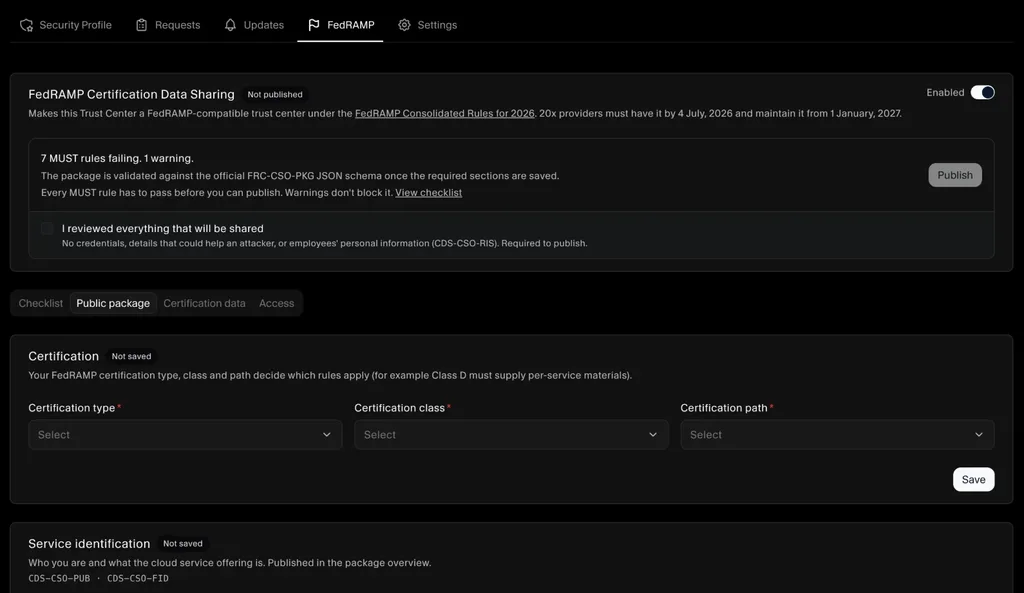
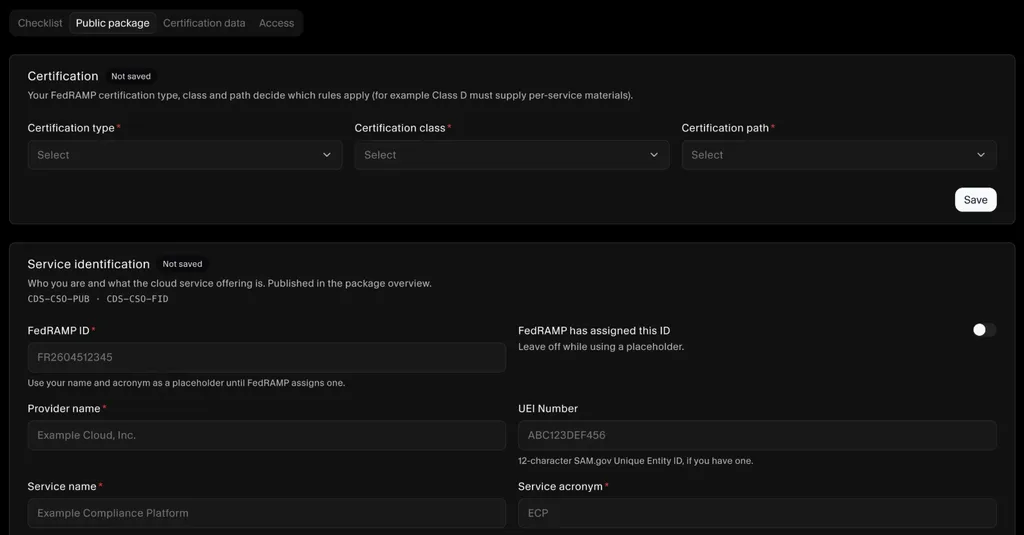
The public package is a guided form. Certification type, class and path, service identification, service properties, contacts and certified services each have their own section, labeled with the FedRAMP rule it satisfies (for example CDS-CSO-PUB and CDS-CSO-FID). SecureSlate builds the human-readable page and the machine-readable JSON from the same data, so the two never drift apart.
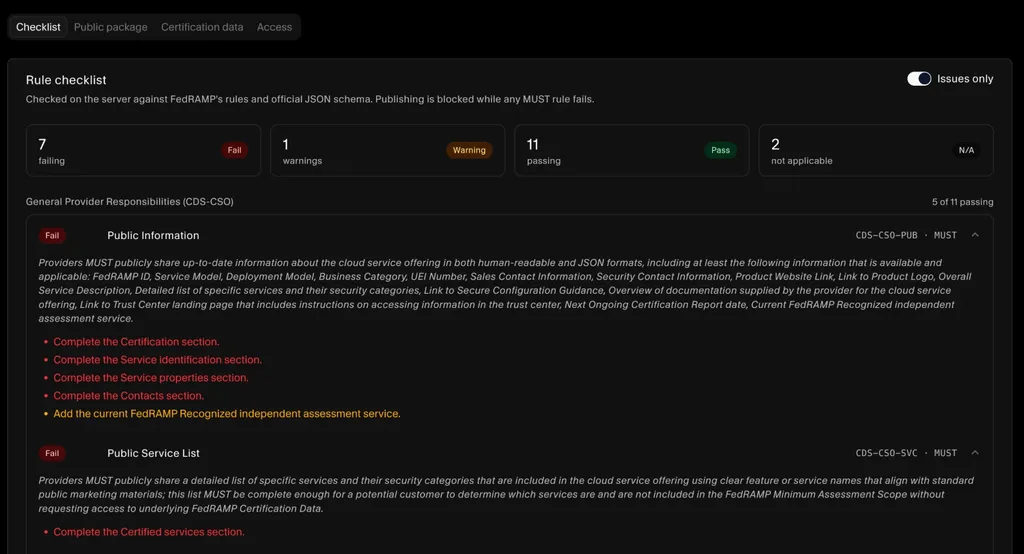
Every rule is checked on the server. The rule checklist validates your setup against FedRAMP's rules and the official FRC-CSO-PKG JSON schema. Each failing rule quotes the requirement and lists what to fix, so your team works from a to-do list instead of a spreadsheet of rule IDs.
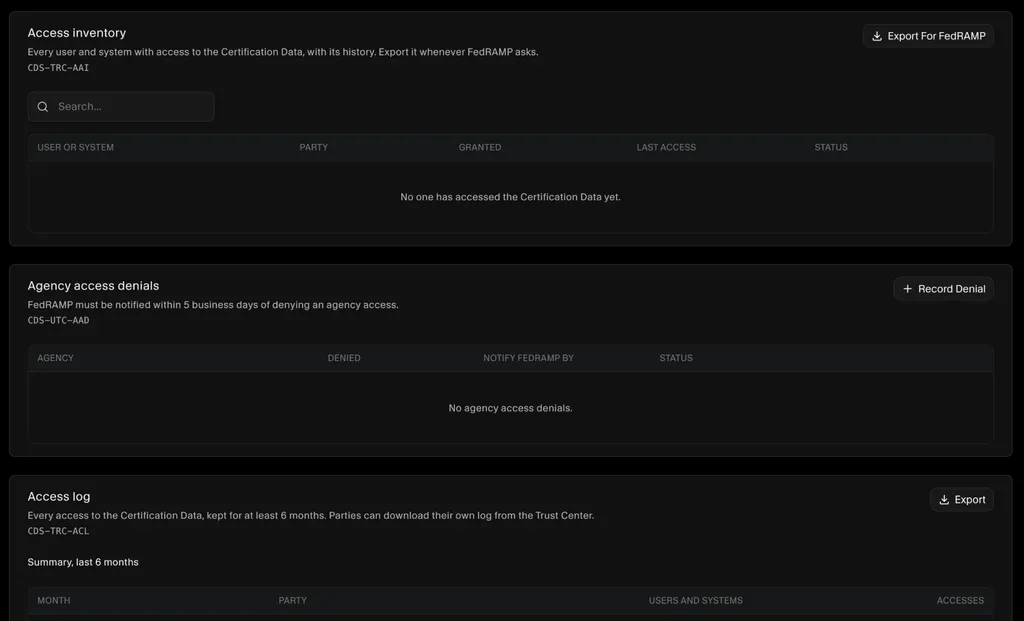
Access records are ready for FedRAMP. The Access tab keeps an access inventory of every user and system with access to your Certification Data, a register of agency access denials with the date FedRAMP must be notified by, and an access log with six months of monthly summaries. Each one exports in a click.
For setup steps, see the FedRAMP Certification Data Sharing guide.
Walkthrough: an agency request in SecureSlate
- The agency reviewer opens
trust.yourcompany.com, sees FedRAMP marked with its status, and reads your public overview, controls, and subprocessors. - They click Request Access, choose the restricted documents they need, enter their details, and accept your NDA.
- The request appears in SecureSlate as Needs Decision, and in Salesforce next to the opportunity.
- Your compliance lead reviews it and approves. SecureSlate records who approved and when.
- The reviewer receives access to the approved documents. Restricted file links were never exposed before this point.
- Next month, you publish a new continuous monitoring update. Subscribers are notified by email.
What to confirm for your offering
FedRAMP's trust center rules are new, and several of them go beyond what commercial trust centers were built for: documented API access to all certification data, machine-readable data kept consistent with the web page, self-service management of agency users and services, and access logs with six months of retained summaries. When you evaluate any trust center, SecureSlate included, ask for a walkthrough of exactly how each of these is handled for your path, impact level, and certification class. Our team will map your FedRAMP path against these rules during onboarding and show you where the SecureSlate Trust Center covers each one today.
Mapping summary
| FedRAMP requirement | How SecureSlate supports it |
|---|---|
| 1. Visible and labeled | Hosted trust center, custom domain with DNS verification, FedRAMP framework badge with status, header links |
| 2. Public information | Public documents, controls from your control library, subprocessors with hosting regions, FAQ, trust updates |
| 3. Responsible sharing | Public or Restricted per item, server-side protection of restricted file links, NDA and MSA acceptance |
| 4. Human and machine-readable | Human-readable views and downloads; review machine-readable formats for your path with our team |
| 5. Programmatic access | Review with our team during onboarding |
| 6. Self-service access | Agency reviewers request the resources they need through a request access workflow |
| 7. Access inventory and history | Every request stores requester, organization, documents, status, decision maker, and date |
| 8. Access logging, six months | Review logging and retention for your offering with our team |
| 9. Denied request reporting | Rejected requests are recorded with decision maker and date, ready to report |
| Fresh certification data | Continuous monitoring with cloud findings mapped to FedRAMP 20x KSIs |
A 90-day rollout plan
You do not need to do everything at once. This plan gets a FedRAMP-ready trust center live in a quarter.
Days 1 to 30: foundation
- Inventory your certification data: package or 20x materials, KSI results, scan reports, plan of action items, incident and change notices.
- Write a one-page classification standard and assign every artifact to a tier.
- Choose your trust center platform and domain, and add the trust center to your main website.
- Assign owners for publishing, access decisions, denial reporting, and availability.
- Connect your cloud and identity integrations so continuous monitoring data flows automatically.
Days 31 to 60: access and accountability
- Publish public content: offering overview, FedRAMP status, controls, subprocessors, FAQ.
- Upload restricted artifacts and require NDA acceptance where needed.
- Turn on the access request workflow and set an internal decision target.
- Confirm how access is logged and retained, and how you will export the agency inventory for FedRAMP.
- Write the procedure for reporting denials within five business days.
Days 61 to 90: automation and rehearsal
- Confirm your machine-readable and API approach for your path, and publish API documentation.
- Connect monthly continuous monitoring publishing to the trust center, with subscriber notifications.
- Run a tabletop: a mock agency requests access, you approve one request and deny another, and you produce the inventory, logs, and denial report.
- Add the trust center to your availability monitoring and status page.
- Start the monthly routine from the operating model above.
Questions to ask any trust center vendor
Use these in any evaluation, including ours.
- How do you support FedRAMP's requirement for documented programmatic access to all certification data, including human-readable documents?
- Which machine-readable formats do you support, and how do you keep them consistent with the web view?
- Can agencies provision and manage their own users and service accounts after approval?
- How is access logged for views, downloads, and API calls? Is anonymous public access logged by IP and time?
- How long are access logs and summaries retained, and can retention be set to at least six months?
- Can I export a full inventory and history of agency users and systems with access?
- How are access decisions recorded, and how do you help me report denials within five business days?
- Are restricted file links protected from being shared or reused outside approved access?
- Can I host the trust center on my own domain?
- How is the trust center itself monitored for availability, and is its status published?
- Does content come from my GRC data automatically, or do I maintain it separately?
- Can I serve commercial buyers and agencies from one trust center with different access tiers?
- Which integrations feed continuous monitoring data into the trust center?
- Is the trust center platform itself covered by your own security certifications?
- What does your roadmap look like for FedRAMP trust center rules as they evolve?
Metrics that show it is working
Track a handful of measures so you know the trust center is doing its job, and can show it.
| Metric | Why it matters |
|---|---|
| Median time to decide an access request | Shows agencies are not waiting, and keeps you clear of the denial reporting window |
| Requests older than your target | Early warning before a request becomes a reporting issue |
| Days since last certification data update | Shows the trust center is keeping pace with continuous monitoring |
| Web page and data file mismatches | Should be zero if both come from one source |
| Agency users and services with active access | Tracks reuse of your certification across agencies |
| Stale access (no use in 90 days) | Candidates for revocation, keeping the inventory tight |
| Trust center availability | Part of your public information, and a signal of reliability |
| Sales cycles shortened by self-service access | Connects the trust center to revenue |
FAQ
Is a FedRAMP-compatible trust center required?
For FedRAMP 20x offerings, yes. The Authorization Data Sharing standard requires providers to use a FedRAMP-compatible trust center. Rev5 providers have historically used the USDA Connect Community Portal, and FedRAMP has signaled a transition to trust centers for them too. Check the current rules on fedramp.gov for your certification class.
Is a commercial trust center the same as a FedRAMP-compatible one?
Not automatically. A commercial trust center typically focuses on sharing SOC 2 reports and policies with buyers. A FedRAMP-compatible trust center adds documented programmatic access, machine-readable data, an inventory of agency users and systems, access logging with retention, and reporting of denied agency requests.
What counts as certification data?
The information that supports your FedRAMP certification and ongoing monitoring: your security package or 20x materials, Key Security Indicator results, vulnerability and continuous monitoring reports, plans of action, and incident and significant change communications.
How long must trust center access logs be kept?
FedRAMP's rules require trust centers to store summaries of access for at least six months, with party-specific detail available on request.
Do I have to log access to public content?
Yes. FedRAMP's guidance says anonymous access can be logged with the source IP address and time of access, while authenticated access should be logged with the user and time.
What happens if I deny an agency's access request?
Under the Consolidated Rules for 2026, you must notify FedRAMP within five business days of denying an agency's request for certification data. Record every decision so the report is easy to produce.
Can I put my full SSP on the public tier to keep things simple?
You should not. FedRAMP asks providers to share enough for agencies to decide, without exposing details that would help a threat actor. Detailed package content belongs in a restricted or approved tier.
Is OSCAL required?
It depends on your path. FedRAMP's 2026 direction favors simplified JSON documents, with OSCAL still relevant in some cases, such as higher-impact Rev5 packages. Follow the formats FedRAMP specifies for your certification class.
Can I use one trust center for FedRAMP and commercial customers?
Yes. Many providers run a single trust center with tiered access, so commercial buyers and agency reviewers each see what they are entitled to, and content stays consistent.
Does SecureSlate support FedRAMP 20x?
Yes. SecureSlate supports FedRAMP readiness and continuous monitoring, including cloud findings mapped to FedRAMP 20x Key Security Indicators. See FedRAMP compliance with SecureSlate.
How long does it take to launch a FedRAMP-ready trust center?
With your certification data inventoried and a platform in place, most teams can follow a plan like the 90-day rollout above. The hardest parts are usually classification decisions and automating continuous monitoring data, not the page itself.
Disclaimer (legal note)
SecureSlate is not a law firm, a FedRAMP Third Party Assessment Organization, or a government agency, and this article does not constitute legal advice. FedRAMP requirements, rule identifiers, formats, and timelines change. JSON examples in this article are illustrative and are not FedRAMP schemas or a SecureSlate API. Confirm the current Certification Data Sharing rules at fedramp.gov and with your assessor before relying on this summary.
Need compliance without the complexity?
SecureSlate automates ISO 27001, SOC 2, GDPR, HIPAA, and more. Built for growing teams. See it in action.
Find compliance gaps in 30 seconds
