
Related breach analyses:
- Todoist breach 2026: a stolen developer credential reaches production
- GitHub security breach 2026: the malicious VS Code extension
- Identity incident response playbook for ITDR
The 60-second version
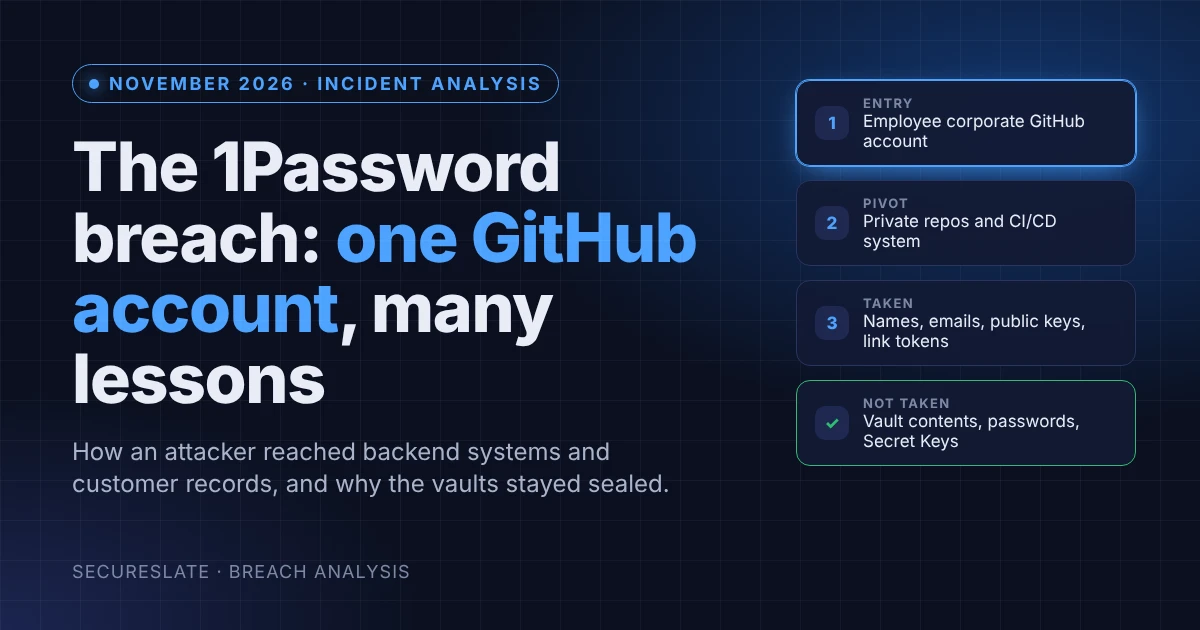
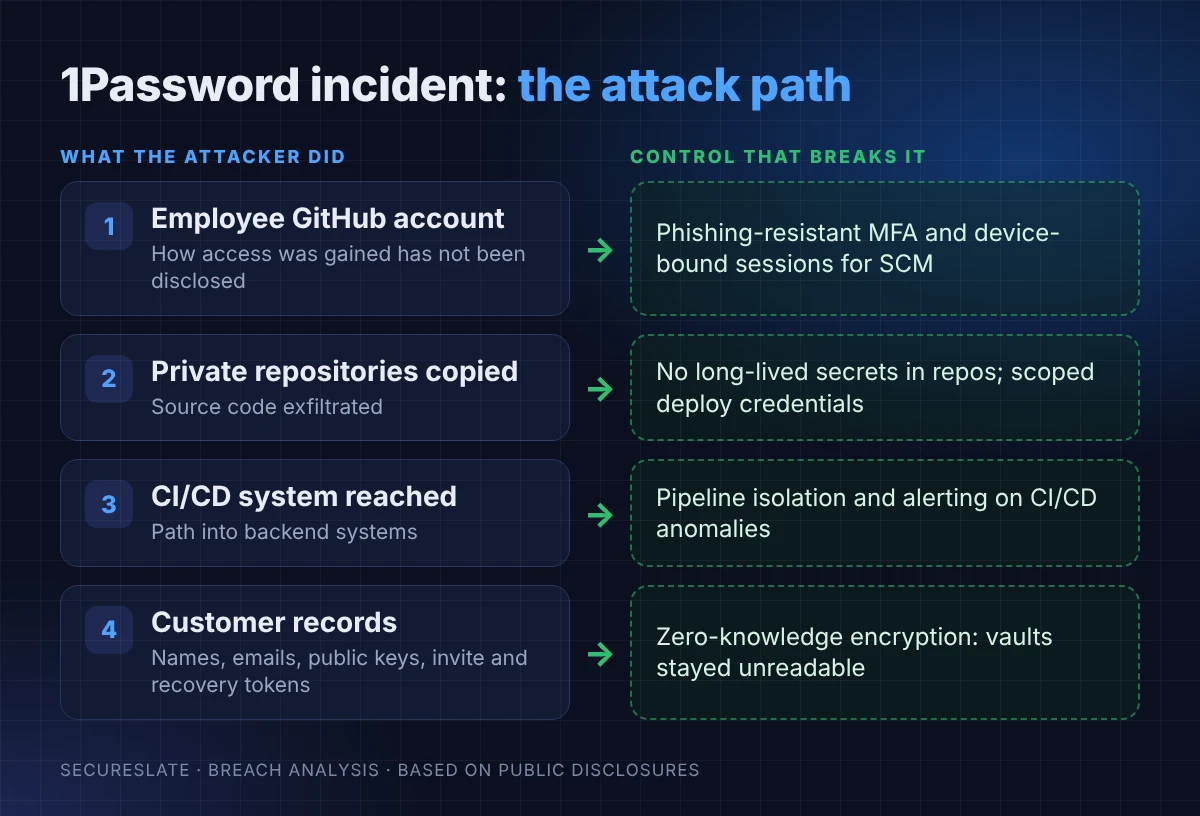
- What happened: An attacker took over a 1Password employee's corporate GitHub account, copied source code from private repositories, reached the company's CI/CD system and, from there, pulled customer records out of backend systems. 1Password began investigating on November 19, 2026 and disclosed the incident on November 25.
- What was taken: Customer names, sign-in email addresses, account IDs, public keys, account creation and last-login times, and some invitation, provisioning and account recovery tokens.
- What was not taken: Vault contents, account passwords and Secret Keys. 1Password says customer vault contents were never accessed by, or available to, the attacker.
- What you should do: 1Password says customers do not need to change their credentials. Expect convincing phishing that uses your real name and email, and remember 1Password will never ask for your account password or Secret Key.
| At a glance | |
|---|---|
| Disclosed | November 25, 2026 |
| Investigation started | November 19, 2026 |
| Entry point | An employee's corporate GitHub account |
| Systems reached | Private source code repositories, CI/CD system, backend systems |
| Customer vaults | Not accessed |
| Number affected | Not disclosed |
| How the account was compromised | Not disclosed |
Why this one matters
1Password sells one thing above all: trust that your secrets stay secret. So when a password manager says "we were breached," most people hear "my passwords are gone." In this case, that is not what happened, and the reason why is the most useful lesson in the whole incident.
The attacker got deep. They had a developer identity, private source code and a foothold in the build pipeline, which is close to the worst-case access an attacker can get inside a software company. And yet the most valuable data, the vaults, stayed sealed. That is architecture doing its job when every other control has already been bypassed.
For every other SaaS company, this incident is a free, detailed rehearsal. It shows exactly how a modern attack moves from one developer account to customer data, and which design decisions decide how bad the day becomes.
Timeline: how the breach unfolded
| Date (2026) | Event |
|---|---|
| Before Nov 19 | An attacker gains access to an employee's corporate GitHub account. How is not yet public. |
| Before Nov 19 | Source code is copied from private repositories and the attacker reaches the CI/CD system. |
| Before Nov 19 | Customer records are taken from backend systems. |
| Nov 19 | 1Password begins investigating indications of the GitHub account compromise. |
| Nov 19 to 25 | The compromised account is disabled, the stolen token is revoked, and verification codes are strengthened. |
| Nov 25 | 1Password publicly discloses the incident. Affected users are contacted directly. |
Exact attacker dates have not been published. The order above reflects the sequence described in 1Password's disclosure and press coverage.
What was accessed, and what was not
Clarity here matters more than anything, because it decides what customers actually need to do.
| Data or system | Status | Why it matters |
|---|---|---|
| Customer names, sign-in emails and account IDs | ❌ Exposed | Fuel for highly targeted phishing |
| Public keys | ❌ Exposed | Public by design, low direct risk |
| Account creation and last-login times | ❌ Exposed | Helps attackers time and tailor lures |
| Invitation, provisioning and recovery tokens | ❌ Exposed | Could have aided account takeover attempts, hence the code change |
| Source code from private repositories | ❌ Copied | Lets attackers study the product for weaknesses |
| CI/CD system | ❌ Reached | The path from code to production |
| Vault contents | ✅ Not accessed | Encrypted with keys 1Password never holds |
| Account passwords | ✅ Not accessed | 1Password does not have them |
| Secret Keys | ✅ Not accessed | Generated and kept on customer devices |
1Password says it found no internal evidence of customer account takeovers.
How 1Password responded
The public response included:
- Containment: The compromised employee account was disabled and the stolen token revoked.
- Hardening the exposed link tokens: Invitation and recovery verification codes moved from 6 numeric digits to 10 alphanumeric characters, a precaution against brute-force attempts using the stolen link tokens. That moves the search space from one million combinations to more than 3.6 quadrillion (36 to the power of 10, even before counting letter case).
- Direct outreach: The affected users were contacted directly.
- Stronger internal controls: Tightened controls for GitHub, CI/CD and endpoints, plus new detection mechanisms.
- Independent validation: Outside cybersecurity experts were engaged to validate the remediation.
Two questions remain open at the time of writing: how many customers were affected, and how the attacker got into the employee's GitHub account in the first place.
Why the vaults survived: zero-knowledge in practice
1Password encrypts vault data on the customer's device using a key derived from two things: the account password and a 128-bit Secret Key. Neither ever reaches 1Password's servers. The company stores only encrypted blobs it cannot read.
That means an attacker who owns 1Password's backend still holds nothing but ciphertext. Compare that with an architecture where the vendor holds the decryption keys server-side: the same GitHub-to-CI/CD path would have ended in plaintext.
The design lesson for everyone else: ask of every sensitive data store, "If an attacker fully owned this system, what could they read?" If the answer is "everything," encryption at rest is not protecting you from the threats that matter. Look at per-tenant keys, client-side encryption for the most sensitive fields, and keys held in a separate trust domain such as a KMS or HSM with its own access policy.
7 lessons for every SaaS team
1. Your source control platform is a production system
A GitHub account is not "just code." With CI/CD wired to it, it is a door to production. Treat SCM identities with the same rigor as cloud admin accounts:
- Enforce phishing-resistant MFA (passkeys or security keys) through SSO, not per-user TOTP
- Require SSO for the GitHub organization, so offboarding and session revocation happen centrally
- Restrict personal access tokens: require fine-grained tokens with short expirations, and approve them centrally
- Review the GitHub audit log for new tokens, SSH keys, OAuth app grants and unusual clone volumes
2. Assume your private code will leak
Private repositories get cloned. Build as if every line will one day be public:
- No secrets in code or commit history. Scan every push and the full history with a secrets scanner
- No security through obscurity. If a control only works because attackers cannot see how it works, it is not a control
- Keep internal endpoint names, customer identifiers and test data out of repositories
3. Isolate the CI/CD pipeline
The pipeline was the bridge between "has code" and "has customer data." Break that bridge:
- Use OIDC federation and short-lived credentials for deployments instead of long-lived cloud keys stored as CI secrets
- Scope credentials per job and per environment, so a test job cannot touch production data
- Protect production deploys with required reviews and environment protection rules
- Alert on pipeline changes: new workflows, modified runners, new secrets, unexpected manual runs
4. Design for the breach, not just against it
1Password's zero-knowledge design turned a potential catastrophe into a serious but bounded incident. The cheapest time to make that call is at design time. Classify your data and decide which fields should be unreadable even to your own backend.
5. Treat recovery and invitation flows as high-value targets
Account recovery is a password reset with extra steps, which makes it an account takeover path. Recovery and invite tokens should be short-lived, single-use, bound to a device or session where possible, and rate-limited. 1Password's move to 10-character alphanumeric codes is a good benchmark.
6. Prepare for the phishing wave that follows
When names and emails leak, the follow-on attack is phishing that looks real. Pre-write customer guidance that clearly says what you will never ask for, publish your official sender addresses, and brief your support team before disclosure.
7. Disclose fast and precisely
Six days from investigation to public disclosure, with a clear "what was and was not accessed" breakdown, is a strong model. Customers can tolerate an incident. What they do not forgive is vagueness or a slow drip of bad news.
Map the lessons to your compliance controls
If you are working toward SOC 2 or ISO 27001, each lesson maps to controls an auditor will already ask about:
| Lesson | SOC 2 (TSC) | ISO 27001:2022 Annex A |
|---|---|---|
| Lock down SCM identities and MFA | CC6.1, CC6.2, CC6.3 | 5.15, 5.17, 8.2, 8.5 |
| No secrets in code, secure development | CC8.1 | 8.4, 8.25, 8.28 |
| CI/CD isolation and change control | CC8.1, CC6.8 | 8.31, 8.32 |
| Encryption and key management design | CC6.1, CC6.7 | 8.24 |
| Logging and detection on SCM and pipelines | CC7.2, CC7.3 | 8.15, 8.16 |
| Incident response and customer communication | CC7.4, CC7.5, CC2.3 | 5.24 to 5.28 |
Continuous monitoring for these controls is where SecureSlate helps: it pulls evidence from GitHub, your cloud and your identity provider, and flags drift such as a disabled MFA requirement or an over-permissioned token before an auditor or an attacker finds it.
Your 15-minute GitHub and CI/CD checklist
Use this today. Every item is a configuration change, not a project.
- SSO is enforced on your GitHub organization
- MFA is required for all members, ideally passkeys or security keys
- Classic personal access tokens are blocked or restricted; fine-grained tokens expire within 90 days
- Outside collaborators and inactive members have been reviewed in the last quarter
- Secret scanning and push protection are enabled on every repository
- CI deploys use OIDC and short-lived credentials, not static cloud keys
- Production environments require reviewers before a deploy runs
- GitHub audit logs stream to your SIEM, with alerts for new tokens, keys and bulk clones
- Your incident response plan has a playbook for "developer account compromised"
- Customer-facing breach guidance, including "we will never ask for," is pre-written
FAQ
Was 1Password hacked in 2026?
Yes. On November 25, 2026, 1Password disclosed that an attacker used an employee's corporate GitHub account to access private source code, its CI/CD system and backend systems containing customer records.
Were 1Password passwords or vaults stolen?
No. 1Password says customer vault contents were never accessed by, or available to, the attacker. It does not hold customer account passwords or Secret Keys, so those could not be taken from its systems.
What 1Password customer data was exposed?
Customer names, sign-in email addresses, account IDs, public keys, account creation and last-login times, and some invitation, provisioning and account recovery tokens.
Do I need to change my 1Password password?
1Password says customers do not need to change their account credentials. Stay alert for phishing that uses your real name and email, and never share your account password or Secret Key with anyone claiming to be 1Password.
How did the attacker get into the GitHub account?
1Password has not disclosed how the employee's GitHub account was compromised, or how many customers were affected.
Is 1Password still safe to use?
The incident shows the core zero-knowledge design held under real attack conditions. Whether to keep using it is your call, but the vault encryption model is the reason the most sensitive data stayed protected.
Sources
- BleepingComputer: 1Password customer data stolen after employee GitHub account breach
- Help Net Security: 1Password breached through hijacked employee GitHub account
- TechCrunch: 1Password said hackers broke into its internal systems, but customer passwords are safe
- MacRumors: 1Password security breach, what was accessed and what wasn't
- The Hacker News: 1Password hacked, customer data and source code stolen
This analysis is based on public disclosures and press reporting as of November 26, 2026. Details may change as investigations continue.
Need compliance without the complexity?
SecureSlate automates ISO 27001, SOC 2, GDPR, HIPAA, and more. Built for growing teams. See it in action.
Find compliance gaps in 30 seconds