
Related breach analyses:
- 1Password breach 2026: one hijacked GitHub account
- GitHub security breach 2026: the malicious VS Code extension
- Identity incident response playbook for ITDR
The 60-second version
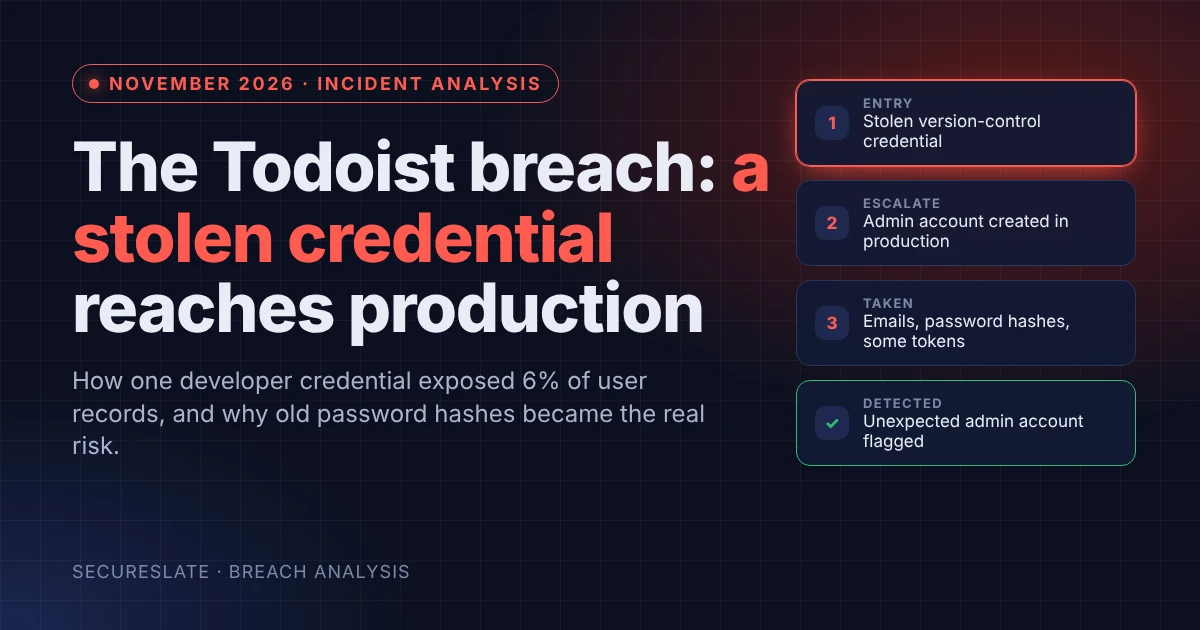
- What happened: An attacker used a stolen developer credential for Todoist's version control system to get into its production cloud systems, created an administrator account, and downloaded a file of user records. Monitoring flagged the unexpected admin account the next afternoon.
- What was taken: For about 6% of users: email addresses, password hashes and account creation dates. For a much smaller group: API and Slack integration tokens (about 0.003%) and Outlook add-in mailbox data (about 0.001%).
- What was not taken: Plaintext passwords. Accounts that sign in with Google or Apple were not affected by the password hash exposure. Todoist found no sign the attacker signed in to the affected accounts.
- What you should do: If you got an email from
no-reply@notify.todoist.com, follow it to set a new password. If you reused your Todoist password anywhere else, change it there too. If you used the Outlook add-in, reconnect it.
| At a glance | |
|---|---|
| First use of stolen credential | November 22, 2026, 14:04 UTC |
| Records exported | November 23, 2026 |
| Detected | November 23, 2026, 17:01 UTC (unexpected admin account) |
| Entry point | A developer's version control credential |
| Users affected | About 6% (records), 0.003% (tokens), 0.001% (Outlook add-in) |
| Plaintext passwords | Not exposed |
| How the credential was stolen | Not yet established |
Why this one matters
Todoist's incident is a near-perfect illustration of two of the oldest problems in SaaS security, colliding at once.
First, a developer credential was enough to reach production. Version control access should let you push code. Here it opened a path to creating an administrator account in the production environment, which is a privilege boundary that should not have been so easy to cross.
Second, old data stayed dangerous for a decade. Some of the stolen password hashes used salted SHA1, a scheme Todoist retired more than ten years ago. The users behind those hashes simply never changed their passwords, so the weak format was still sitting in the database, waiting.
Neither problem is unique to Todoist. Almost every company over five years old has both somewhere.
Timeline: how the breach unfolded
All times are UTC and come from Todoist's incident notice as reported in the press.
| When (2026) | Event |
|---|---|
| Nov 22, 14:04 | Earliest identified use of the stolen version-control credential. |
| Nov 23, 12:45 to 12:51 | Attacker exports user account records. |
| Nov 23, 13:05 to 17:12 | Attacker queries integration tokens, accesses mailbox data through the Todoist Outlook add-in and searches content. |
| Nov 23, 17:01 | Security monitoring flags an unexpected administrator account. |
| Nov 24, 05:06 | Outlook add-in disabled. |
| Nov 24, 14:19 | Protections on affected accounts completed: passwords disabled, tokens revoked, sessions ended. |
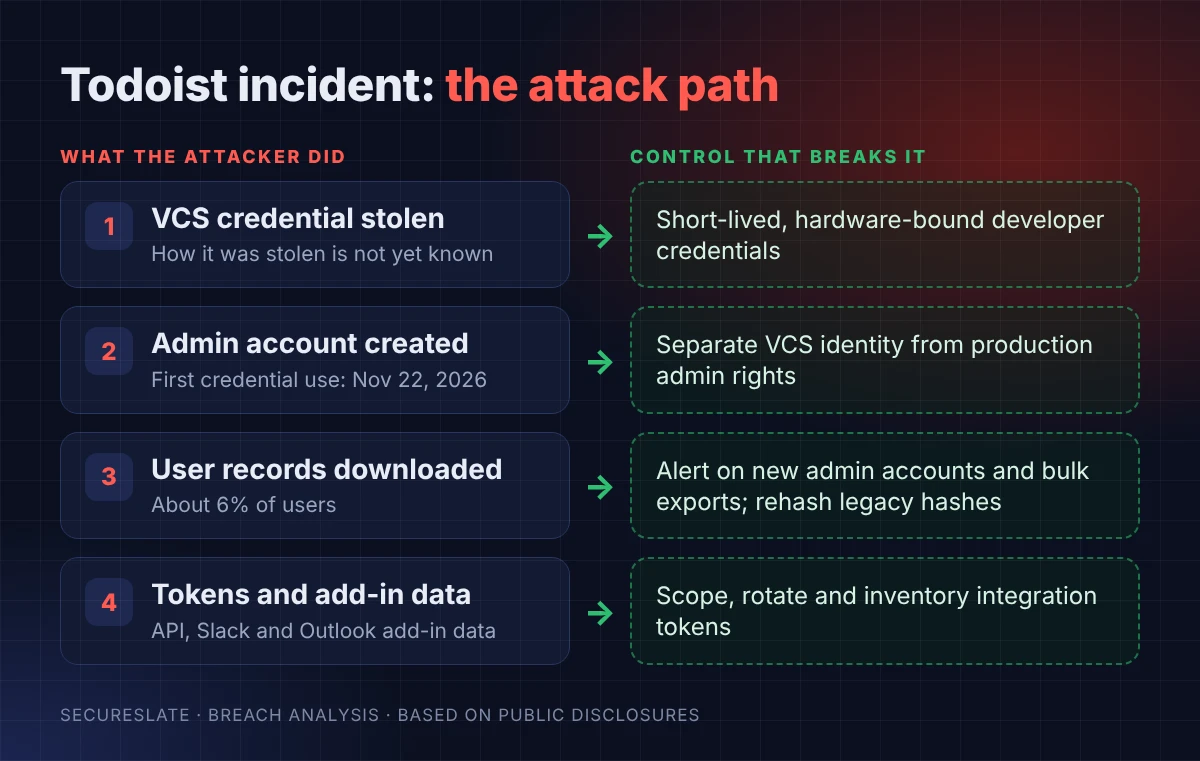
Notice the gap: roughly 27 hours between the first use of the stolen credential and detection, and about 4 hours between the data export and the alert. Detection worked, but it fired on the attacker's privilege change, not on the bulk export that actually hurt users.
What was accessed, and what was not
| Data | Share of users | Status | Risk |
|---|---|---|---|
| Email addresses | ~6% | ❌ Exposed | Targeted phishing |
| Password hashes (incl. legacy salted SHA1) | ~6% | ❌ Exposed | Offline cracking, then credential stuffing on other sites |
| Account creation dates | ~6% | ❌ Exposed | Low on its own, useful for lures |
| Todoist API and Slack integration tokens | ~0.003% | ❌ Exposed | Direct access to task data and connected workspaces |
| Outlook add-in mailbox data | ~0.001% | ❌ Exposed | Email subjects, senders, first 255 characters of messages, attachment details |
| Plaintext passwords | None | ✅ Not exposed | Not stored |
| Google and Apple sign-in accounts | None | ✅ Not affected by hash exposure | No Todoist password to crack |
Why salted SHA1 is the real problem
Salting stops attackers from using precomputed tables, but SHA1 is a fast hash. Modern GPUs can test billions of SHA1 guesses per second, so short or common passwords fall quickly. Modern password hashing algorithms such as Argon2id, scrypt or bcrypt are deliberately slow and memory-hard, which makes the same attack thousands of times more expensive.
The hashes themselves are only the first step. The real damage comes when a cracked password is reused on email, banking or work accounts.
How Todoist responded
- Cut off the access paths: Disabled the Outlook add-in, removed attacker-created accounts and rotated internal credentials.
- Protected affected users: Disabled passwords, revoked API tokens, disconnected OAuth applications and ended active sessions for affected users.
- Notified users from a known sender: Emailed affected users from
no-reply@notify.todoist.comand stated it will never ask for passwords or ask anyone to install software over this incident. - Leadership accountability: Todoist's founder and CEO publicly apologized and committed to examining how the breach happened.
The open question is the first link in the chain: how the developer's credential was stolen has not yet been established.
7 lessons for every SaaS team
1. Developer credentials must not unlock production admin
Version control access and production administration are different privileges and should live behind different identities, approvals and devices. Practical steps:
- Separate production admin roles from day-to-day developer accounts
- Use just-in-time elevation with approval and automatic expiry for production admin
- Require a managed, compliant device for any production access
2. Make developer credentials short-lived and hardware-bound
A credential that can be stolen and replayed a day later is a liability. Prefer SSO-backed sessions with phishing-resistant MFA, device-bound tokens and short expirations over long-lived personal access tokens or SSH keys that live on laptops forever.
3. Alert on what attackers do, not only on who they become
Todoist caught the new admin account. The bulk export four hours earlier is the signal you want to catch first. Build alerts for:
- New admin or service accounts in any production system
- Bulk reads or exports of user tables
- Database dumps or snapshots outside of scheduled backups
- Access from new IP ranges, ASNs or devices for privileged accounts
4. Hunt down your legacy password hashes
If you ever changed hashing algorithms, some users are almost certainly still on the old one. Fix it with a one-time migration:
- Wrap old hashes now: Store
argon2id(sha1_hash)so the weak hash never sits in plaintext form again - Upgrade on login: When a user signs in, rehash the real password with your current algorithm
- Force resets for dormant accounts still on the legacy scheme after a set window
5. Treat integration tokens like passwords
API tokens, Slack tokens and OAuth grants give direct access to data, no password cracking needed. Encrypt them at rest with keys outside the database, scope them to the minimum permissions, expire them, and keep an inventory so you can revoke them all at once during an incident.
6. Your add-ins and integrations are part of your attack surface
The Outlook add-in turned a breach of Todoist into exposure of customers' email. Every integration that reads third-party data extends your blast radius. Review what each integration can read, minimize what it stores, and include integrations in your threat model and your vendor risk reviews.
7. Publish your official sender and your "we will never ask"
Todoist named its exact sending address and said what it would never request. That single sentence is one of the best defenses against the phishing wave that follows every breach. Have it ready before you need it.
Map the lessons to your compliance controls
| Lesson | SOC 2 (TSC) | ISO 27001:2022 Annex A |
|---|---|---|
| Separate developer and production admin access | CC6.1, CC6.3 | 5.15, 5.18, 8.2 |
| Short-lived, MFA-protected credentials | CC6.1, CC6.2 | 5.17, 8.5 |
| Detect admin creation and bulk exports | CC7.2, CC7.3 | 8.15, 8.16 |
| Modern password hashing and legacy cleanup | CC6.1, CC6.7 | 8.24 |
| Integration token management | CC6.1, CC6.6 | 5.17, 8.24 |
| Third-party integration risk | CC9.2 | 5.19 to 5.22 |
| Incident response and user notification | CC7.4, CC7.5, CC2.3 | 5.24 to 5.28 |
SecureSlate monitors these controls continuously, so a missing MFA rule, an unreviewed admin account or an access review that slipped past its date gets flagged on a dashboard, not discovered in an incident postmortem.
Your 15-minute production access checklist
- List every account with production admin rights, and confirm each one is still needed
- Developer accounts cannot create production admin accounts without approval
- Production access requires SSO, phishing-resistant MFA and a managed device
- Alerts fire on new admin accounts and on bulk exports from user tables
- You know which password hashing algorithms exist in your user table today
- Integration and API tokens are encrypted, scoped and expire
- You can revoke all tokens and sessions for a set of users in one step
- Quarterly access reviews cover version control and production
- Your incident response plan names your official notification sender address
1Password vs Todoist: two breaches, one pattern
Both incidents were disclosed the same week, and both started with a developer's access to source control.
| 1Password | Todoist | |
|---|---|---|
| Entry point | Employee corporate GitHub account | Stolen version-control credential |
| How access was gained | Not disclosed | Not established |
| Escalation | Private repos, then CI/CD, then backend | Admin account created in production |
| Customer data taken | Names, emails, public keys, link tokens | Emails, password hashes, some tokens and mailbox data |
| Crown jewels | Vaults stayed encrypted and unread | No plaintext passwords; legacy hashes exposed |
| Biggest lesson | Zero-knowledge design limits the blast radius | Old data and broad dev access widen it |
Read the full 1Password breach analysis for the CI/CD side of the story.
FAQ
Was Todoist hacked?
Yes. In November 2026, Todoist disclosed that an attacker used a stolen developer credential for its version control system to access production cloud systems and download records for about 6% of users.
Were Todoist passwords stolen?
Plaintext passwords were not exposed. Password hashes were taken for about 6% of users, and some of those were older salted SHA1 hashes that are easier to crack than modern formats.
What should I do if I use Todoist?
If you received a notice from no-reply@notify.todoist.com, follow it to set a new password. Change the password on any other site where you reused it. If you used the Outlook add-in, reconnect it. Todoist will never ask you for your password or to install software over this incident.
Were Google and Apple sign-in users affected?
Accounts that sign in with Google or Apple do not have a Todoist password, so they were not affected by the password hash exposure.
How was the Todoist breach detected?
Todoist's security monitoring flagged an unexpected administrator account at 17:01 UTC on November 23, 2026, a few hours after the user records were exported.
How did the attacker get the developer credential?
Todoist has not yet established how the version-control credential was stolen.
Sources
- Todoist: Security incident in November 2026
- Cybersecurity News: Todoist hacked, attackers breach production systems
- Cyberpress: Hackers breach Todoist cloud systems
- SQ Magazine: Todoist breach exposes old SHA1 hashes
- tbreak: Todoist breach exposed password hashes for 6% of users
This analysis is based on Todoist's incident notice and press reporting as of November 26, 2026. Details may change as the investigation continues.
Need compliance without the complexity?
SecureSlate automates ISO 27001, SOC 2, GDPR, HIPAA, and more. Built for growing teams. See it in action.
Find compliance gaps in 30 seconds