
Short answer: The best CCPA compliance tools are the ones that cover your gaps: consent and opt-out handling, consumer request workflows, data mapping, vendor contracts and reasonable security. Few companies need one tool per category. Map your obligations first, then choose the smallest set of tools that produces evidence you can show a regulator.
Related guides: What is the CCPA · CCPA compliance checklist · CCPA training requirements
Key takeaways
- CCPA tools fall into a handful of categories: consent and opt-out, request management, data discovery and mapping, notices, vendor management, security and compliance, and training.
- Start from the legal requirements in the statute and regulations, not from a feature list.
- Judge tools on evidence: logs of requests, opt-outs, vendor reviews and security controls that you can export.
- Smaller companies often cover the CCPA with a consent tool, a request workflow and a compliance platform they already use for SOC 2 or ISO 27001.
- No tool makes you compliant on its own. Ownership, accurate data maps and trained staff still matter.
What does a CCPA tool actually need to support?
A CCPA tool needs to help you meet specific duties in the statute and regulations, so list those duties before you look at products.
The CCPA statute, as amended by the CPRA, and the CCPA regulations set out the core obligations. The ones that drive tooling decisions are:
- Notices. A privacy policy and a notice at collection that list categories of personal information, purposes and retention periods.
- Consumer requests. Requests to know, delete, correct, opt out of sale or sharing and limit use of sensitive personal information, with identity verification where required. Section 1798.130 sets a 45-day response period, which can be extended once by another 45 days when reasonably necessary, with notice to the consumer.
- Opt-out signals. The regulations require businesses to treat opt-out preference signals such as the Global Privacy Control as valid opt-out requests.
- Records. The regulations require records of consumer requests and how you responded to be kept for at least 24 months.
- Contracts. Specific terms with service providers, contractors and third parties.
- Reasonable security under Section 1798.100(e), and for businesses in scope, cybersecurity audits and risk assessments under regulations that took effect on January 1, 2026.
- Training for staff who handle consumer inquiries.
Which types of CCPA compliance tools exist?
Six tool categories cover almost every CCPA duty, and most companies need only some of them.
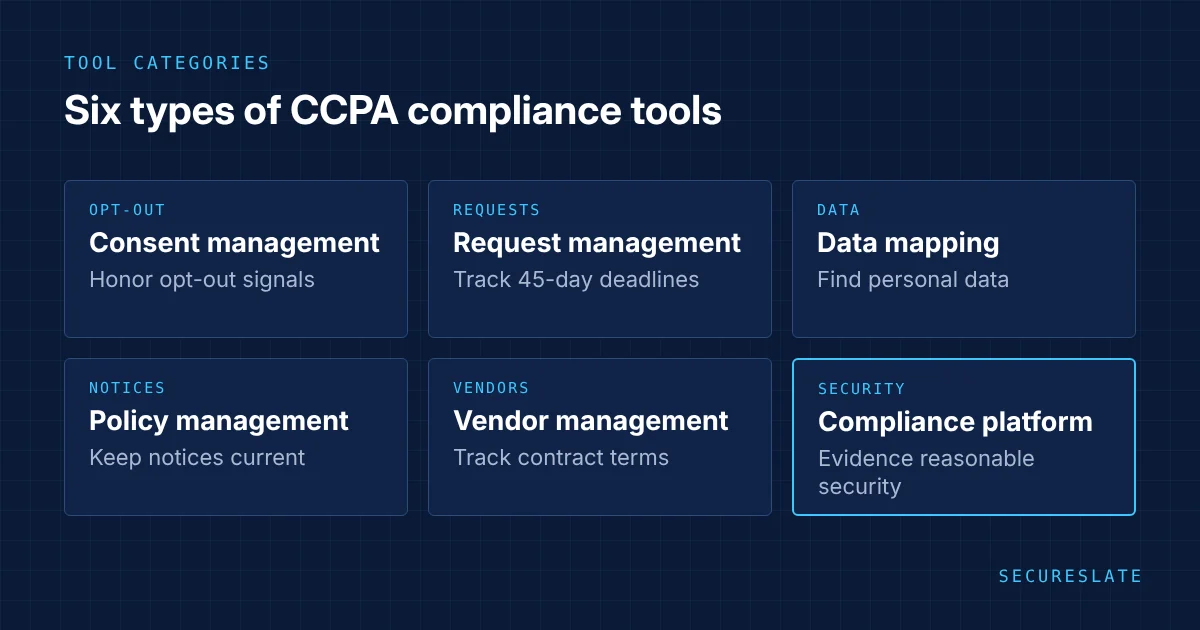
| Category | CCPA duties it supports | What to check |
|---|---|---|
| Consent and opt-out management | Opt-out of sale and sharing, opt-out preference signals, cookie and tag control | Does it honor the Global Privacy Control and actually block advertising tags? |
| Consumer request management | Intake, verification, deadlines and responses for privacy requests | Deadline tracking, identity checks, audit log of each step |
| Data discovery and mapping | Knowing which systems hold personal and sensitive data | Connectors to your real systems, sensitive data tagging |
| Notice and policy management | Privacy policy, notice at collection, retention disclosures | Version history and review reminders |
| Vendor and contract management | Service provider, contractor and third party terms and reviews | Contract term tracking, review status, renewal dates |
| Security and compliance automation | Reasonable security, cybersecurity audit and risk assessment evidence | Control mapping, automated evidence, audit exports |
Training platforms are a seventh, smaller category. Many companies already have one for security awareness and can add a CCPA module.
Some products span several categories. That can reduce integration work, but check each module on its own merits rather than assuming a suite is strong everywhere.
How should you compare CCPA tools?
Compare tools on how well they produce reliable evidence with the least manual work, not on the length of the feature list.
| Criterion | Question to ask | Why it matters |
|---|---|---|
| Requirement coverage | Which specific CCPA sections does this help with? | Avoids paying for features you do not need |
| Integrations | Does it connect to our identity provider, data stores, CRM and ticketing? | Manual steps are where deadlines slip |
| Evidence and logs | Can we export a record of each request, opt-out and review? | Regulators and auditors ask for proof, not screenshots |
| Multi-law support | Does it handle other state laws and GDPR with one workflow? | Many companies face several privacy laws at once |
| Security of the tool | Does the vendor have its own security attestations? | The tool will hold personal data |
| Ownership fit | Can legal, security and support teams each use it? | Privacy work crosses teams |
| Total effort | How much setup and upkeep does it need? | A tool no one maintains gives false comfort |
Ask vendors to demonstrate a real request end to end: intake, verification, search across systems, response and the resulting log. That shows more than a slide deck.
What does a lean CCPA stack look like by company size?
In our experience, the right stack depends more on data complexity than on headcount, but company size is a useful starting point.
- Early-stage B2B SaaS. Often a consent tool on the marketing site, a shared request inbox with a documented workflow, and a compliance platform that already covers SOC 2 controls. Data maps can live in the compliance platform or a maintained spreadsheet.
- Growing B2C or HealthTech app. Sensitive personal information and advertising tags raise the stakes. A dedicated request management tool with deadline tracking, a consent platform that honors opt-out signals, and data discovery for app and analytics data become more valuable.
- Larger multi-state business. Broader data discovery, a privacy management suite and formal vendor management usually make sense, together with a compliance platform to run security controls and audit preparation.
Whatever the size, keep one owner for each tool and a review date on every data map.
If you operate in several US states, check whether a tool handles the differences between state laws, such as varying rights, response windows and definitions of sensitive data, from one configuration. Our US data privacy compliance checklist summarizes the main state laws. A tool that forces a separate workflow per state adds work that grows with every new law.
How to choose CCPA compliance tools in seven steps
- Confirm applicability. Check the CCPA thresholds and which exemptions apply, for example for HIPAA data.
- List your duties. Turn the requirements above into a short list owned by named people.
- Map your data. Identify systems with personal and sensitive personal information, including employee and applicant data.
- Find the gaps. Mark which duties you already meet with existing tools and which are manual or missing.
- Shortlist by category. Pick one or two candidates per gap, favoring tools that integrate with your current stack.
- Run a proof of concept. Process a test request and a test opt-out, then export the logs.
- Assign ownership and review. Name an owner, set review dates and document the tool in your vendor inventory.
Common buying mistakes
- Buying a cookie banner and calling it done. A banner that does not block tags or ignores opt-out signals does not meet the opt-out duty.
- Ignoring HR and B2B data. The employee and business contact exemptions ended on January 1, 2023, so request tools must reach HR systems too.
- Treating the tool as the program. Software tracks work. People still decide what data you collect and why.
- Skipping vendor review of the tool itself. Privacy tools process personal data and need contracts with the required service provider terms.
- Leaving security out. Reasonable security is a CCPA duty, and breach-related claims are where consumers have a private right of action. The CCPA cybersecurity audit guide covers the audit rules.
How SecureSlate helps
SecureSlate is a compliance automation platform that covers the security and vendor side of a CCPA program. It is one option to consider alongside dedicated consent and request tools. SecureSlate does not include a built-in CCPA framework, but you can set the CCPA up as a custom framework.
- Custom frameworks and controls to track CCPA duties, owners and evidence, mapped to built-in SOC 2, ISO 27001, HIPAA and GDPR controls.
- Vendor risk management to record reviews of service providers and contractors.
- Risk management to track privacy and security risks.
- Agentless read-only cloud integrations and a device agent for evidence of reasonable security.
- Audit management and a trust center to support audits and customer reviews. SecureSlate does not perform audits.
FAQ
Is there one tool that covers the whole CCPA?
Some privacy suites cover many categories, but most companies still combine tools and processes. Check each duty against what the tool actually does.
Do small businesses need CCPA software?
Only if the CCPA applies to them. If it does, a small company can often meet its duties with a consent tool, a documented request workflow and existing compliance software.
Does a CCPA tool need to support the Global Privacy Control?
The regulations require businesses to treat opt-out preference signals as valid opt-out requests, so your consent setup should detect and honor them.
Can GDPR tools be used for the CCPA?
Often yes, especially for request handling and data mapping, but confirm they support CCPA-specific items such as the right to opt out of sale and sharing and the right to limit use of sensitive data.
How long must CCPA request records be kept?
The regulations require records of consumer requests and responses to be kept for at least 24 months.
Disclaimer (legal note)
This article is for general information only and is not legal, regulatory, or professional advice. Requirements vary by framework, industry, and jurisdiction. Consult qualified advisors for your specific obligations.
Need compliance without the complexity?
SecureSlate automates ISO 27001, SOC 2, GDPR, HIPAA, and more. Built for growing teams. See it in action.
Find compliance gaps in 30 seconds