
Short answer: IT GRC tools are software that help a company govern its technology, manage IT and security risk, and prove compliance with frameworks such as SOC 2, ISO 27001 and HIPAA. They hold one control library, link each control to evidence from your systems, track risks and vendors, and give auditors a single place to review.
Related guides: How to choose a GRC platform · Top GRC tools for 2026 · Risk management software guide
Key takeaways
- IT GRC is the part of governance, risk and compliance that deals with technology: systems, data, access, vendors and the people who run them.
- A useful tool does six jobs: control library, evidence collection, risk register, policy management, vendor risk and audit workflow.
- Tools fall into a few categories, from spreadsheets to compliance automation platforms to enterprise GRC suites. The right category depends on team size and the number of frameworks.
- Score vendors against your own systems and frameworks, not against a feature list. Integration coverage and evidence quality matter more than dashboards.
- A tool does not make a company compliant. Named owners and a regular review rhythm do, and the tool makes that work visible.
What are IT GRC tools?
IT GRC tools are applications that record how a company controls its technology, what could go wrong with it, and whether it meets the rules it has signed up to. The three letters describe three linked jobs:
- Governance: policies, roles, decisions and oversight. Who owns the identity provider, who approves production access, who signs off on risk.
- Risk: identifying threats to systems and data, rating them, and deciding whether to reduce, transfer, avoid or accept each one.
- Compliance: showing that controls required by a framework, a law or a customer contract are in place and working.
The "IT" prefix separates this from enterprise GRC, which also covers financial controls, legal matters, health and safety, and operational risk. IT GRC stays close to the technology estate: cloud accounts, endpoints, code repositories, SaaS applications, HR systems and the vendors that touch company data.
Most frameworks an IT team meets fit this model. ISO/IEC 27001:2022 requires an information security management system with a risk assessment and a set of controls selected from Annex A, which lists 93 controls. SOC 2 reports are assessed against the AICPA Trust Services Criteria. The HIPAA Security Rule requires an accurate and thorough risk analysis under 45 CFR 164.308(a)(1)(ii)(A). An IT GRC tool gives all of these one home.
What should an IT GRC tool be able to do?
An IT GRC tool should cover six core capabilities that together answer three questions: what are our controls, are they working, and can we prove it.
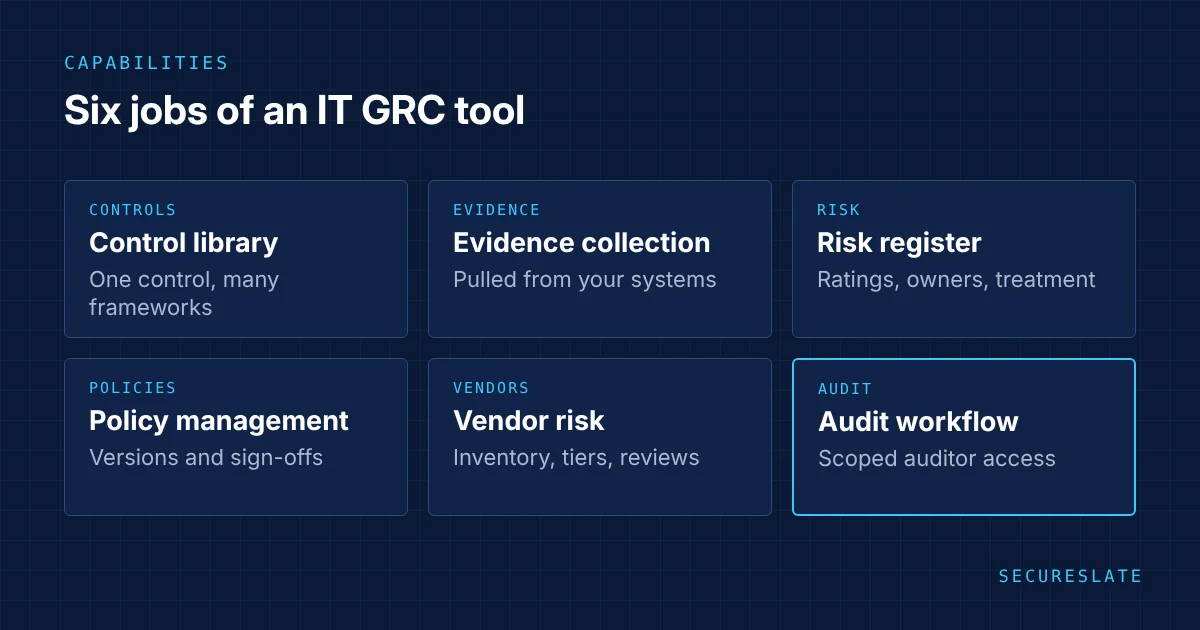
| Capability | What it does | What good looks like |
|---|---|---|
| Control library | Stores controls once and maps each to the frameworks it satisfies | One access review control counts for SOC 2, ISO 27001 and HIPAA at the same time |
| Evidence collection | Pulls configuration and activity data from cloud, identity, HR and code systems | Evidence refreshes on a schedule and failed checks raise a task with an owner |
| Risk register | Records risks, ratings, owners and treatment plans | Each risk links to the controls that reduce it and has a review date |
| Policy management | Holds policies, versions, approvals and employee acknowledgements | Policies link to the controls that enforce them |
| Vendor risk | Keeps a vendor inventory with tiering, reviews and documents | High-risk vendors have a current review and a contract owner |
| Audit workflow | Gives auditors scoped access to controls, evidence and requests | Requests, comments and samples sit in one place, not in email |
Beyond these, look for an asset and system inventory, access reviews, task assignment with reminders, and reporting that a non-technical executive can read. Features such as trust centers and security questionnaire answers are helpful when sales teams field many customer reviews.
What types of IT GRC tools exist?
IT GRC tools fall into five broad categories, and most teams move through them as they grow.
| Category | Typical fit | Strengths | Limits |
|---|---|---|---|
| Spreadsheets and shared documents | Very small teams, one framework, first readiness pass | No cost, flexible, quick to start | No evidence automation, version drift, hard for auditors to navigate |
| Ticketing and wiki add-ons | Teams that already run everything in a ticketing tool | Tasks sit where engineers work | Weak control mapping, evidence still gathered by hand |
| Compliance automation platforms | Startups and SMBs pursuing SOC 2, ISO 27001, HIPAA and similar | Prebuilt frameworks, integrations, continuous checks, auditor access | Less suited to complex enterprise risk models |
| Enterprise GRC suites | Large organizations with many business units and risk domains | Deep configuration, broad risk and audit modules | Long implementations, often need dedicated administrators |
| Point tools | Teams with one acute gap, such as vendor risk or policy management | Depth in one area | Data ends up split across several systems |
Our companion guides go deeper on two of these: the compliance automation platform guide and the vendor risk management software guide.
In our experience, the most common pattern for a growing software company is a move from spreadsheets straight to a compliance automation platform at the point where a first audit is booked, followed by adding frameworks to the same platform over time.
When does a team need an IT GRC tool?
A team needs a dedicated tool when the cost of tracking controls by hand becomes higher than the cost of the software, and that usually happens earlier than expected.
Signs that you have reached that point:
- You are preparing for a first audit and evidence requests arrive faster than people can answer them.
- You are adding a second framework and notice the same control written three different ways.
- Customer security questionnaires take days because answers live in individual heads.
- Controls drift between audits: an offboarding step is missed, a laptop loses encryption, and nobody notices until the auditor samples it.
- Nobody can say with confidence who owns a given control or risk.
- The risk register was last opened before the previous audit.
If only one of these applies and the company has a handful of employees, a disciplined spreadsheet can still work for a while. If three or more apply, manual tracking is already costing more than it appears.
How do you evaluate and choose an IT GRC tool?
Choose by testing each shortlisted tool against your own systems, frameworks and auditor, using a weighted scorecard instead of a demo impression.
- Write down your scope. List the frameworks you need in the next 24 months, the systems that hold sensitive data, your headcount and who will run the program.
- List your integrations. Name your cloud provider, identity provider, HR system, code host, device management and ticketing tool. A tool that cannot read from these will leave you collecting evidence by hand.
- Set weights. Decide what matters most before you see any demos. A typical weighting puts integration coverage and framework coverage first, then usability, auditor experience, security of the tool itself, and total cost.
- Run a hands-on trial. Connect a real cloud account and identity provider. Check what the tool finds, how clear the failed checks are and how long setup takes.
- Ask your auditor. Confirm the audit firm is comfortable working in the tool and what access they need.
- Check the vendor's own assurance. Ask for their security reports, how they store your data, what permissions their integrations request and how you export your data if you leave.
- Compare total cost. Include licences, extra frameworks, implementation help, audit fees and the internal time each option needs.
For a comparison of specific products, see our review of top GRC tools for 2026.
How do you roll out an IT GRC tool?
Roll out in phases, starting with one framework and the systems that hold the most sensitive data, so the team sees working evidence early.
- Assign an owner for the program and a sponsor in leadership.
- Connect core systems first: identity provider, cloud accounts, HR system, code host and device management.
- Select the first framework and review the mapped controls. Mark controls that do not apply, with a reason.
- Assign a named owner to every control, not a team name.
- Import or adopt policies, get them approved and send them for employee acknowledgement.
- Build the risk register from a short workshop, then link each risk to controls.
- Load the vendor inventory and tier vendors by the data they handle.
- Work through failing checks in priority order: access, encryption, logging, backups.
- Set a rhythm: weekly review of failing checks, quarterly access reviews, annual policy and risk review.
- Invite the auditor once the control set is stable.
Teams that treat the tool as part of engineering practice, with checks reviewed like any other operational signal, tend to get more from it. Our guide to GRC engineering explains that approach.
How SecureSlate helps
SecureSlate is a compliance automation platform built for small and mid-sized companies, with a focus on HealthTech. It is one option in the compliance automation category described above, and it covers several of these capabilities in one place:
- Multi-framework control mapping with built-in SOC 2, ISO 27001, HIPAA, HITRUST, GDPR, PCI DSS, NIST CSF, ISO 42001, EU AI Act, NIS 2, DORA, CMMC, FedRAMP, Cyber Essentials and ISO 9001. Anything else can be set up as a custom framework with custom controls.
- Agentless, read-only cloud integrations and a device agent for evidence collection.
- Access reviews, risk management and vendor risk management linked to the same control library.
- Audit management so your auditor works from the same records as your team.
- Trust center and security questionnaire automation for customer reviews.
- Code security and secrets detection for engineering teams.
SecureSlate does not perform audits or issue certifications. Those come from independent audit firms and certification bodies. You can test it against your own systems with a free trial.
FAQ
What is the difference between IT GRC and enterprise GRC?
IT GRC covers technology and information security: systems, data, access, vendors and the frameworks that govern them. Enterprise GRC is broader and also includes financial controls, legal and regulatory matters outside IT, operational risk and internal audit across the whole business. Many smaller companies only need the IT part.
Can a small company manage IT GRC with spreadsheets?
Yes, for a short time and for one framework. Spreadsheets work when a few people own everything and the system count is low. They become hard to maintain once evidence has to be refreshed regularly, more than one framework is in scope, or an auditor needs to navigate the material.
Do IT GRC tools make a company compliant?
No. A tool organizes controls, collects evidence and highlights gaps, but people still have to fix the gaps and run the controls. A SOC 2 report is issued by an independent CPA firm and an ISO 27001 certificate by a certification body, based on what the company actually does.
Which integrations matter most in an IT GRC tool?
Start with the identity provider, cloud infrastructure, HR system, code host and device management. These five sources cover most access, change management, configuration and onboarding evidence. Ticketing, vulnerability scanning and security training integrations are useful additions.
How long does it take to implement an IT GRC tool?
It depends on scope and on how mature existing controls are. Connecting core systems and reviewing a first framework is usually a matter of days to weeks for a small company. Closing the gaps the tool reveals takes longer, and that work sets the real timeline to audit readiness.
Disclaimer (legal note)
This article is for general information only and is not legal, regulatory, or professional advice. Requirements vary by framework, industry, and jurisdiction. Consult qualified advisors for your specific obligations.
Need compliance without the complexity?
SecureSlate automates ISO 27001, SOC 2, GDPR, HIPAA, and more. Built for growing teams. See it in action.
Find compliance gaps in 30 seconds