
Short answer: STRIDE is a threat modeling method from Microsoft that sorts threats into six categories: Spoofing, Tampering, Repudiation, Information disclosure, Denial of service and Elevation of privilege. Teams draw a data flow diagram of a system, walk each element through the six categories, then record threats and mitigations so design flaws are fixed before code ships.
Related guides: Threat modeling for HealthTech · Cyber security risk assessment · Cyber threat analysis tutorial
Key takeaways
- STRIDE is a checklist of six threat types, each the opposite of a security property such as authentication or integrity.
- It works best on a data flow diagram with clear trust boundaries, not on a vague architecture sketch.
- A useful session ends with a threat list, owners and mitigations, tracked like any other engineering work.
- STRIDE finds design-level threats. It does not score risk on its own, so pair it with a rating method.
- Threat model records are strong evidence of secure design for SOC 2, ISO 27001 and HIPAA risk analysis.
What is the STRIDE threat model?
STRIDE is a mnemonic for six categories of threat that engineers use to ask "what can go wrong?" about a system design. It was developed at Microsoft and is built into the Microsoft Threat Modeling Tool, which still uses the same six categories.
The idea is simple. Every system relies on a handful of security properties: users are who they claim to be, data is not changed without permission, actions can be traced, secrets stay secret, services stay available and people only do what they are allowed to do. Each STRIDE letter is a way of breaking one of those properties. Walking through all six forces a team to look past the threats it already worries about and consider the ones it has not thought of.
STRIDE is a threat identification method. It answers "what threats exist?" rather than "how bad is each one?" That makes it a good fit for design reviews, new features and architecture changes, and a natural input to a wider risk assessment.
What are the six STRIDE categories?
Each category maps to the security property it violates, which tells you what kind of control will fix it.
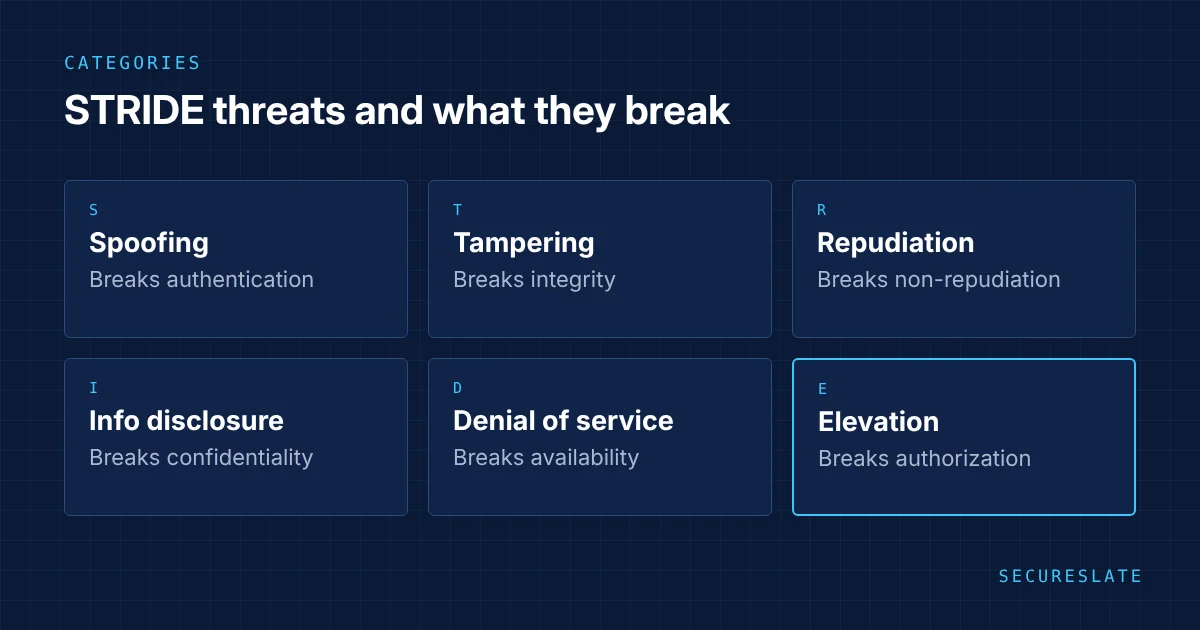
| Category | Property violated | Typical example | Typical mitigation |
|---|---|---|---|
| Spoofing | Authentication | Attacker reuses a stolen session token to act as a clinician | MFA, short-lived tokens, mutual TLS between services |
| Tampering | Integrity | Request parameters edited to change a record's owner ID | Server-side validation, signed payloads, write-restricted storage |
| Repudiation | Non-repudiation | Admin deletes patient data and no log shows who did it | Tamper-resistant audit logs tied to named accounts |
| Information disclosure | Confidentiality | API returns full records when the UI shows only names | Field-level authorization, encryption, minimal responses |
| Denial of service | Availability | Unthrottled export endpoint exhausts the database | Rate limits, quotas, autoscaling, queueing |
| Elevation of privilege | Authorization | Regular user calls an admin endpoint that lacks a role check | Deny by default, role checks on every request, least privilege |
Two categories are often underestimated. Repudiation matters most in regulated products, because an audit trail you cannot trust is close to no audit trail. Elevation of privilege covers both obvious admin bypasses and quieter paths, such as a background job running with more permissions than the feature that triggers it.
How do you run a STRIDE threat modeling session?
A STRIDE session takes a scoped design, walks it through the six categories and produces a prioritized, owned list of threats. For a single feature, 60 to 90 minutes with the right people is usually enough in our experience.
- Pick the scope. One feature, service or data flow. "The whole platform" is too big to finish.
- Invite the right people. The engineer who designed it, someone who will operate it, and a security lead or champion to facilitate.
- Draw a data flow diagram. Show external entities (users, third-party APIs), processes (services, functions), data stores (databases, buckets, queues) and the data flows between them.
- Mark trust boundaries. Any point where data crosses between networks, accounts, privilege levels or organizations. Most serious threats sit on these lines.
- Walk each element through STRIDE. For each element and flow, ask the six questions. Record every credible threat, even if a control already exists.
- Rate and decide. Score each threat with your normal risk method (likelihood and impact) and choose to mitigate, accept, transfer or avoid.
- Assign owners and tickets. Each mitigation becomes a tracked work item with a due date.
- Revisit on change. Update the model when the design changes materially, not only once a year.
Keep the output short. A table of threats, ratings, decisions and ticket links is more useful to engineers and auditors than a long narrative document.
What does a STRIDE analysis look like in practice?
A worked example shows how STRIDE turns a plain diagram into specific, testable threats. Take a telehealth feature where a patient uploads a document, a service stores it in object storage, and a clinician views it in a web portal.
| Element | STRIDE category | Threat | Decision |
|---|---|---|---|
| Patient upload API | Spoofing | Upload accepted with an expired or forged token | Mitigate: validate token signature and expiry on every call |
| Upload API to storage | Tampering | File replaced after upload by a process with broad write access | Mitigate: narrow write permissions, object versioning |
| Clinician portal | Repudiation | Clinician views a record and later denies it | Mitigate: log every view with user, time and record ID |
| Object storage | Information disclosure | Bucket misconfigured as public | Mitigate: block public access at account level, alert on change |
| Upload API | Denial of service | Very large files exhaust processing workers | Mitigate: size limits and per-user rate limits |
| Portal admin page | Elevation of privilege | Support role can change clinician permissions | Mitigate: separate admin role, approval for role changes |
Notice that every row names a specific element, a specific threat and a decision. Rows like "attackers might hack the API" do not help anyone and should be rewritten until they are concrete.
Should you use STRIDE per element or per interaction?
Both variants are valid: per element is simpler to teach, while per interaction catches more threats that live on data flows between components.
- STRIDE per element applies a subset of categories to each type of element. For example, external entities are mainly analyzed for spoofing and repudiation, while data stores are analyzed for tampering, information disclosure and denial of service. It is quick and keeps sessions focused.
- STRIDE per interaction analyzes each flow as a tuple (origin, destination, interaction) and asks which categories apply to that exchange. It is slower but better at finding threats at trust boundaries, such as a service trusting a header that a client can set.
For small teams, start with per element. Switch to per interaction for flows that cross trust boundaries or carry regulated data such as PHI or payment data.
STRIDE also pairs well with other methods. Some teams use it inside the threat analysis stage of PASTA, a risk-centric process that links technical threats to business impact.
How does STRIDE support SOC 2, ISO 27001 and HIPAA?
None of these frameworks require STRIDE by name, but each expects you to identify risks and build security into design, and a STRIDE record is direct evidence of both.
- SOC 2: the Trust Services Criteria ask the organization to identify and analyze risks to its objectives (CC3.2) and to manage change to systems (CC8.1). Threat models attached to design reviews show both.
- ISO 27001:2022: Annex A controls 8.25 (secure development life cycle) and 8.27 (secure system architecture and engineering principles) expect security to be considered in design. See the ISO 27001 standard page.
- HIPAA: the Security Rule requires an accurate and thorough risk analysis of threats to ePHI under 45 CFR 164.308(a)(1)(ii)(A). STRIDE output on systems that handle ePHI is useful input to that analysis, though it does not replace an organization-wide assessment such as the one in our HIPAA security risk assessment template.
- NIST SP 800-53: control enhancement SA-11(2) covers threat modeling and vulnerability analyses during development. See NIST SP 800-53 Rev. 5.
Keep each model with a date, participants, scope and linked tickets. That is what turns a whiteboard session into audit evidence.
What are common STRIDE mistakes?
Most failed STRIDE efforts fail on scope and follow-through rather than on the method itself.
- Modeling everything at once. Large scopes produce long, shallow lists that no one finishes.
- No trust boundaries on the diagram. Without them, the team misses the threats that matter most.
- Stopping at identification. A threat list with no ratings, owners or tickets changes nothing.
- Treating it as a one-off. Models that are never updated drift away from the real system.
- Security team working alone. Engineers who built the system know where the shortcuts are.
- Ignoring third parties. External APIs, identity providers and vendors are external entities and belong on the diagram.
How SecureSlate helps
SecureSlate gives the output of your STRIDE sessions a home. Use risk management to log threats as risks with owners, ratings and treatment decisions, and map them to controls across SOC 2, ISO 27001, HIPAA and NIST CSF through multi-framework control mapping. Code security and secrets detection help catch some implementation issues that design reviews flag, and vendor risk management covers the third-party services on your diagrams. SecureSlate does not perform audits, but audit management keeps threat models and linked evidence ready for your auditor.
FAQ
What does STRIDE stand for?
Spoofing, Tampering, Repudiation, Information disclosure, Denial of service and Elevation of privilege. Each is a category of threat that breaks one security property.
Is STRIDE a risk assessment method?
Not on its own. STRIDE identifies threats. You still need a rating method, such as likelihood and impact scoring, to decide which threats to fix first.
When should you do STRIDE threat modeling?
During design of new features or services, before major architecture changes and when adding integrations that cross trust boundaries. Update existing models when the design changes.
What is the difference between STRIDE and PASTA?
STRIDE is a threat categorization checklist. PASTA is a seven-stage, risk-centric process that starts from business objectives and ends with risk and impact analysis. Many teams use STRIDE inside PASTA's threat analysis stage.
Do auditors require a STRIDE threat model?
SOC 2, ISO 27001 and HIPAA do not name STRIDE. Auditors look for evidence that risks are identified and that security is considered in design, and documented threat models are a strong way to show that.
Disclaimer (legal note)
This article is for general information only and is not legal, regulatory, or professional advice. Requirements vary by framework, industry, and jurisdiction. Consult qualified advisors for your specific obligations.
Need compliance without the complexity?
SecureSlate automates ISO 27001, SOC 2, GDPR, HIPAA, and more. Built for growing teams. See it in action.
Find compliance gaps in 30 seconds