
Short answer: Policy management software is a system for writing, approving, publishing and reviewing company policies, and for proving that employees have read them. It replaces shared folders and email reminders with version control, approval workflows, acknowledgement tracking and review schedules, so you can show an auditor the full history of every policy.
Related guides: How to create security policies · Access control policy · Data classification policy
Key takeaways
- Policy management software covers the whole policy lifecycle: draft, review, approve, publish, acknowledge and revisit.
- The features auditors care about are version history, named approvers, dated acknowledgements and a review schedule.
- Policies are only useful when they are linked to controls and evidence, so a tool that connects the two saves duplicate work.
- A small company rarely needs a standalone policy product. A compliance platform with a policy module is often enough.
- Choose on fit with your frameworks, HR and identity integrations, and export quality, not on the size of the template library.
What is policy management software?
Policy management software is a central place to create, approve, distribute and maintain policies and procedures, with a record of every change and every acknowledgement.
Most companies start with documents in a shared drive. That works until the first audit or customer security review. Then the questions arrive: which version was in force last March, who approved it, did the new hires in the sales team read it, and when is it due for review? A folder cannot answer those questions. Policy management software can, because it treats each policy as a record with an owner, a status, a version history and a list of people who must acknowledge it.
The term covers a wide range of products. Some are built for security and privacy policies in technology companies. Others are built for clinical procedures in hospitals, or for conduct and ethics policies in large enterprises. The core functions are the same, but the depth of workflow and the integrations differ, which is why it helps to define your use case before you look at tools.
Which parts of the policy lifecycle should it cover?
A good tool supports all six stages of the policy lifecycle, from the first draft to the scheduled review, and keeps evidence of each stage.
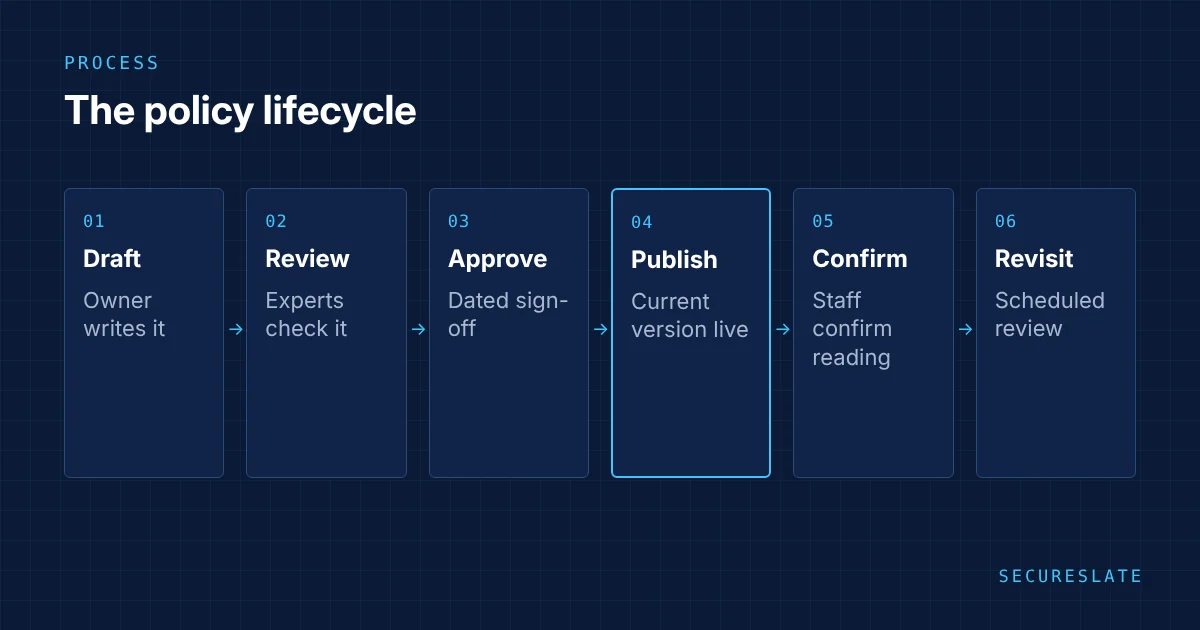
- Draft. The owner writes the policy from a template or from scratch. Comments and tracked changes keep reviewers out of email threads.
- Review. Subject matter experts, legal and affected teams check the draft. The tool records who reviewed it and when.
- Approve. A named approver, such as the CISO, CTO or CEO, signs off. The approval must be dated and tied to a specific version.
- Publish. The approved version becomes the current one and is visible to the people it applies to. Older versions are archived.
- Acknowledge. Employees and contractors in scope confirm that they have read the policy. New hires are assigned policies automatically during onboarding.
- Revisit. The tool reminds the owner before the review date. The review ends in a new version or a recorded decision that no change is needed.
If a tool is weak in one stage, that stage will fall back to email and spreadsheets, and that is usually where audit findings come from. In our experience the two stages that break most often are acknowledgement, because people leave and join, and review, because nobody is reminded.
What features matter most?
The features that matter most are the ones that produce evidence: version control, approval workflows, acknowledgement tracking, review scheduling and reporting.
| Feature | What to look for | Why it matters |
|---|---|---|
| Version control | Full history, comparison between versions, archived copies | Shows which policy was in force on any date |
| Approval workflow | Named approvers, dated sign-off, multi-step routes | Proves management approved the policy |
| Acknowledgement tracking | Assignment by team or role, reminders, onboarding triggers | Proves the policy was communicated |
| Review scheduling | Owner per policy, review date, automated reminders | Prevents policies from going stale |
| Control mapping | Link each policy to the controls and requirements it supports | Lets you answer "where is this required?" in seconds |
| Exception handling | Requests, approvals, expiry dates | Records deviations instead of hiding them |
| Access and audience | Role-based visibility, single sign-on, contractor access | Puts the right policies in front of the right people |
| Reporting and export | Acknowledgement rates, overdue reviews, PDF or evidence exports | Gives auditors what they ask for without manual work |
| Templates | Editable starting points for common policies | Saves drafting time, but must be tailored |
Two points on templates. First, a template is a starting point. A policy that describes controls you do not operate is worse than no policy, because an auditor will test what the document says. Second, a large library is less useful than a small set of templates written for your frameworks and company size.
What do frameworks require for policy management?
Most security and privacy frameworks require policies that are approved by management, communicated to staff, reviewed regularly and retained, which is exactly what policy management software records.
| Framework | What it expects | Evidence the tool should produce |
|---|---|---|
| ISO 27001 | An information security policy set by top management (clause 5.2), control of documented information (clause 7.5), and policies that are approved, published, communicated, acknowledged and reviewed at planned intervals (Annex A 5.1) | Approval records, version history, acknowledgements, review log |
| SOC 2 | Control activities deployed through policies and procedures (CC5.3) and internal communication of responsibilities (CC2.2) in the Trust Services Criteria | Current policies, acknowledgement reports, review dates |
| HIPAA Security Rule | Written policies and procedures, kept for six years from creation or the date last in effect, whichever is later, made available to those who implement them, and reviewed periodically (45 CFR 164.316) | Archived versions with dates, access records, review history |
| PCI DSS v4.0.1 | An information security policy that is established, published, maintained, disseminated to relevant personnel and reviewed at least once every 12 months (Requirement 12.1) | Published policy, distribution record, annual review record |
| GDPR | The controller must be able to demonstrate compliance, including through appropriate data protection policies where proportionate (Article 24) | Data protection policies, approval and training records |
The HIPAA retention rule deserves attention when you evaluate tools. If the product deletes old versions, or if you would lose the archive when you cancel the subscription, you need an export routine that keeps retired versions for the full period.
What types of policy management tools exist?
There are four broad types of tool, and the right one depends on how many policies you have, who must read them and whether you need to link them to audits.
- Document and wiki tools. Shared drives and internal wikis with page history. Low cost and familiar, but approvals, acknowledgements and review reminders are manual.
- Standalone policy management products. Built for the full lifecycle, often with rich workflows, quizzes and audience targeting. Common in healthcare, financial services and large enterprises with hundreds of procedures.
- HR and learning platforms. Good at distributing documents and collecting signatures from employees. Weaker on version control, control mapping and audit exports.
- Compliance and GRC platforms with a policy module. Policies sit next to the controls, risks and evidence they relate to. This suits companies whose main driver is SOC 2, ISO 27001, HIPAA or a similar framework.
In our experience, for a company with fewer than a few hundred employees and 15 to 30 security and privacy policies, a compliance platform with a policy module is usually the simplest choice, because the same system also runs the audit. A hospital with thousands of clinical procedures has different needs and will often want a dedicated product.
How do you choose policy management software?
Choose by testing each shortlisted tool against your real policies, your frameworks and your joiner and leaver process, then compare the evidence it produces.
A practical checklist for the evaluation:
- List your policies, their owners and the frameworks that require them.
- Decide who must acknowledge policies: employees, contractors, or specific teams only.
- Confirm the tool integrates with your identity provider or HR system, so the audience list stays current.
- Load two existing policies and take them through approval, publication and acknowledgement in a trial.
- Check that a policy can be mapped to controls or framework requirements.
- Export an acknowledgement report and a version history, and ask whether your auditor would accept them.
- Ask how archived versions are retained and how you get your data out if you leave.
- Review the vendor's own security posture, including its audit reports and data hosting locations.
- Compare total cost, including per-user pricing for people who only read and acknowledge.
Per-user pricing is worth a close look. Authors and approvers are a handful of people, but readers are everyone. Check how readers are priced.
How do you roll it out without losing people?
Roll out in small steps: migrate the core policies first, fix ownership, then turn on acknowledgements.
Start with the policies your auditor will ask for first, such as information security, access control, acceptable use, incident management and change management. Give each one an owner and a review date before you import anything else.
Keep acknowledgement requests short and staged. Asking a new hire to read 25 documents on day one produces clicks, not understanding. Assign the general policies to everyone and the technical ones only to the teams they apply to. Then set a reminder cadence and report overdue acknowledgements to managers rather than chasing individuals from the security team.
How SecureSlate helps
SecureSlate is a compliance automation platform that connects your policies to the controls and evidence they support. With multi-framework control mapping, the controls a policy describes can be mapped to the matching requirements in SOC 2, ISO 27001, HIPAA, HITRUST, GDPR, PCI DSS and other built-in frameworks, and to custom frameworks and controls you define yourself. Audit management keeps the documents and evidence an auditor requests in one place, and risk management links policy decisions to the risks they treat.
SecureSlate does not perform audits or issue certifications. It helps your team prepare for them and stay ready between them. You can start a free trial and test it with your own controls.
FAQ
What is the difference between a policy and a procedure?
A policy states what the company requires and why, in terms that change rarely. A procedure describes how a specific team carries out the requirement, step by step. Policy management software usually handles both, with separate owners and review cycles.
How often should policies be reviewed?
At least once a year is the common practice, and PCI DSS requires a review of the information security policy at least once every 12 months. Policies should also be reviewed after significant changes, such as a new product, a reorganization or a security incident.
Do employees have to acknowledge every policy?
No. Employees should acknowledge the policies that apply to them. General policies such as acceptable use and the code of conduct apply to everyone, while technical policies such as secure development can be limited to engineering.
Can we manage policies in a shared drive instead?
Yes, for a very small team. You will need a manual log of approvals, acknowledgements and reviews, and discipline to keep it current. Most companies move to a tool when the first audit shows how much time the manual log takes.
Does policy management software write the policies for us?
It can provide templates and, in some products, drafting assistance. You still need to adapt each policy to how your company actually works, because auditors test your practice against your own written policy.
Disclaimer (legal note)
This article is for general information only and is not legal, regulatory, or professional advice. Requirements vary by framework, industry, and jurisdiction. Consult qualified advisors for your specific obligations.
Need compliance without the complexity?
SecureSlate automates ISO 27001, SOC 2, GDPR, HIPAA, and more. Built for growing teams. See it in action.
Find compliance gaps in 30 seconds