
An access control policy sets the rules for who can access your systems and data, how access is granted, how it is reviewed and how it is removed. It is one of the first policies auditors ask for in SOC 2, ISO 27001, HIPAA and PCI DSS assessments, because weak access control is behind many breaches. A good policy is short, specific to your environment and backed by evidence that people follow it. This guide explains what to include, gives a section-by-section template, shows example rules and lists best practices.
Related guides: Identity risk · Best access control software · Data classification policy · Incident management policy
Key takeaways
- An access control policy covers principles, roles, account lifecycle, authentication, privileged access, reviews and exceptions.
- Base access on least privilege, need to know and role-based access.
- Require MFA for all users and phishing-resistant MFA for administrators where possible.
- Define timelines: provisioning approvals, same-day removal for leavers and quarterly access reviews for sensitive systems.
- Keep evidence: approval tickets, review records and removal logs prove the policy works.
What an access control policy does
The policy translates security goals into clear rules. It tells managers how to request access for new hires, tells IT how to grant and remove it, tells engineers how privileged access works, and tells auditors how the company controls who can reach sensitive data. It applies to employees, contractors, vendors and service accounts, across cloud platforms, SaaS applications, code repositories, devices and physical offices where relevant.
Access control policy template
1. Purpose
Explain that the policy protects the confidentiality, integrity and availability of information by limiting access to authorized users with a business need.
2. Scope
List who and what is covered: all workforce members, contractors, third parties, service accounts and all company systems, applications, data and facilities.
3. Principles
- Least privilege: users get the minimum access needed for their role.
- Need to know: access to sensitive data only where the job requires it.
- Role-based access control (RBAC): access is granted through defined roles rather than individually where practical.
- Segregation of duties: conflicting duties, such as requesting and approving payments or writing and approving code for production, are separated.
- Default deny: access is not granted unless explicitly approved.
4. Roles and responsibilities
| Role | Responsibility |
|---|---|
| System owner | Defines roles for the system and approves access |
| Manager | Requests access for their team and reviews it |
| IT or security | Provisions, deprovisions and monitors access |
| HR | Notifies joiners, movers and leavers promptly |
| Users | Protect credentials and report suspected misuse |
5. User account lifecycle
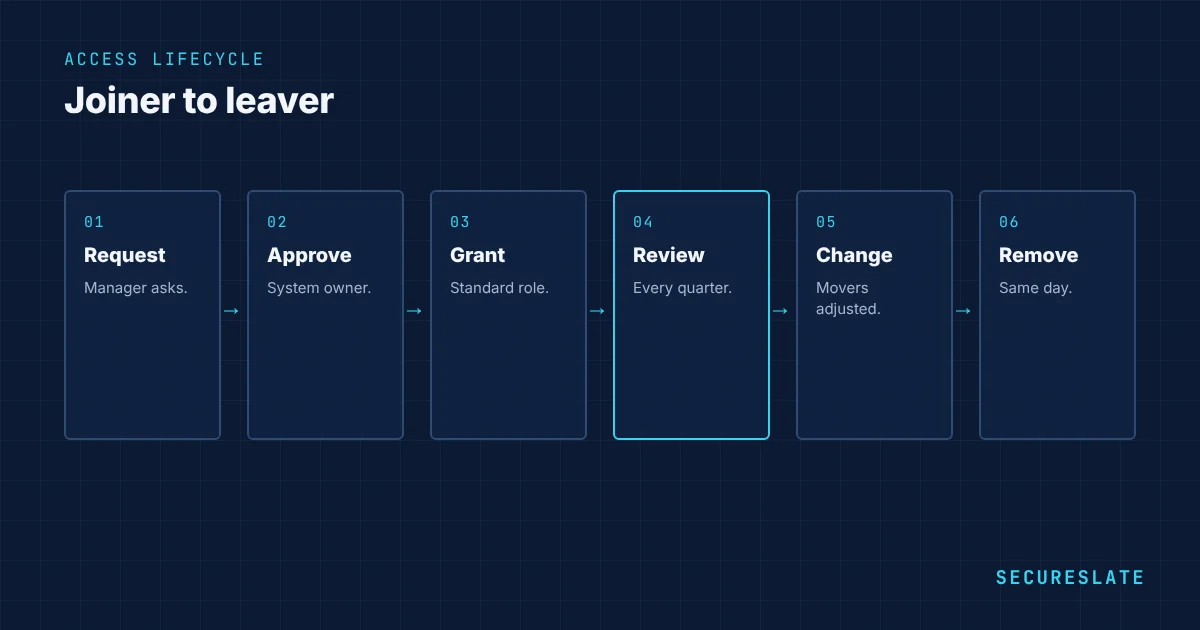
- Joiners: access requested by the manager, approved by the system owner, granted through standard roles before or on the start date.
- Movers: access reviewed when someone changes role; old access removed within a defined time, such as 5 business days.
- Leavers: accounts disabled on the last day, or immediately for involuntary terminations; devices and tokens collected.
- Contractors: accounts have an expiry date matching the contract.
6. Authentication
- Unique accounts for every user; no shared accounts except documented, controlled exceptions.
- Single sign-on for supported applications.
- MFA required for all users; phishing-resistant MFA (security keys or passkeys) for administrators where supported.
- Password rules aligned with NIST SP 800-63B: long passwords or passphrases, checked against known breached passwords, no forced periodic changes unless compromise is suspected.
- Session timeouts and device lock rules.
7. Privileged access
- Separate admin accounts from daily accounts.
- Admin rights granted only with approval and documented business need.
- Just-in-time elevation preferred over standing admin rights.
- All privileged activity logged and reviewed.
- Root or global admin credentials stored securely and used only for break-glass scenarios.
8. Service accounts and secrets
- Every service account has an owner and documented purpose.
- Credentials stored in a secrets manager, never in code.
- Keys rotated on a schedule or replaced with short-lived credentials.
9. Remote and third-party access
- Remote access only through approved, encrypted methods with MFA.
- Vendor accounts named, time limited and reviewed.
10. Access reviews
- Sensitive systems (production, customer data, finance, identity provider): quarterly.
- Other systems: at least every six months or yearly.
- Reviews performed by managers or system owners, with results recorded and removals completed.
11. Physical access
Badge access to offices and secure areas based on role, with visitor logs and prompt badge deactivation for leavers.
12. Logging and monitoring
Access events, failed logins and privilege changes are logged, retained per policy and monitored for suspicious activity.
13. Exceptions
Exceptions require documented risk acceptance by the system owner and security lead, with an expiry date.
14. Enforcement
Violations may lead to disciplinary action. Suspected misuse must be reported to security.
15. Review
The policy is reviewed at least yearly and after significant changes.
Example rules by system type
| System | Example rule |
|---|---|
| Cloud production accounts | Access only via SSO roles; admin through just-in-time request approved by a second engineer |
| Customer database | Read access for support only through an audited admin tool, not direct database access |
| Code repositories | Branch protection requires a review; only release managers can merge to main |
| HR system | HR team only; managers see their direct reports |
| Finance tools | Requester and approver roles separated |
| Identity provider | Two named administrators with phishing-resistant MFA |
How the policy maps to frameworks
| Framework | Relevant requirements |
|---|---|
| SOC 2 | CC6.1 logical access security, CC6.2 user registration and authorization, CC6.3 role-based access and removal |
| ISO 27001:2022 | Annex A 5.15 access control, 5.16 identity management, 5.17 authentication information, 5.18 access rights, 8.2 privileged access rights, 8.3 information access restriction, 8.5 secure authentication |
| HIPAA Security Rule | Access control, unique user identification, automatic logoff, audit controls |
| PCI DSS v4.0.1 | Requirement 7 restrict access by business need, Requirement 8 identify users and authenticate access |
| NIST CSF 2.0 | PR.AA identity management, authentication and access control |
Evidence auditors will ask for
- The approved policy with version and review date
- Samples of new hire access requests and approvals
- Samples of leavers showing access removed on time
- Access review records with reviewer decisions
- MFA enforcement settings from the identity provider
- List of privileged users and justification
- Logs of privileged activity and alerts
Best practices
- Automate the lifecycle. Connect HR to the identity provider so joiners, movers and leavers trigger changes automatically.
- Use roles. Define standard role bundles so access is consistent and easier to review.
- Keep admin small. Track the number of admins and challenge every new one.
- Review meaningfully. Show reviewers what access each person has and when it was last used.
- Close gaps outside SSO. Inventory applications that bypass SSO and bring them under control.
- Write it for your company. Name your real tools and timelines instead of generic text.
Common mistakes
- Policies that require things the company does not do, which auditors find quickly
- No defined timeline for removing leavers
- Access reviews with no evidence of follow-up removals
- Ignoring service accounts and API keys
- Shared admin accounts for convenience
How SecureSlate helps
SecureSlate includes an access control policy template aligned to SOC 2 and ISO 27001, then helps you prove it works. It continuously checks MFA, admin roles and inactive accounts, runs access reviews with recorded decisions, tracks policy acknowledgment by every employee, and flags exposed credentials with secrets detection. It is built and priced for small and mid-size teams.
FAQ
What is an access control policy?
A document that defines how access to systems and data is requested, approved, granted, reviewed and removed, and the rules for authentication and privileged access.
What should an access control policy include?
Purpose, scope, principles, roles, account lifecycle, authentication, privileged access, service accounts, remote and vendor access, reviews, logging, exceptions and review cycle.
How often should access be reviewed?
Sensitive systems are commonly reviewed quarterly and other systems every six to twelve months.
Is an access control policy required for SOC 2?
SOC 2 does not prescribe specific policies, but auditors expect documented access control rules and evidence they operate, so nearly every SOC 2 program has one.
What is least privilege?
Giving each user or system only the access needed to do its job, and nothing more.
Disclaimer (legal note)
This article is for general information only and is not legal, regulatory, or professional advice. Requirements vary by framework, industry, and jurisdiction. Consult qualified advisors for your specific obligations.
Need compliance without the complexity?
SecureSlate automates ISO 27001, SOC 2, GDPR, HIPAA, and more. Built for growing teams. See it in action.
Find compliance gaps in 30 seconds