
Short answer: SaaS security posture management (SSPM) is the continuous monitoring of the security settings, user permissions and third-party connections in the SaaS applications a company uses, such as its email suite, CRM, code hosting and HR system. It finds misconfigurations and risky access, compares them with a secure baseline and helps the team fix them.
Related guides: Best CSPM tools · Cloud identity threat detection and response · Access review template
Key takeaways
- The SaaS provider secures the application. You are responsible for how it is configured, who has access and what data is shared from it.
- SSPM watches six areas: configuration settings, identities, permissions, connected third-party apps, data exposure, and logging.
- SSPM covers SaaS applications. CSPM covers cloud infrastructure such as AWS, Azure and GCP. Most companies need visibility into both.
- A small team can cover the largest risks without a dedicated tool by hardening five or six core applications against a written baseline.
- Posture checks produce evidence for access control, configuration and vendor requirements in SOC 2, ISO 27001 and HIPAA.
What is SaaS security posture management?
SaaS security posture management is a category of security practice and tooling that continuously assesses the configuration and access state of SaaS applications against security best practice and flags what has drifted.
The word posture means the overall state of your settings at a point in time. Is multi-factor authentication enforced for every user or only for some? Can anyone create a public sharing link? How many people hold the super admin role? Which third-party apps were granted permission to read mailboxes? Each answer is a setting in an admin console, and each can change without anyone noticing.
An SSPM tool connects to each application through its API, reads those settings, compares them with a baseline and reports the gaps. The same work can be done by hand for a few applications. The tooling becomes valuable as the number of applications, users and settings grows past what a person can review.
Why do SaaS applications need posture management?
SaaS applications need posture management because the customer, not the provider, controls most of the settings that decide whether data is exposed.
This is the shared responsibility model applied to SaaS. The provider is responsible for the security of the platform: its infrastructure, its code and its availability. The customer is responsible for configuration, identities, data and integrations.
| Area | SaaS provider | You |
|---|---|---|
| Infrastructure and application code | Responsible | Not responsible |
| Platform availability and patching | Responsible | Not responsible |
| Authentication settings (SSO, MFA, session rules) | Provides the features | Turn them on and enforce them |
| User accounts, roles and admin rights | Provides the model | Assign, review and remove |
| Data sharing and external access | Provides the controls | Set the defaults and monitor use |
| Third-party app connections | Provides the consent screen | Approve, limit and revoke |
| Audit logs | Generates them | Enable, retain and review |
Several features of SaaS make this harder than it sounds:
- Sprawl. Teams adopt applications on their own, and each has a different admin model.
- Defaults favor convenience. Sharing and collaboration settings are often permissive out of the box.
- Settings drift. An admin relaxes a rule to fix a problem and never restores it.
- Ownership is unclear. The CRM belongs to sales, the HR system to people operations, and security may have no admin access to either.
- Integrations multiply. Every app that a user connects through OAuth becomes another party with access to your data.
What does SSPM monitor?
SSPM monitors six areas of each connected application: configuration, identities, permissions, third-party integrations, data exposure and logging.
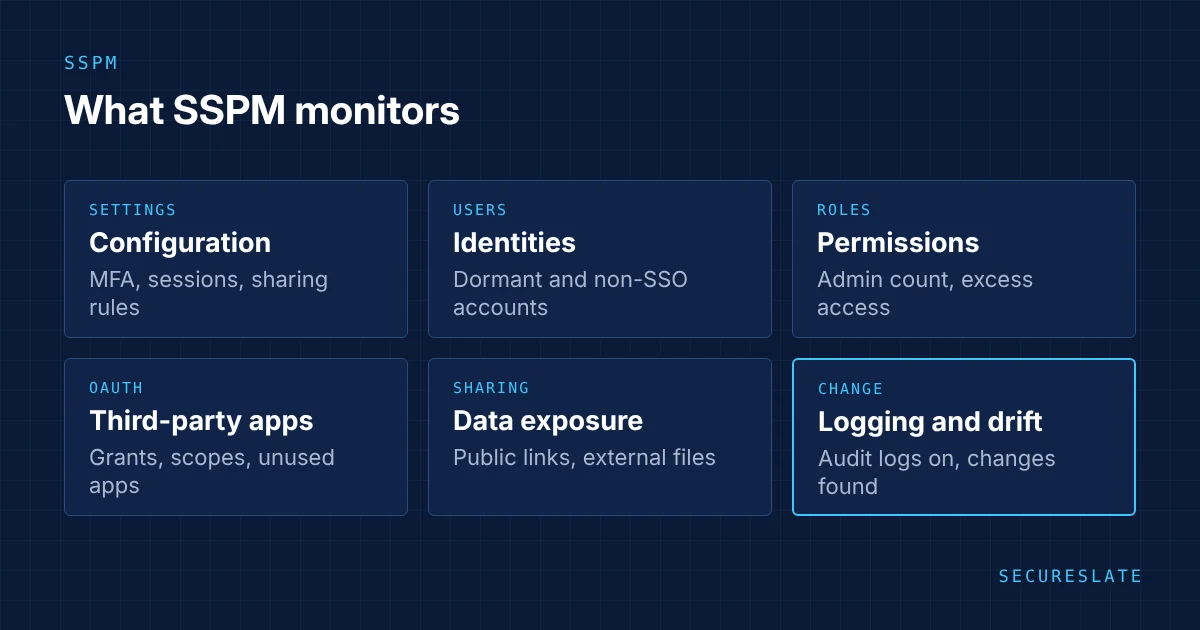
- Configuration settings. Authentication requirements, password and session rules, sharing defaults, email forwarding rules and security features that should be enabled.
- Identities. Accounts outside SSO, local accounts with passwords, dormant users, former employees who still have access, guest and external users.
- Permissions. The number of administrators, over-privileged roles and access that does not match the person's job.
- Third-party apps. OAuth grants and API tokens, the scopes each app holds, unused or unverified apps with broad permissions.
- Data exposure. Public links, files shared with external domains, public repositories and channels open to guests.
- Logging and drift. Whether audit logging is on, and which settings changed since the last check.
For the baseline itself, public standards are a good starting point. The CIS Benchmarks include configuration guidance for widely used SaaS suites, and the CISA Secure Cloud Business Applications (SCuBA) project publishes secure configuration baselines for Microsoft 365 and Google Workspace. They were written for US federal agencies, but the settings are useful for any organization.
How is SSPM different from CSPM and CASB?
SSPM secures the configuration of SaaS applications, CSPM secures the configuration of cloud infrastructure, and a CASB controls and inspects the traffic between users and cloud services.
| SSPM | CSPM | CASB | |
|---|---|---|---|
| Protects | SaaS applications you subscribe to | IaaS and PaaS accounts you build on | Access to and data movement in cloud services |
| Looks at | App settings, users, roles, OAuth apps, sharing | Cloud resources such as storage, networks, IAM and databases | User sessions, uploads, downloads, unsanctioned apps |
| Typical finding | MFA not enforced for admins in the CRM | Storage bucket open to the public | Sensitive file uploaded to a personal account |
| How it connects | Application APIs | Cloud provider APIs | Proxy, API or both |
| Main question answered | Are our SaaS apps configured safely? | Is our cloud infrastructure configured safely? | How are people using cloud services? |
The categories overlap and vendors increasingly combine them, so judge a product by what it checks, not by the label. A company that builds a product on a cloud provider and runs its business on SaaS has both kinds of exposure. For the infrastructure side, see our guide to CSPM tools and to cloud configuration drift.
How do you start a SaaS posture program?
Start by listing your applications, ranking them by the sensitivity of the data they hold, and hardening the top few against a written baseline before you consider tooling.
- Build the inventory. Combine SSO application lists, expense and finance records, and OAuth grants in your identity provider to find what is in use, including tools nobody told IT about.
- Rank by risk. Put applications that hold customer data, health data, source code, credentials or financial records at the top. For most companies this means the identity provider, email and documents, code hosting, cloud consoles, CRM and HR system.
- Assign owners. Each application needs a named business owner and a named administrator.
- Write a baseline for the top tier. Keep it short: SSO required, MFA enforced, a limit on the number of admins, external sharing restricted by default, audit logging on, third-party app installs requiring approval.
- Fix the gaps. Work through the settings in each admin console and record what you changed.
- Review third-party apps. Remove unused OAuth grants and any app whose permissions are broader than its purpose.
- Set a review cadence. Re-check settings and access on a schedule, such as quarterly for the top tier. Fold in joiner, mover and leaver steps from your offboarding checklist.
- Automate once the manual process is stable. When the number of applications or the rate of change makes manual checks unreliable, add tooling.
What should you look for in an SSPM tool?
Look for coverage of the applications you actually use, depth of checks for each one, clear remediation guidance and reporting you can map to your compliance frameworks.
| Criterion | Questions to ask |
|---|---|
| Application coverage | Does it support our top-tier applications today, with documented checks for each? |
| Depth | Does it read settings, users, roles and OAuth apps, or only a few headline settings? |
| Access model | Is the connection read-only? What permissions does the tool itself need? |
| Baselines | Are checks based on recognized benchmarks, and can we add our own rules? |
| Remediation | Does each finding explain the setting, the risk and the fix? Is automated remediation optional? |
| Identity context | Can it link a user across applications and show unused or excessive access? |
| Compliance mapping | Can findings be mapped to SOC 2, ISO 27001 or HIPAA controls and exported as evidence? |
| Noise | Can we accept a risk with a reason and an expiry date so it stops alerting? |
Remember that an SSPM tool is itself a third party with access to your most sensitive applications. Put it through the same vendor review as any other supplier, and extend that thinking to the vendors behind your vendors, as described in our guide to fourth-party risk management.
How does SSPM support compliance?
SSPM supplies ongoing evidence that access, configuration and monitoring controls are working in the applications where much of your sensitive data lives.
- SOC 2: The Trust Services Criteria cover logical access (CC6.1 to CC6.3) and detection of configuration changes that introduce vulnerabilities (CC7.1). MFA enforcement, admin lists and access reviews in SaaS applications are standard evidence.
- ISO 27001:2022: Annex A control 5.23 addresses information security for the use of cloud services, 8.9 covers configuration management and 5.15 to 5.18 cover access control and identity.
- HIPAA Security Rule: The technical safeguards require access control and audit controls for systems that hold electronic protected health information, which includes SaaS applications that store it. A business associate agreement with the provider is also required where it handles that information on your behalf.
- GDPR: Article 32 requires security measures appropriate to the risk. Controlling who can access and share personal data in SaaS applications is part of meeting it.
How SecureSlate helps
SecureSlate is a compliance automation platform, not a dedicated SSPM product. It covers the parts of SaaS posture that auditors and customers ask about, and connects them to your frameworks.
- Access reviews: review who has access to your key applications on a schedule and keep a record of each decision.
- Vendor risk management: keep an inventory of the SaaS vendors you rely on, with risk ratings, reviews and documents.
- Multi-framework control mapping: map access, configuration and vendor controls once across SOC 2, ISO 27001, HIPAA, GDPR and other built-in frameworks. Your own SaaS baseline can be set up as custom controls.
- Agentless, read-only cloud integrations: monitor cloud infrastructure configuration alongside your SaaS controls.
- Risk and audit management: track accepted risks, remediation tasks and evidence requests in one place.
SecureSlate does not perform audits or issue certifications. Start a free trial to see how it fits your stack.
FAQ
What does SSPM stand for?
SSPM stands for SaaS security posture management. It refers to continuously checking the security configuration, user access and third-party integrations of the SaaS applications an organization uses, and correcting anything that falls short of a defined baseline.
Is SSPM the same as CSPM?
No. CSPM (cloud security posture management) checks the configuration of cloud infrastructure accounts, such as storage, networking and identity settings in AWS, Azure or GCP. SSPM checks the configuration of finished SaaS applications. The idea is the same, but the systems, settings and APIs are different.
Does a small company need an SSPM tool?
Not necessarily. A small company can manage posture manually for its handful of critical applications by enforcing SSO and MFA, limiting administrators, restricting sharing and reviewing access regularly. A dedicated tool becomes worthwhile when the number of applications and users makes manual review slow or unreliable.
What are the most common SaaS misconfigurations?
Common ones include MFA not enforced for every account, too many administrators, accounts that bypass SSO, former employees who still have access, public or externally shared files, unrestricted third-party app installs and audit logging left off.
Who should own SaaS security posture?
Security or IT should own the baseline and the monitoring. Each application's business owner should own its day-to-day administration and fix findings. Without both roles named, findings tend to sit unresolved because nobody has the authority and the access to change the setting.
Disclaimer (legal note)
This article is for general information only and is not legal, regulatory, or professional advice. Requirements vary by framework, industry, and jurisdiction. Consult qualified advisors for your specific obligations.
Need compliance without the complexity?
SecureSlate automates ISO 27001, SOC 2, GDPR, HIPAA, and more. Built for growing teams. See it in action.
Find compliance gaps in 30 seconds