
Short answer: Choose an all-in-one compliance platform when a small team needs several frameworks, shared evidence and one place to answer auditors. Choose a specialized tool when one risk area needs depth that a platform cannot match. Most growing companies end up with a platform at the center and one or two specialists around it.
Related guides: compliance automation platform guide, multi-framework compliance, moving beyond manual GRC
Key takeaways
- The real question is who stitches the evidence together, because every extra tool adds a handoff someone must own.
- All-in-one platforms tend to win on coverage, shared controls and total admin time.
- Specialized tools tend to win on depth in one domain, such as application security testing or complex vendor programs.
- A short weighted scorecard beats a feature checklist because it forces you to rank what matters.
- Check integrations and data export before buying either model, so that your decision stays reversible.
What is the difference between all-in-one and specialized tools?
An all-in-one compliance platform runs several compliance jobs from one data model, while a specialized tool does one job in more depth and hands results to something else. Both can be good software. The difference is where the connective work happens.
With an all-in-one platform, a control, its evidence, the risk it reduces and the vendor it depends on sit in one record. With specialized tools, that same chain crosses products, and a person or an integration has to keep it aligned.
| Job | Typical all-in-one coverage | Typical specialist depth |
|---|---|---|
| Control mapping | Shared control library across frameworks | Mapping for one domain, such as privacy |
| Evidence collection | Integrations with cloud, identity and HR systems | Deep collection from one system type |
| Vendor risk | Intake, questionnaires, tiering, reviews | Continuous external monitoring and large vendor populations |
| Code and application security | Scanning tied to controls | Full testing suites and developer workflow tuning |
| Questionnaires and trust | Answer library and trust center | Large-scale proposal response workflows |
Where does each model win and lose?
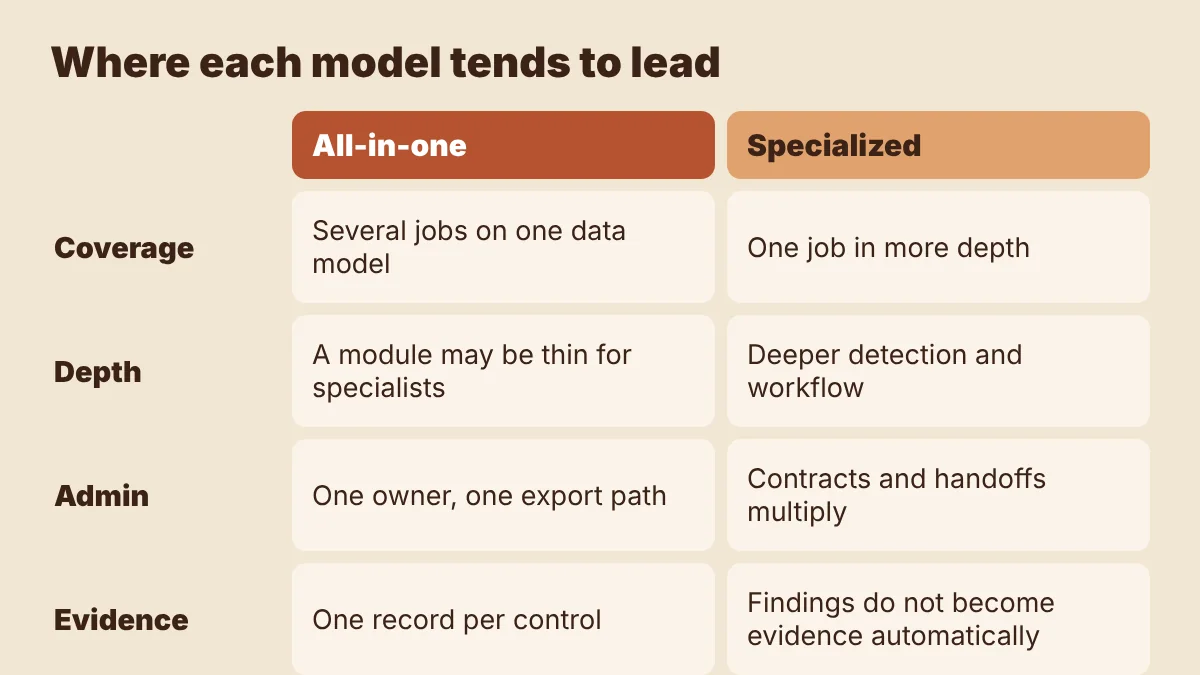
All-in-one platforms win on coordination, and specialized tools win on depth, so the deciding factor is usually how much coordination your team can afford. In our experience, teams underestimate this cost because no one budgets for the hours spent reconciling exports before an audit.
Where all-in-one tends to lead
- One control can satisfy several frameworks, which reduces duplicated testing.
- A single owner can run the program without being an admin in many systems.
- Auditors get one export path instead of screenshots from several products.
Where all-in-one tends to fall short
- A module may be good enough for a checklist but thin for a mature specialist team.
- You are tied to one vendor's roadmap and data model.
Where specialized tools tend to lead
- They often have deeper detection, reporting and workflow in their domain.
- Expert users such as AppSec engineers usually prefer tools built for them.
Where specialized tools tend to fall short
- Costs and contracts multiply, and so do security reviews of your own vendors.
- Findings do not automatically become control evidence.
- Ownership gets blurred when a tool sits between security and engineering.
When is a specialized tool still the right call?
Keep or buy a specialist when a domain carries more risk than a platform module can handle, or when a dedicated team already runs that tool well. Depth is worth paying for when someone will actually use it.
These signals point toward a specialist:
- You have a dedicated team for that domain with a defined workflow.
- A regulator, customer contract or framework requires a capability the platform lacks.
- You have far more vendors, assets or repositories than the platform's module is designed for.
- The data carries extra rules. If a tool will handle protected health information, for example, you will need a business associate agreement in place, which can narrow your options.
The opposite signals point toward consolidation: one person owns compliance part-time, you are adding a second or third framework, or audit prep still means weeks of collecting screenshots.
How do you score the decision for your company?
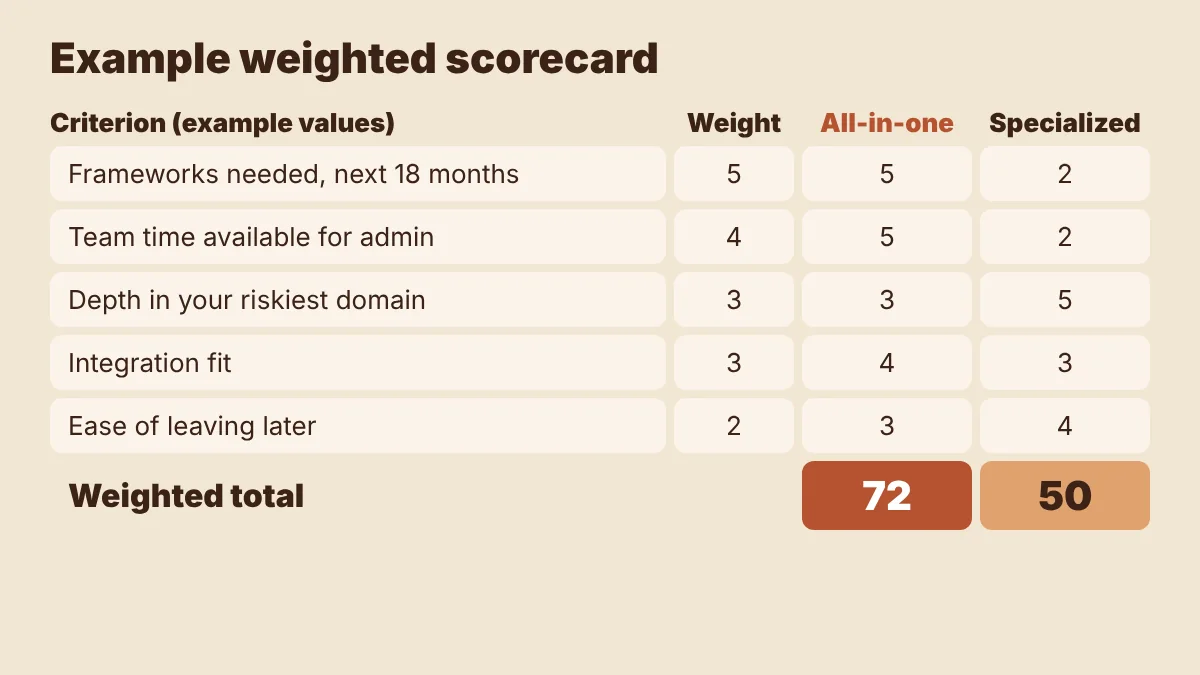
Score each option against five weighted criteria, then multiply and total. The numbers below are examples, so set the weights to fit your own program.
| Criterion | Example weight | All-in-one, example score (1 to 5) | Specialized stack, example score (1 to 5) |
|---|---|---|---|
| Frameworks needed in the next 18 months | 5 | 5 | 2 |
| Team time available for admin | 4 | 5 | 2 |
| Depth needed in your riskiest domain | 3 | 3 | 5 |
| Integration fit with your current systems | 3 | 4 | 3 |
| Ease of leaving later | 2 | 3 | 4 |
| Weighted total | 72 | 50 |
Two rules keep this honest. First, have the person who will administer the tool set the admin score. Second, test the highest-weighted criterion in a trial using your real systems, since demo environments hide integration gaps.
If the totals land within about 10% of each other, choose the option that is easier to reverse.
What does a sensible hybrid stack look like?
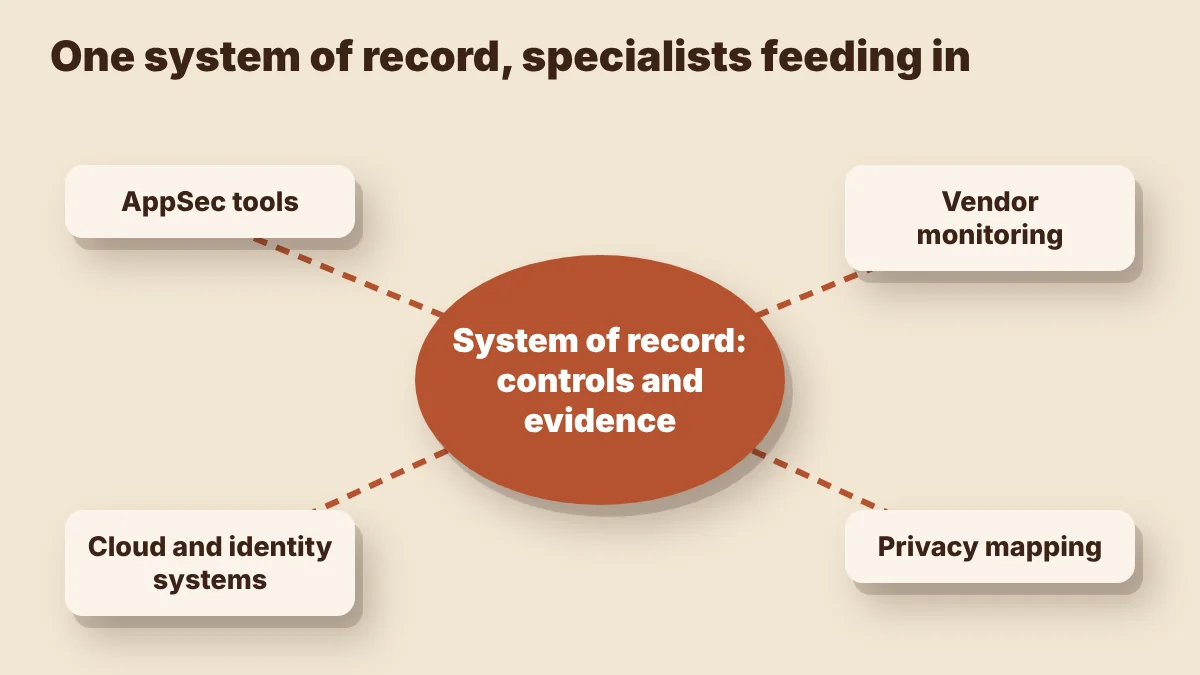
A sensible hybrid stack has one system of record for controls and evidence, with specialists feeding into it rather than sitting beside it. The test is simple: can an auditor's request for a control be answered from one place?
Three patterns come up often:
- Seed-stage SaaS, first SOC 2: one platform, no specialists, and engineers working from their existing cloud console.
- HealthTech adding HIPAA or HITRUST: a platform as the record, with a specialist only where clinical or data rules demand it.
- Mature company with an AppSec team: the platform holds controls and evidence, and the AppSec team's tools feed findings to it.
For any specialist you keep, write down three things: who owns it, which controls its output supports, and how that output reaches the system of record. If you cannot answer the third, that tool is creating manual work. If you do decide to consolidate, plan the cutover around your audit calendar.
Which mistakes make either choice fail?
Most failed stack decisions come from buying for a feature list rather than for the people and audits the tool has to serve.
- Counting modules instead of workflows. A module existing does not mean it covers your process. Walk one real task end to end.
- Ignoring data export. Confirm you can get controls, evidence history and audit trails out in a usable format.
- Skipping the auditor's view. Ask your auditor what format they accept before you commit. An independent auditor still has to evaluate the evidence, whichever tool produced it.
- Keeping redundant tools out of habit. Review each tool's usage and cost once a year, and retire any that no longer earn their place.
- Buying ahead of the team. A sophisticated specialist tool without an owner becomes an expensive dashboard no one opens.
How SecureSlate helps
SecureSlate is built to serve as the system of record at the center of your stack. It offers multi-framework control mapping, with built-in support for SOC 2, ISO 27001, HIPAA, HITRUST, GDPR and others, plus custom frameworks and controls. Agentless read-only cloud integrations and a device agent support evidence collection.
The same platform includes access reviews, vendor risk management, risk management, audit management, a trust center, security questionnaire automation, and code security with secrets detection. That lets smaller teams start with one tool and add a specialist only where it is justified. Results depend on your scope, systems and auditor.
Start a SecureSlate trial and test it against your own scorecard.
FAQ
Is an all-in-one compliance platform always cheaper?
Not always. License costs can be higher than one specialist tool, but the comparison should include admin hours, integration work and the number of vendor contracts you have to manage.
Can I start with specialized tools and consolidate later?
Yes, but plan for migration. Keep evidence history exportable, avoid long contracts where you can, and time any move away from your active audit window.
How many compliance tools is too many?
There is no fixed number. It is too many when nobody can trace a control to its evidence without opening several systems, or when tools overlap without a clear owner.
Does using one platform make an audit pass automatic?
No. Software can organize controls and evidence, but your team still has to operate the controls, and an independent auditor still decides the outcome.
Disclaimer (legal note)
This article is for general information only and is not legal, regulatory or professional advice. Requirements vary by framework, industry and jurisdiction. Consult qualified advisors for your specific obligations.
Need compliance without the complexity?
SecureSlate automates ISO 27001, SOC 2, GDPR, HIPAA, and more. Built for growing teams. See it in action.
Find compliance gaps in 30 seconds
