
Short answer: SaaS security is the set of controls that protect software delivered as a service and the data inside it. The vendor secures the platform, infrastructure and code. The customer secures its own users, configuration, integrations and data handling. Most SaaS incidents come from identity weaknesses, misconfiguration and over-permissioned integrations rather than from the platform itself.
Related guides: Identity and access management · Cloud security controls · Minimum Viable Secure Product
Key takeaways
- SaaS security has two sides: the vendor building the service and the customer configuring and using it. Both carry real obligations.
- Identity is the main perimeter. SSO, MFA, least privilege and fast offboarding prevent most account takeover paths.
- Integrations and API tokens are a growing blind spot. Every OAuth grant and API key is a standing path into your data.
- Vendors need secure development, tenant isolation, encryption, logging and incident response, backed by evidence a customer or auditor can check.
- Frameworks such as SOC 2, ISO 27001 and HIPAA do not prescribe a "SaaS security" control set, but their requirements map closely to the controls below.
What is SaaS security?
SaaS security means protecting the confidentiality, integrity and availability of a software-as-a-service application and the data it processes, across everyone who builds, runs and uses it.
The term is used in two ways, and it helps to be clear which one you mean:
- Securing a SaaS product you sell. This is the vendor view: how you design, build, host and operate the service so customers can trust it with their data.
- Securing the SaaS apps you use. This is the customer view: how you control who can sign in to tools like your CRM, file storage or ticketing system, how they are configured and which third-party apps can reach them.
Most growing software companies, especially in HealthTech, sit on both sides. You sell a SaaS product to hospitals or clinics, and you run your own company on dozens of SaaS tools. A buyer's security questionnaire will ask about both, because a compromised internal tool (for example, a support desk holding customer exports) can expose customer data just as surely as a flaw in your product.
Who is responsible for what in SaaS security?
Responsibility is shared: the vendor owns everything below the application's configuration layer, and the customer owns identities, settings and the data it chooses to put in.
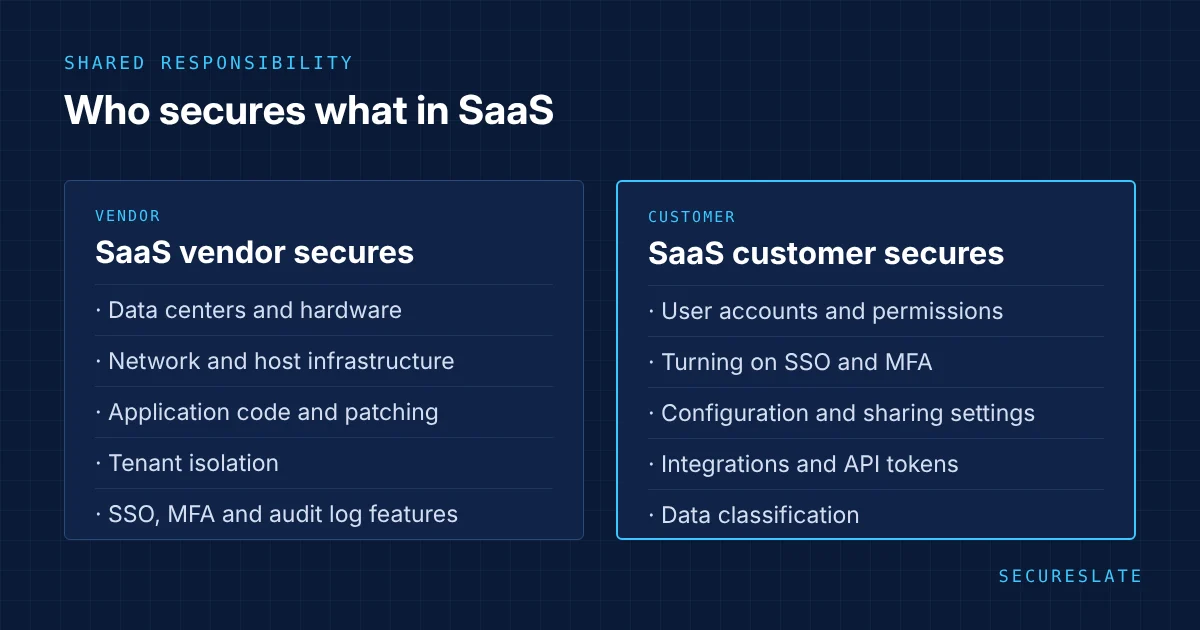
The exact split is defined in each vendor's terms and documentation, so always read them. In our experience the general pattern looks like this:
| Layer | SaaS vendor | SaaS customer |
|---|---|---|
| Physical data centers and hardware | Responsible (often via a cloud provider) | Not responsible |
| Network and host infrastructure | Responsible | Not responsible |
| Application code and patching | Responsible | Not responsible |
| Tenant isolation | Responsible | Not responsible |
| Encryption of stored data | Usually responsible | May manage keys if the vendor offers it |
| Security features (SSO, MFA, audit logs) | Must provide them | Must turn them on and configure them |
| User accounts and permissions | Provides the controls | Responsible |
| Third-party integrations and API tokens | Provides scoping options | Responsible for approving and reviewing |
| Data classification and sharing settings | Provides the controls | Responsible |
The weak point is the middle of the table. Excellent SSO and logging protect nothing if the customer leaves local passwords enabled and never reviews logs. Vendors who make secure settings the default, and who document what the customer must do, reduce this gap for everyone.
What are the biggest SaaS security risks?
The biggest SaaS security risks are compromised identities, misconfiguration, over-permissioned integrations, weak vendor practices and data that leaves through sharing features.
| Risk | What it looks like | Primary control |
|---|---|---|
| Account takeover | Phished or reused passwords, MFA fatigue, stolen session tokens | SSO, phishing-resistant MFA, session limits |
| Misconfiguration | Public sharing links, admin defaults, logging turned off | Secure baselines and continuous configuration checks |
| Over-permissioned integrations | OAuth apps with broad read and write scopes that nobody owns | Integration approval and periodic review |
| Leaked secrets | API keys committed to code or pasted into tickets | Secrets scanning and key rotation |
| Orphaned accounts | Former employees or contractors who still have access | Automated offboarding and access reviews |
| Vendor weakness | A supplier with poor security practices holds your data | Vendor risk assessment before and after onboarding |
| Data exfiltration | Bulk exports or external sharing of sensitive records | Data classification, DLP rules, export alerts |
Notice that only one of these rows is about the vendor's own platform. That is why "the vendor has a SOC 2 report" is a necessary check, not a complete answer.
Which controls should a SaaS vendor have?
A SaaS vendor should be able to show controls across identity, secure development, infrastructure, data protection, monitoring and incident response, with evidence that each one operates.
Identity and access inside the vendor. Engineers and support staff should use SSO with MFA, hold only the access their role needs, and use time-limited elevation for production. Access to customer data should be logged and reviewed. Our guide to role-based access controls covers how to design roles that hold up in an audit.
Secure development. Code review before merge, dependency and secrets scanning in the pipeline, separation of development and production, and a documented process for fixing vulnerabilities by severity. Independent testing matters too: see penetration testing vs vulnerability scanning for how the two fit together.
Tenant isolation. Multi-tenant products need a clear isolation model (separate databases, schemas or row-level controls) and tests that prove one tenant cannot read another's data.
Data protection. Encryption in transit and at rest, defined retention and deletion, backups that are tested by restoring them, and clear documentation of where data is stored.
Customer-facing security features. SSO (commonly SAML or OIDC), MFA enforcement, role-based permissions, audit logs customers can export, and scoped API tokens.
Monitoring and response. Centralized logging, alerting on suspicious activity, an incident response plan that has been exercised, and a way to notify customers within contractual timelines.
Supplier oversight. Your own subprocessors (cloud host, email provider, analytics) are part of your security story. Keep an inventory and assess them.
How do you secure the SaaS apps your company uses?
Secure the SaaS apps you use by knowing which apps you have, putting them behind central identity, hardening their settings and reviewing access and integrations on a schedule.
Work through these steps in order:
- Build an inventory. List every SaaS app, its owner, the data it holds and how users sign in. Expense reports and SSO logs help find tools that were adopted without review.
- Centralize identity. Put every app that supports it behind SSO and enforce MFA at the identity provider. For apps without SSO, require MFA and track them as exceptions.
- Apply a secure baseline. For each critical app, document the settings that matter: external sharing, admin roles, session timeout, audit logging, data retention.
- Control integrations. Require approval for new OAuth apps and API keys, prefer the narrowest scopes, and remove unused grants.
- Review access regularly. Run access reviews on sensitive apps, and remove leavers on their last day.
- Monitor. Forward audit logs from critical apps to a central place and alert on admin changes, mass downloads and new integrations.
- Assess vendors. Check security documentation before you buy and revisit it at renewal.
Tools that continuously check SaaS configurations are often called SaaS security posture management (SSPM). They help at scale, but the steps above work with spreadsheets and discipline if you are early. Our identity and access management guide goes deeper on steps 2 and 5.
How does SaaS security map to SOC 2, ISO 27001 and HIPAA?
None of the major frameworks has a separate SaaS chapter, but their requirements cover the same ground: access control, change management, monitoring, vendor management and incident response.
- SOC 2. The AICPA Trust Services Criteria Security criteria (the common criteria, CC1 to CC9) include logical access (CC6), system operations and monitoring (CC7), change management (CC8) and risk mitigation including vendors (CC9). For a SaaS vendor, a SOC 2 report is usually the first document buyers request.
- ISO 27001. ISO/IEC 27001:2022 requires an information security management system and lists 93 reference controls in Annex A, including controls on supplier relationships, use of cloud services, secure development and logging.
- HIPAA. For SaaS vendors that handle protected health information as business associates, the HIPAA Security Rule requires administrative, physical and technical safeguards, including access control, audit controls and transmission security, plus a business associate agreement with the covered entity.
If you are running on AWS, Azure or GCP underneath, the infrastructure controls in our multi-cloud security guide sit below everything here.
SaaS security checklist
Use this checklist to find gaps quickly. Each item should have an owner and evidence.
For your product (vendor side)
- SSO and MFA required for all staff with production or customer data access
- Production access is time-limited, approved and logged
- Code review, dependency scanning and secrets scanning run on every change
- Tenant isolation is designed, documented and tested
- Data is encrypted in transit and at rest, and backups are restore-tested
- Customers can use SSO, enforce MFA and export audit logs
- Independent penetration test performed and findings tracked to closure
- Incident response plan tested, with a customer notification process
- Subprocessor inventory maintained and assessed
For the apps you use (customer side)
- Complete SaaS inventory with owners and data types
- Critical apps behind SSO, with MFA enforced
- Secure configuration baseline documented for each critical app
- OAuth apps and API tokens approved, scoped and reviewed
- Access reviews completed and removals recorded
- Audit logs from critical apps centralized and alerted on
How SecureSlate helps
SecureSlate helps SaaS teams run and prove both sides of SaaS security. Agentless, read-only cloud integrations and a device agent continuously check configurations and collect evidence. Access reviews record who approved or removed access, vendor risk management tracks your subprocessors and SaaS suppliers, and code security with secrets detection flags exposed credentials in repositories. Controls map across SOC 2, ISO 27001, HIPAA and other built-in frameworks, so one piece of evidence can support several audits. When buyers ask, a trust center and security questionnaire automation help you answer consistently. SecureSlate does not perform audits; it helps you prepare for them.
FAQ
What is SaaS security?
SaaS security is the practice of protecting software delivered as a service and the data in it, covering the vendor's platform and code as well as the customer's users, settings and integrations.
Is the SaaS vendor responsible for security?
Partly. The vendor secures the infrastructure, application and tenant isolation. The customer remains responsible for user access, configuration, integrations and how its data is shared.
What is SSPM?
SaaS security posture management is a category of tools that connect to your SaaS apps and continuously check their settings, users and integrations against a secure baseline.
Does a SOC 2 report mean a SaaS app is secure?
A SOC 2 report shows an independent auditor tested the vendor's controls over a period. It is strong evidence, but you still need to read the scope, exceptions and complementary user entity controls, and configure the app securely yourself.
What is the first SaaS security step for a small company?
Build an inventory of the apps you use, then put the critical ones behind SSO with MFA enforced. That combination closes many of the most common account takeover paths.
Disclaimer (legal note)
This article is for general information only and is not legal, regulatory, or professional advice. Requirements vary by framework, industry, and jurisdiction. Consult qualified advisors for your specific obligations.
Need compliance without the complexity?
SecureSlate automates ISO 27001, SOC 2, GDPR, HIPAA, and more. Built for growing teams. See it in action.
Find compliance gaps in 30 seconds