
Short answer: Data governance tools help you know what data you hold, where it lives, who owns it, who can access it and how long you keep it. The main categories are data catalogs, lineage, data quality, discovery and classification, access governance, privacy management, retention and master data management. Choose by the problem you need to solve first.
Related guides: Data governance policy · Data classification policy · GDPR data mapping
Key takeaways
- "Data governance tool" is a family of categories, not one product type. Most organizations combine two or three.
- Pick the category from your first use case: finding sensitive data, proving lineage for reporting, fixing quality, or answering privacy requests.
- Tools enforce and record decisions. They do not make them. You still need owners, a policy and a classification scheme.
- For compliance, the most valuable outputs are an accurate data inventory, classification labels, access records and deletion proof.
- Small teams can often start with cloud-native features and a maintained inventory before buying a dedicated platform.
What are data governance tools?
Data governance tools are software that helps an organization manage data as an asset: documenting it, assigning ownership, controlling quality and access, and applying rules across its lifecycle. They support a data governance program. They are not a substitute for one.
Governance itself is a set of decisions. Who owns the customer table? Which fields count as sensitive? Who may query production health data, and for what purpose? How long are support tickets kept? A tool makes those decisions visible, applies them consistently across many systems and keeps a record that they were applied. Without the decisions, a tool is an empty catalog.
That is why the data governance policy and roles such as data owner and data steward come first, and the tooling follows.
What types of data governance tools exist?
There are eight common categories, and each answers a different question about your data. Many commercial and open-source products cover several of them, but it helps to evaluate by capability.
| Category | Question it answers | Typical capabilities |
|---|---|---|
| Data catalog | What data do we have and what does it mean? | Metadata inventory, business glossary, ownership, search |
| Data lineage | Where did this number come from and what depends on it? | Column-level flow from source to report, impact analysis |
| Data quality and observability | Can we trust it? | Rules, profiling, freshness and anomaly checks, issue tracking |
| Discovery and classification | Where is our sensitive data? | Scanning stores for personal, health and financial data, automatic labels |
| Access governance | Who can see it, and should they? | Role and attribute-based policies, masking, access requests, audit logs |
| Privacy management | Can we meet privacy obligations? | Records of processing, data subject requests, consent, impact assessments |
| Retention and deletion | How long do we keep it? | Retention schedules, legal holds, automated deletion, disposal records |
| Master and reference data management | Which record is the correct one? | Matching, merging, golden records, shared reference lists |
Two neighbouring categories are often confused with governance tools. Data loss prevention software stops sensitive data leaving approved channels, and security posture tools assess how data stores are configured. Both consume the classifications that governance produces.
Which compliance requirements do they support?
Data governance tools support the parts of privacy and security frameworks that require you to know, limit and account for the data you hold. They do not make you compliant on their own, but several requirements are very hard to meet at scale without them.
| Requirement | Source | Tool capability that helps |
|---|---|---|
| Data minimisation, accuracy and storage limitation | GDPR Article 5(1)(c), (d) and (e) | Classification, data quality rules, retention and deletion |
| Records of processing activities | GDPR Article 30 | Catalog and privacy management |
| Responding to access and erasure requests | GDPR Articles 15 and 17 | Discovery across systems, deletion workflows |
| Minimum necessary use and disclosure of protected health information | HIPAA Privacy Rule, 45 CFR 164.502(b) | Access governance, masking |
| Access controls and audit controls for electronic PHI | HIPAA Security Rule, 45 CFR 164.312 | Access policies, query and access logs |
| Inventory, classification and labelling of information | ISO/IEC 27001:2022 Annex A 5.9, 5.12 and 5.13 | Catalog, discovery and classification |
| Information deletion, data masking and data leakage prevention | ISO/IEC 27001:2022 Annex A 8.10, 8.11 and 8.12 | Retention, masking, integration with DLP |
| Identifying and disposing of confidential information | SOC 2 Confidentiality criteria C1.1 and C1.2 in the Trust Services Criteria | Classification, retention and disposal records |
For teams handling several kinds of regulated data, it helps to agree definitions first. Our guide to PII vs PHI vs PCI explains how the categories differ.
Data governance tools vs compliance platforms
Data governance tools manage the data itself, while compliance platforms manage the controls and evidence around your whole security program. They overlap at the data inventory and are otherwise complementary.
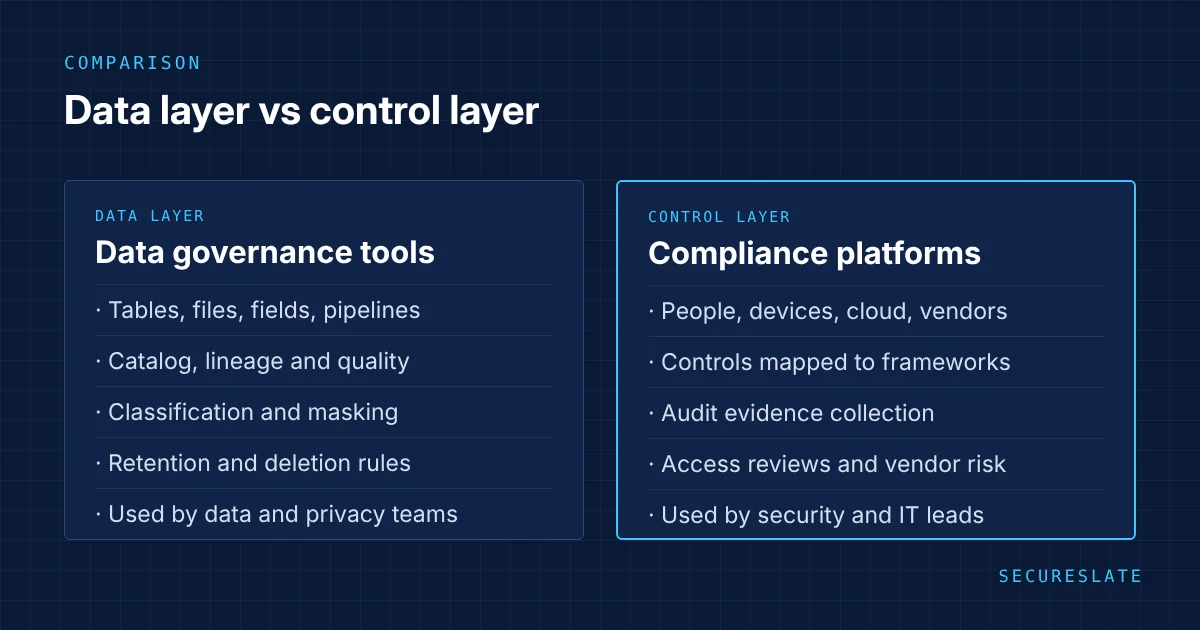
A governance tool looks inward at tables, files, fields and pipelines. Its users are data engineers, analysts, stewards and privacy staff. A compliance platform looks across people, devices, cloud accounts, vendors and policies, maps controls to frameworks and collects audit evidence. Its users are security, IT and compliance leads.
In practice the two connect in a few places. Classification results from the governance tool inform the risk assessment. The access policies it enforces are evidence for access control requirements. The retention rules it applies show that your retention policy is followed. If you only need to pass a security audit and your data estate is small, the compliance platform plus a maintained inventory may be enough. If you run a large analytics environment or handle sensitive data across many stores, you will likely need both.
What should you look for in a data governance tool?
Look for fit with your data stack and your first use case before comparing feature lists. Use this checklist during evaluation:
- Connectors for the databases, warehouses, lakes, SaaS applications and BI tools you actually use
- Automated metadata harvesting, so the catalog does not depend on manual entry
- Classification accuracy on a sample of your own data, including false positives and health or free-text fields
- Lineage depth: table-level only, or column-level across transformations
- Policy enforcement, not just documentation: masking, row filters, access requests
- Audit trail of who changed a definition, policy or label and when
- Workflow for stewards: ownership assignment, review tasks, issue handling
- Deployment and data handling: whether the tool reads data content or metadata only, where it runs and what leaves your environment
- Security of the tool itself: single sign-on, role-based access, its own assurance reports
- APIs and export, so the inventory can feed privacy records and your compliance program
- Total cost, including the people needed to operate it
The deployment question matters most for regulated data. A scanner that copies health records into a vendor's cloud creates a new processing relationship that needs a contract and a risk review. A tool that reads metadata only, or runs inside your own environment, changes that assessment.
How do you roll out a data governance tool?
Roll it out in small stages tied to one use case, because catalogs that try to document everything at once tend to go stale.
- Name the first problem. For example: locate all personal data for records of processing, or prove where a regulatory report's figures originate.
- Appoint owners and stewards for the domains in scope and agree the classification levels.
- Connect the highest-risk systems first, usually production databases and the warehouse.
- Run discovery and review the results with owners. Correct labels and record decisions.
- Apply policies: access rules, masking and retention for the classified data.
- Feed the outputs onward to privacy records, the risk assessment and audit evidence.
- Measure and expand: share of critical data sets with an owner, classified and under a retention rule. Then add the next domain.
Keep retention aligned with a written schedule. A data retention policy gives the tool the rules it needs to apply.
Do small teams need a dedicated tool?
Small teams often do not need a dedicated data governance platform at first. If you have a handful of data stores and one product, a maintained data inventory, the access and audit features of your cloud provider and database, a classification policy and regular access reviews cover a great deal.
Signs you have outgrown that approach include: nobody can say with confidence where a category of personal data lives, data subject requests take days of manual searching, analysts disagree on which table is correct, or auditors ask for evidence of deletion that you cannot produce. At that point, start with the single category that addresses the pain, usually discovery and classification or a catalog.
How SecureSlate helps
SecureSlate is a compliance automation platform, not a data catalog or lineage tool. It covers the control layer around your data. Built-in frameworks including SOC 2, ISO 27001, HIPAA, HITRUST, GDPR and PCI DSS share one mapped control set, and frameworks without a built-in template can be set up as a custom framework. Agentless, read-only cloud integrations check the configuration of the accounts where your data lives, access reviews record who can reach sensitive systems, and vendor risk management tracks the third parties that process your data. Risk management and audit management keep the decisions and evidence in one place.
If you use a dedicated data governance tool, its outputs, such as your data inventory and classification results, can be attached as evidence to the relevant controls.
FAQ
What is the difference between a data catalog and a data governance tool?
A data catalog is one type of data governance tool. It inventories and describes data. Governance as a whole also covers quality, access, privacy, retention and ownership, which other tool categories address.
Are data governance tools required for GDPR or HIPAA?
No specific tool is required. Both regimes require outcomes, such as records of processing under GDPR or limiting access to protected health information under HIPAA. Tools make those outcomes practical as data volume grows.
Who should own a data governance tool?
Usually a data or analytics leader owns the platform, with data owners and stewards in each business domain responsible for content. Security and privacy teams set the classification and access rules it enforces.
Can open-source data governance tools work for regulated data?
They can, provided you can operate and secure them. Evaluate them with the same criteria as commercial tools, and account for the engineering time needed to run upgrades, connectors and access control.
How is data governance different from data security?
Data governance decides how data should be defined, owned, used and retained. Data security protects it from unauthorized access and loss. Governance supplies the classifications and rules that security controls enforce.
Disclaimer (legal note)
This article is for general information only and is not legal, regulatory, or professional advice. Requirements vary by framework, industry, and jurisdiction. Consult qualified advisors for your specific obligations.
Need compliance without the complexity?
SecureSlate automates ISO 27001, SOC 2, GDPR, HIPAA, and more. Built for growing teams. See it in action.
Find compliance gaps in 30 seconds