
Trust Management
Getting Started with SecureSlate Trust Center
SecureSlate Trust Center implementation guide
This guide outlines the steps to implement the free SecureSlate Trust Center, a centralized hub to showcase your organization's security, compliance, and privacy posture. Available to all users via direct signup at trust-center, the Trust Center is also included free with any SecureSlate paid plan, making it ideal for startups and small to medium-sized businesses. It streamlines security reviews, reduces questionnaire fatigue, and builds trust through real-time compliance transparency. This guide provides a phased approach to ensure quick deployment and maximum impact.
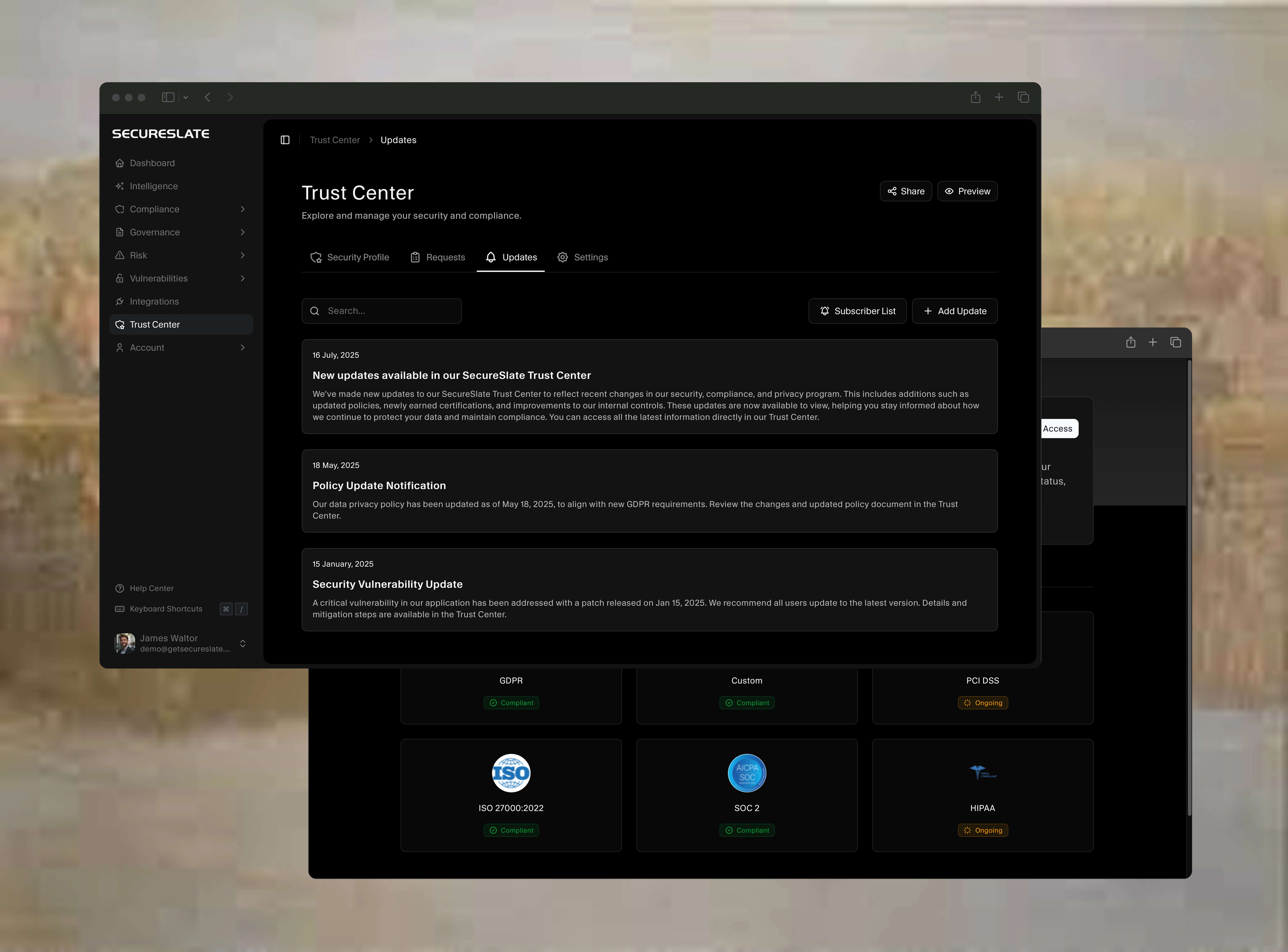
Overview
The SecureSlate Trust Center is a customizable, no-cost webpage that consolidates security and compliance information, such as certifications (e.g., SOC 2, ISO 27001, HIPAA, GDPR), policies, controls, and sub-processor details. It serves as an always-on source of truth, enabling prospects to self-serve critical information while providing audit trails for credibility. The free plan offers robust features for small teams, with seamless access for paid plan subscribers.
Key Benefits
- Accelerates Sales: Streamlines security reviews to close deals faster.
- Real-Time Transparency: Displays up-to-date compliance statuses and audit trails.
- Reduces Manual Work: Automates responses to security inquiries, saving time.
- Free and Accessible: Sign up directly at trust-center only or get free access with any paid plan, ideal for budget-conscious teams.
Implementation Phases
The implementation is structured into six stages: Discovery, Setup, Launch Preparation, Deployment, Operating, and Optimize & Report. The free signup process ensures quick onboarding.
Phase 1: Discovery
Objective: Align stakeholders and define goals for the Trust Center.
- Assess Content Needs: Inventory compliance artifacts (e.g., SOC 2 reports, ISO 27001 certificates, policies) to publish.
- Explore Features: Review SecureSlate's knowledge base or tutorials to understand features like real-time monitoring, document management, and audit trails.
- Define Success Criteria: Set goals, e.g., deflect 50% of security questionnaires, achieve 500 Trust Center visits in 6 months, or reduce inquiry response time by 20%.
- Identify Stakeholders: Engage security, compliance, sales, and marketing teams to align on objectives.
- Sign Up for Free Access: Register at trust-center (takes ~3 minutes) to access the Trust Center. Paid plan subscribers automatically gain access without additional signup.
Best Practice: Clarify whether you're using the free plan or a paid plan to understand feature availability (e.g., advanced analytics may be limited in the free tier).
Phase 2: Setup
Objective: Configure the Trust Center with content and branding.
Upload Core Content:
- FAQs: Create answers for common security questions.
- Sub-processors: List third-party vendors handling data.
- Policies: Include non-sensitive policies (e.g., Data Protection, Incident Response).
- Controls and Evidence: Upload evidence of active controls (e.g., penetration test summaries) for real-time display.
- Compliance Badges: Add certifications (e.g., SOC 2, ISO 27001, HIPAA, GDPR).
Customize Branding:
- Organize content with categories (e.g., by compliance framework).
- Configure logoband layout to match your brand (custom domains may be limited in the free plan; use SecureSlate's default domain, e.g., yourcompany.trustshare.com).
Configure Access Controls:
- Enable manual approval for access requests to ensure security.
- Set up NDA requirements for sensitive documents (e.g., SOC 2 reports).
Enable Real-Time Features:
- Set up in-platform notifications for updates (e.g., new certifications, incidents).
- Activate real-time compliance monitoring to display current control statuses.
Best Practice: Prioritize high-impact content like certifications and leverage SecureSlate's intuitive interface for quick setup, especially for non-technical users.
Phase 3: Launch Preparation
Objective: Test the Trust Center for readiness.
Internal Testing:
- Validate content clarity with internal teams.
- Test real-time control displays and notification accuracy.
- Simulate access requests to verify NDA and approval workflows.
Domain Setup:
- Verify accessibility via internal browsers.
- Use SecureSlate's default domain (e.g., app.getsecureslate.com/yourcompany) for the free plan.
Internal Feedback:
- Confirm content meets customer needs (e.g., clear compliance proof).
- Share with sales and marketing teams to ensure branding and usability align with expectations.
Best Practice: Use audit trails to verify access control functionality, ensuring sensitive data is protected.
Phase 4: Deployment
Objective: Launch the Trust Center internally and publicly.
Internal Rollout:
- Share internal access links for review.
- Train sales and customer success teams to direct inquiries to the Trust Center.
Public Launch:
- Include links in sales collateral and RFPs.
- Promote via website footer, email signatures, or social media (e.g., "Explore our Trust Center for compliance details").
Monitor Initial Activity:
- Track visits and document downloads via SecureSlate's analytics (if available in the free plan).
Best Practice: Emphasize the Trust Center as the primary resource for security inquiries to maximize its free benefits.
Phase 5: Operating
Objective: Integrate the Trust Center into daily workflows.
Streamline Workflows:
- Use in-platform notifications to share updates (e.g., new certifications).
- Monitor access request logs to approve requests efficiently.
Sales Enablement:
- Track engagement to gauge prospect interest (if analytics are available).
- Encourage sales teams to highlight the Trust Center in pitches.
Content Updates:
- Post security updates or incident reports via in-platform tools.
- Add new certifications or policies as achieved.
Best Practice: Designate a Trust Center manager to maintain real-time data accuracy and respond to requests promptly.
Phase 6: Optimize & Report
Objective: Refine the Trust Center and measure its impact.
Regular Reviews:
- Refine FAQs based on inquiry patterns.
- Update certifications, policies, or sub-processors.
Track Metrics:
- Sales Impact: Note instances where Trust Center access influenced deals.
- Efficiency Gains: Estimate time saved on questionnaires (e.g., hours/week).
- Usage Metrics: Monitor visits and downloads (if supported in the free plan).
Share KPIs:
- Highlight customer feedback on usability.
- Report to stakeholders, e.g., "Deflected 50% of questionnaires" or "100 monthly visits."
Optimize Content:
- Update controls to reflect ongoing compliance.
- Add FAQs for recurring questions.
Best Practice: Leverage audit trails to demonstrate transparency to stakeholders and customers.
Best Practices
- Highlight Audit Trails: Use logged updates to prove ongoing compliance.
- Promote Actively: Embed Trust Center links in customer-facing materials.
- Simplify Management: Leverage SecureSlate's user-friendly design for non-technical users.
- Keep Content Current: Update badges and policies regularly to maintain trust.
- Maximize Free Plan: Use all available features (e.g., real-time controls, audit trails) to enhance credibility.
Requirements
- Internet Access: For signup and platform use; no custom domain needed for the free plan.
- Team Access: Admin access for security/IT to manage content and approvals.
- Compliance Artifacts: SOC 2 reports, ISO 27001 certificates, penetration test summaries, or policies ready for upload.
Tips for Success
- Showcase Value: Report time savings (e.g., "Saved 10 hours/week") to leadership.
- Refine Content: Use inquiry patterns to improve FAQs and user experience.
- Promote Widely: Add Trust Center links to email signatures, website, and sales materials.
- Focus on Real-Time: Highlight active controls to stand out from static pages.
- Quick Signup: Register at trust-center to start immediately; paid plan users can activate instantly from their account.
Example Metrics
- Trust Impact: "Prospects cited Trust Center as key to deal confidence."
- Engagement: "200 monthly Trust Center visits, 50 document downloads."
- Time Savings: "Deflected 50% of questionnaires, saving 10 hours/week."
By following this guide, your organization can deploy the free SecureSlate Trust Center, or use it with a paid plan, to build trust, streamline compliance, and drive growth at no cost.
