
Controls
Add Tests to a Control
Controls are only as strong as the evidence behind them. In SecureSlate, that evidence is captured through tests. Linking the right tests to a control ensures:
- The control’s health reflects real coverage
- Auditors can trace a control requirement to its supporting checks and uploads
- Your team knows exactly what to keep passing (and what evidence to refresh)
Before you start
SecureSlate supports two test types:
- Platform tests: Automated or policy-based checks backed by integrations.
- Document (evidence) tests: Tests where you upload files (PDFs, screenshots, exports) as proof.
If the test you need doesn’t exist yet, create it first (see Creating Custom Test), then link it to your control using the steps below.
Link an existing test to a control
- In the left sidebar, go to Compliance → Controls
- Click the control you want to update to open the control drawer
- Open the Linked Tests tab
- Click the plus (+) icon
- Select the tests you want to link (platform tests and/or document tests)
Once linked, those tests will contribute to the control’s evidence coverage and overall health.
Remove a linked test from a control
If a test no longer supports a control (or was linked by mistake), remove it from the mapping:
- Open the control drawer
- Go to Linked Tests
- Click the trash/bin icon on the test card to unlink it
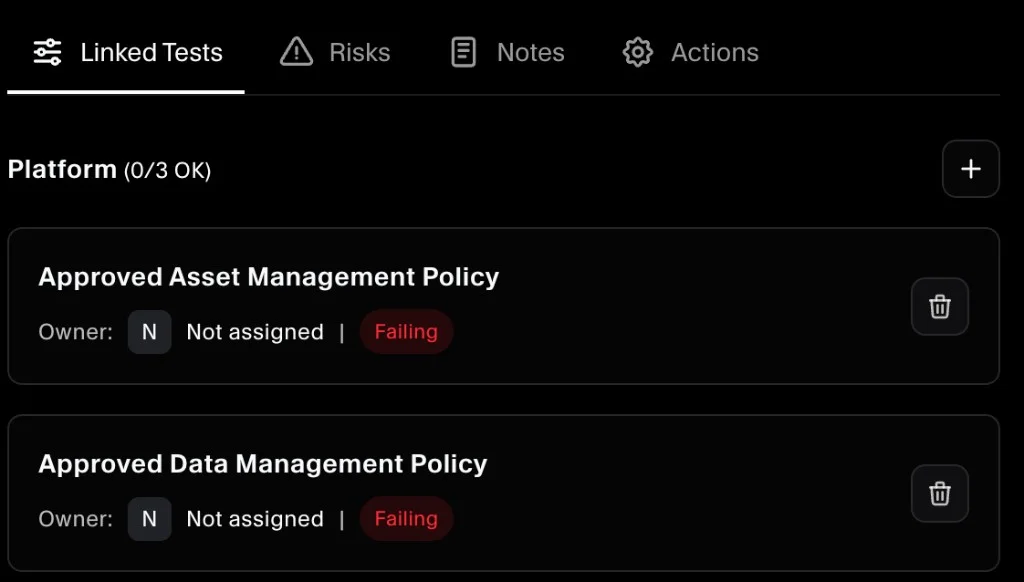
Removing the mapping stops that test’s evidence from contributing to the control. (It does not delete the test.)
Troubleshooting
I can’t find the test in the picker
Try these checks:
- Make sure you’re adding from the Linked Tests tab (not another tab).
- Confirm the test exists on Compliance → Tests.
- If you need a brand new check, create a custom test first: Creating Custom Test.
The control still looks unhealthy after linking tests
Linking tests only connects the relationship. The control’s health depends on test results and evidence being current:
- For platform tests, confirm all linked platform tests are running and passing.
- For document tests, confirm all linked document tests have current evidence and show as passing in the test drawer.
