
Getting Started
Getting Started with Your SecureSlate Trial Account
Welcome to SecureSlate! Your trial account gives you two powerful ways to explore our platform and discover how it can strengthen your organization's security posture.

Understanding Your Two Account Modes
SecureSlate offers a unique dual-mode experience that lets you choose how you want to explore the platform:
Demo Mode: Your Complete Product Tour
Toggle to Demo Mode when you want to see SecureSlate's full capabilities in action. This mode provides:
- Pre-populated dummy data that showcases real-world security scenarios
- Read-only access to explore every feature without affecting actual data
- Complete vulnerability scans demonstrating how SecureSlate identifies and prioritizes security risks
- Full feature access including unlimited tests, controls, policies, and risk assessments
- Real-world use cases that help you understand exactly how SecureSlate can become your go-to security platform
Demo Mode is perfect for evaluating whether SecureSlate meets your organization's needs. You can navigate through comprehensive dashboards, review sample vulnerability reports, and experience the complete workflow from detection to remediation, all without any risk to your actual systems.
Personal Account Mode: Hands-On Testing
Switch to your Personal Account when you're ready to connect SecureSlate to your own environment. This mode allows you to:
- Run actual scans on your infrastructure
- See real vulnerabilities specific to your systems
- Test the platform with your own data and workflows
- Evaluate integration with your existing security tools
Please note: Trial accounts in Personal Mode have limited access to resources such as the number of tests, controls, policies, and risk assessments you can create. This helps you get a meaningful hands-on experience while keeping trial resources manageable.
How to Switch Between Demo Mode and Personal Account Mode
You can switch between Demo Mode and Personal Account Mode at any time using the mode toggle in the dashboard sidebar.
- Step 1: Locate the mode toggle in the left sidebar
- Step 2: Click the toggle to switch modes
- Step 3: Confirm the mode change if prompted
Your settings and preferences are preserved when you switch modes.
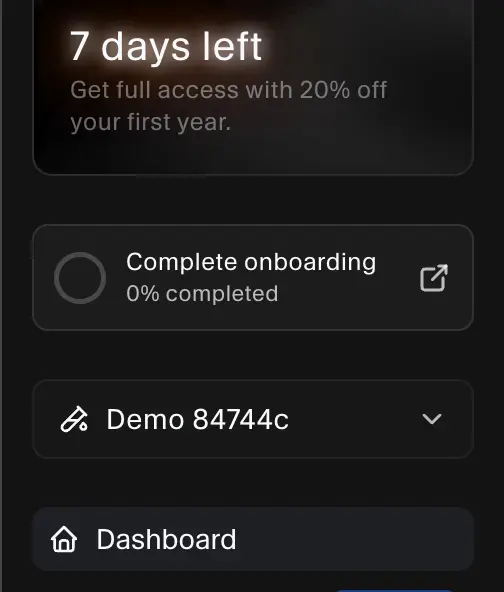
Switching Between Modes
Look for the mode toggle in your dashboard sidebar. Click the toggle to switch between Demo Mode and Personal Account Mode. A label at the top of the dashboard shows which mode is currently active. Your settings and preferences are preserved when you switch, so you can safely compare the full demo experience with your own environment.
Ready for Full Access?
If you need unlimited access to all SecureSlate features in your Personal Account, upgrading to a paid plan unlocks:
- Unlimited security tests and scans
- Comprehensive control frameworks
- Unlimited policy management
- Full risk assessment capabilities
- Priority support and advanced features
You can upgrade anytime from the in-app sidebar:
Get in Touch
We're here to help you find the right plan for your organization:
- Get started for free: Create your trial account at app.getsecureslate.com
- Live Chat: Click the chat icon in sidebar to speak with our sales team instantly
