
User Access
Getting Started with User Access
The User Access module is SecureSlate’s built-in account inventory. It syncs accounts from your connected integrations, surfaces access gaps, and launches auto-remediation workflows that feed into Access Reviews and linked compliance tests.
From the sidebar, go to User Access. The page has two tabs:
- Account: live inventory of synced accounts across platforms
- Access Reviews: periodic review cycles built on that inventory
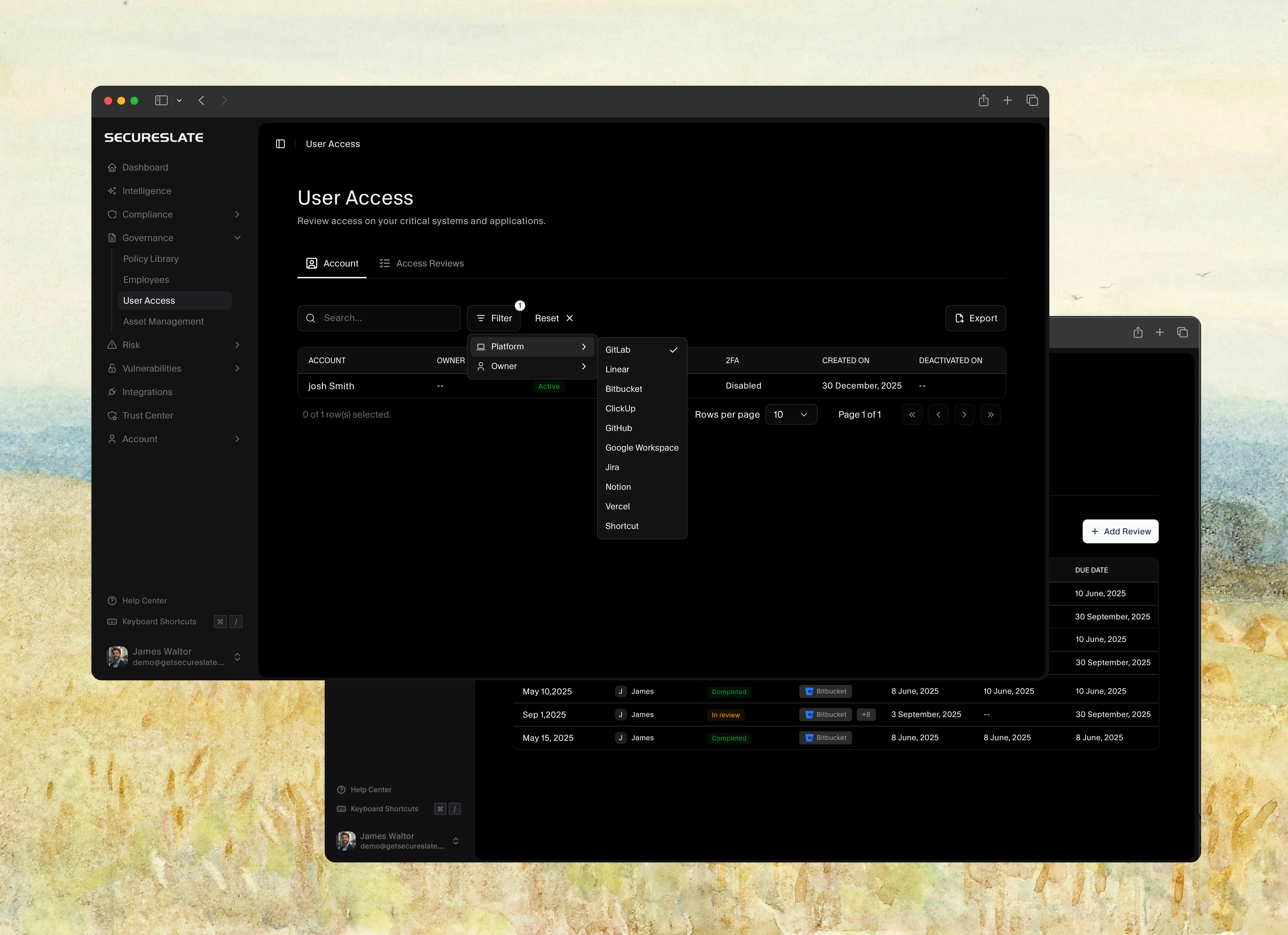
Account tab: built-in inventory
The Account tab shows every account SecureSlate has synced from connected integrations (for example, Asana, Auth0, AWS, ClickUp, Cloudflare).
At the top of the page you’ll see:
- Account count: total accounts across platforms (for example, “33 accounts across 18 platforms”)
- Issue badges: counts of accounts that need attention:
- Unassigned: no owner linked to the account
- MFA off: two-factor authentication is disabled
- Inactive: account is deactivated or no longer in use
Each row in the table shows:
| Column | Description |
|---|---|
| Account | User name and email (or service account identifier) |
| Vendor | Platform the account belongs to |
| Owner | Assigned SecureSlate employee, or Assign owner if unassigned |
| Status | Active, Invited, Accepted, or other vendor-specific state |
| Role | Permission level in that system |
| 2FA | Enabled or Disabled |
Use Search and Filter to narrow by vendor, owner, or issue type. Click Export to download access data as an Excel file organized by platform.
Launch auto-remediation from User Access
When issue badges show unassigned owners, disabled MFA, or inactive accounts, SecureSlate can run an auto-remediation workflow directly from the Account tab, without starting from a failing test.
- Go to User Access → Account.
- Review the issue badges at the top (for example, 23 unassigned, 32 MFA off, 3 inactive).
- Click an issue badge to filter the table to affected accounts, or click Auto Fix on the SecureSlate AI can fix this banner.
- Review the remediation plan the agent proposes:
- Unassigned: match accounts to employees in your directory and assign owners
- MFA off: enforce MFA policy or notify account owners (see MFA enforcement auto-remediation)
- Inactive: flag for deprovisioning or link to offboarding workflows
- Click Approve to apply changes, or Reject to close without saving.
After remediation, the issue badges update automatically. Clean account inventory is a prerequisite for access reviews and for passing tests like Verification of Completed Access Review.
See Access review auto-remediation for the full workflow, including how User Access connects to Access Reviews and compliance tests.
Assign or update owners manually
You can still assign owners one account at a time:
- On the Account tab, find the account row.
- Click the Owner dropdown (or Assign owner).
- Search for and select an existing team member.

Assigning owners before an access review ensures every account has a clear responsible party when reviewers evaluate access decisions.
Move to Access Reviews
Once account inventory is in good shape:
- Click the Access Reviews tab.
- Create or open a review cycle for in-scope systems.
- Use Auto Fix on the review’s Access Changes tab to remediate denied or changed accounts.
See Access Reviews for the full review workflow.
Filtering access data
Use filters to narrow down accounts by:

- Vendor: specific tools or platforms
- Owner: individual users or unassigned accounts
- Issue type: unassigned, MFA off, or inactive (via issue badges)
Click a filter to select options, or hit Clear Filters to reset.
Exporting access data
Download your access data as an Excel file, organized by platform (for example, AWS, Slack).
Find the Export button in the top-right corner of the Account tab.
Why use User Access?
- Built-in inventory: Accounts sync automatically from integrations; no manual spreadsheet required.
- Issue detection: Unassigned owners, disabled MFA, and inactive accounts are surfaced at a glance.
- Auto-remediation: Launch SecureSlate AI from the Account tab to fix gaps before reviews or audits.
- Audit-ready reviews: Completed access reviews and remediation evidence link to compliance tests automatically.
- Compliance made easy: Meet SOC 2 and ISO 27001 access requirements with a single workflow.
